

Before the terminology: the decision
A widespread procurement belief is wrong: an L-shaped appearance does not make a device an “L display,” and a portrait panel does not by itself create a vertical L display. The buying decision concerns orientation, mechanical installation, power, signage software, connectivity, and the exact production configuration written against the purchase order. A vertical l display spec-sheet is therefore a controlled contract document, not a catalogue headline.
For hospitality, the direct answer is to compare the required installation geometry first, then lock every production SKU. The relevant DataMax candidate is DP104R: its published configuration is a 10.1-inch IPS capacitive-touch panel in portrait orientation, with selectable 800x1280 or 1200x1920 resolution. Its documented platform is AOSP Android 11 or above, Rockchip RK3566, and 2GB/16GB with 4GB optional. Those values define the candidate, but they do not prove a complete site installation.
A buyer should request one signed document per SKU containing panel orientation and dimensions, power input, Android version, memory configuration, decoding claims, port inventory, wireless version, camera status, mounting method, certification status, and the agreed evidence package. If a quotation says “L-shaped,” “Android 14,” “Bluetooth 5.4,” or “landscape display,” the discrepancy is not resolved by choosing the more familiar description. It is resolved by naming the production datasheet and purchase-order revision that govern the shipment.
This article focuses on the angle defined by vertical l display spec-sheet review. For the broader hospitality platform assessment, use the canonical guide on vertical l display player for hospitality spec check. The decision frame remains simple: geometry selects the candidate; the SKU-controlled document controls acceptance.
Verification you can ask for on paper
Factory quality evidence is most useful when it forms a traceable chain from component intake to the shipped unit. The buyer does not need a general assurance statement; the buyer needs named process controls, identifiable records, and a clear relationship to the ordered configuration. A production audit that cannot be connected to the ordered SKU is a general statement, not acceptance evidence.
Minimum evidence request: approved configuration sheet, production-line test record, ageing record, visual inspection result, packing list, serial-number list, and signed shipment inspection report. The records should reference the same SKU and hardware revision. Add the golden-sample serial number, carton mark, firmware build identifier, and approved mechanical drawing so that inspection can distinguish a conforming unit from a visually similar variant.
- Incoming consistency Confirm the panel, SoC, RAM/ROM, wireless module, camera option, power supply, and enclosure against the approved production specification. Record the component identity and reject any mismatch that is not covered by written deviation approval.
- SMT and AOI evidence Request the relevant SMT work instruction and AOI inspection record, including defect criteria, rework limits, and record traceability. The useful evidence identifies the line, inspection revision, board or serial scope, disposition, and authorized rework reference.
- Boot and functional testing Verify declared ports, touch response, display orientation, network connection, decoding, camera presence, and Android version on the production unit. Include storage visibility, HDMI output behavior, wired-network negotiation, and any peripherals required by the venue.
- Ageing evidence Obtain the defined burn-in or ageing procedure, sample plan, operating period, fault disposition, and serial-number linkage. Ask what stimulus was applied and whether the record covers display stability, touch operation, boot reliability, and network reconnection.
- Dark-room and visual controls Ask whether dark-room inspection is used, what defects are checked, and how panel or screen defects are recorded before packing. For a touch display, the visual record should be paired with touch-grid or functional verification rather than treated as sufficient on its own.
- Audit trail Tie the inspection report, carton mark, serial number, packing list, and commercial invoice to the accepted production batch. Retain the approved production datasheet, mechanical drawing, firmware identifier, and golden-sample reference with the same evidence chain.
A request for “QC report” is not sufficient. The report should identify the configuration under test. If the quotation combines AOSP Android 11 or above with 4GB optional, it should state whether that unit has 2GB or 4GB. If a camera is optional, the inspection record should say whether the 5MP camera is fitted. If power is listed as DC12V/2A, the document should identify the supplied adaptor and the connector interface required at installation.
A practical review form contains six columns: required field, accepted value, inspection method, evidence filename, production serial number, and deviation disposition. That structure catches contradictions faster than a prose report. It also lets an operations team repeat the same inspection at incoming goods without interpreting a supplier’s terminology.
The evidence set should also state what was not tested. “Passed functional test” does not establish a particular certification, long-term application compatibility, or suitability for a venue’s mounting system. DataMax factory quality information provides a starting point, while the acceptance dossier should remain configuration-specific. The field objective is to make a shipment review possible without inferring a production fact from a catalogue image.
Entry tier versus commitment tier
Entry tier and commitment tier are not simply low-cost and high-cost configurations. The meaningful distinction is how much of the specification is fixed, how much evidence is attached, and where variation is permitted. Entry-tier quotations commonly leave orientation, memory, camera, power, or operating-system revision open. A commitment tier ties those variables to a SKU and revision before production.
| Control point | Entry tier | Commitment tier | Procurement consequence |
|---|---|---|---|
| Configuration identity | Product family and headline specification | SKU, SoC, RAM/ROM, OS, panel option and serial-number traceability | Reduces substitution risk |
| Orientation and geometry | “Portrait” or “L-shaped” wording | Resolution, orientation, dimensions and mounting interface on drawings | Prevents site rework |
| Power | Connector class only | Input, supplied adaptor, connector and installation method stated | Clarifies installer responsibility |
| Optional features | Camera or connectivity described as optional | Populated/not-populated status recorded per unit | Stops payment disputes |
| Quality evidence | Generic factory statement | Revision-linked inspection, ageing and packing records | Supports acceptance |
| Change control | Verbal or catalogue changes accepted | Written approval required before any change | Limits drift across batches |
| Application qualification | Supplier demonstrates a generic file | Actual venue application, account path and content are tested on the frozen SKU | Separates hardware acceptance from software fit |
| Installation package | Basic power lead or undefined adaptor | Mechanical drawing, cable exit, adaptor responsibility, ventilation and service-access notes | Limits site integration ambiguity |
| Compliance scope | Broad statement that the product is “certified” | Document names, applicable SKU, market, model and production revision are identified | Prevents invalid certificate transfer |
For a pilot, entry tier can be operationally reasonable when the units are expendable, the installation is simple, and configuration variation has limited cost. The risk increases when a pilot design is replicated across guest rooms, service points, or menus. At that stage, the absence of fixed RAM, orientation, camera, power, and OS values becomes a programme risk rather than a purchasing shortcut.
The comparison should also distinguish hardware commitment from software commitment. Fixing RK3566, RAM/ROM, panel resolution, and ports does not by itself confirm that the venue’s signage application, DRM workflow, account system, or remote-management platform will behave as expected. Application qualification and installation acceptance remain separate tests.
A useful quotation asks the supplier to state which fields are standard, which are optional, and which will be fixed in the purchase order. That answer exposes the real commitment tier. For a vertical l display spec-sheet, accepted product-family language is insufficient when a rollout depends on repeatable mounts, power infrastructure, and screen orientation.
The mechanism behind the spec
A vertical L-shaped installation can combine a portrait display with a horizontal element, a mechanical surround, or a desk-mounted configuration. The electronics do not need a distinct “L-shaped” operating mode. What matters is how the final mechanical assembly translates a digital-signage player into the customer-facing arrangement.
The DP104R mechanism is straightforward at the platform level. Its published panel specification is a 10.1-inch IPS capacitive-touch panel in portrait orientation, with 800x1280 or 1200x1920 resolution and a 9:16 format. The SoC is Rockchip RK3566 with a quad A55 CPU and Mali-G52 1-Core-2EE graphics. Software is AOSP Android 11 or above, while memory is 2GB/16GB with 4GB optional.
Video requirements depend on the signage application and source format. The documented decode capability is H.265/H.264/VP9 at 4K@60, 1080P encode, and an 8M ISP. These are platform capabilities, not proof that every installed panel, application, or source path will support 4K@60. The production display resolution remains the controlling factor for native presentation.
Connectivity is similarly divided into physical and wireless layers. The documented port set includes HDMI out, two USB2.0 ports, two TF slots, a 3.5mm connection, RJ45 100M, and DC12V/2A, with Wi-Fi and Bluetooth 5.0. These values define the documented configuration. They should not be silently replaced by a catalogue phrase such as “latest Android” or “newer Bluetooth.”
application, accounts, assets
Android, decode, storage
panel, mount, enclosure
power, network, operation
Each arrow introduces a separate acceptance condition. The content layer must preserve the intended orientation and aspect ratio. The platform layer must decode the selected media and retain the required content workflow. The mechanical layer must expose connectors, provide ventilation, and support servicing. The venue layer must supply the specified network and power conditions. A failure at any layer invalidates the complete installation even if the display boots.
Certification must be handled by identity and evidence, not inferred from an Android label. AOSP Android 11 or above describes the software layer; it does not independently prove GMS, Widevine level, HDCP version, EDLA status, electrical compliance, or radio-market approval. Where a project requires any of those, request the applicable document for the exact shipped SKU and intended market. DataMax certifications and DataMax compliance can help frame the request.
The panel’s native portrait resolution also affects content production. A 9:16 canvas fits the stated portrait format, but application chrome, safe areas, rounded corners, overlays, and animation scaling can change the usable picture area. The content owner should approve a screenshot or test pattern on the production panel. That avoids mistaking an application rendering issue for a display defect.
For procurement, this architecture prevents a common error: treating a mechanical marketing name as an electronics specification. The vertical l display spec-sheet must bridge the panel, power, application, installation, and evidence layers.
The platform shortlist with datasheet values
The shortlist separates the actual L-oriented candidate from adjacent DataMax hospitality platforms. Inclusion does not imply interchangeability. It provides a field-by-field comparison so the buyer can reject unsuitable models before requesting samples. The table also prevents a desk kiosk or wall display from being treated as a drop-in replacement for a portrait L-shape desk sign.
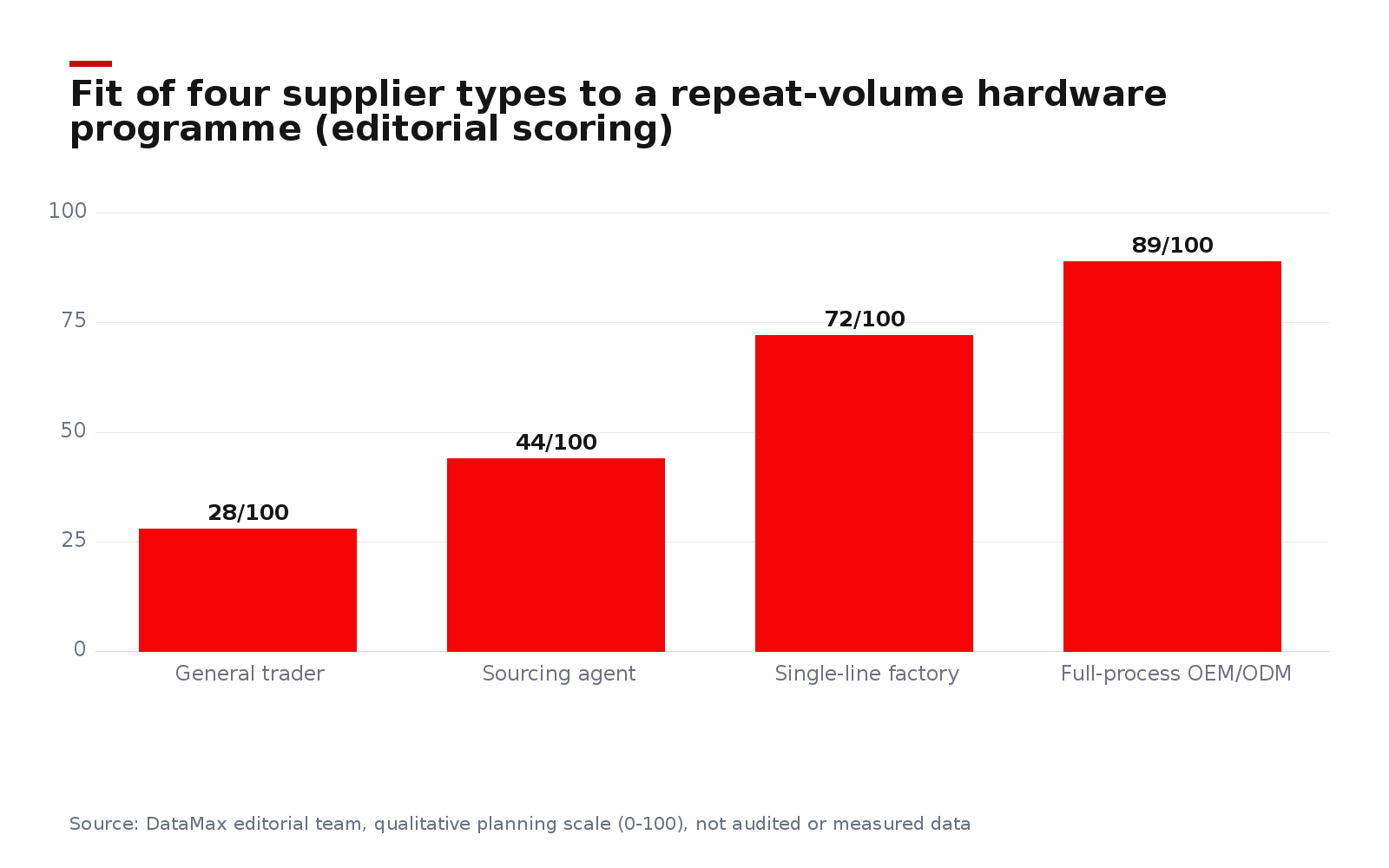
The same figures, in searchable form:
| Supplier type | Editorial score |
|---|---|
| General trader | 28/100 |
| Sourcing agent | 44/100 |
| Single-line factory | 72/100 |
| Full-process OEM/ODM | 89/100 |
Source: DataMax editorial team, qualitative planning scale (0-100), not audited or measured data.
The chart is an editorial planning aid, not a performance measurement or supplier audit. Its purpose is to show where configuration control and production accountability become stronger. A general trader or sourcing agent can still participate in a programme, but the buyer should allocate more explicit responsibility for the production evidence, engineering changes, and SKU governance.
| Field | DP104R | DP810U | DS43H | DP02L |
|---|---|---|---|---|
| Primary fit | Retail/hospitality portrait L-shape desk sign | Bank/government/hotel desktop self-service kiosk | Hospitality/hospital/restaurant wall signage | Hospital bedside infotainment/care terminal |
| SoC and graphics | Rockchip RK3562 quad A55, Mali-G52 1-Core-2EE | Rockchip RK3562 quad A53 up to 1.2GHz, Mali-G52 1-Core-1EE | Hisilicon Hi3751 quad 32-bit A53, Mali-450 | Rockchip RK3399 dual A72 + quad A53, Mali-T860 MP4 |
| OS | AOSP Android 11 or above | AOSP Android 11 | AOSP Android 9 | AOSP Android 11 |
| RAM/ROM | 2GB / 16GB (4GB optional) | 2GB / 16GB (4GB optional) | 1GB / 8GB | 4GB / 32GB (8GB/64GB optional) |
| Decode | H.265/H.264/VP9 4K@60 decode, 1080P encode, 8M ISP | H.265 4K@60, H.264/VP9 1080P@60 | 1080P@60 + VP9 10-bit | H.265 10-bit 4K@60, H.264 4K@30 |
| Panel | 10.1-inch IPS capacitive touch, portrait 800x1280 | 1200x1920, 9:16, 5MP cam optional | 8-inch/10.1-inch capacitive touch, 1280x800 | 1920x1200, 1x3W | 43-inch TFT LED 1920x1080, 300 cd/sqm, 1500:1, 6ms, 89deg, backlight 50,000h, 0-50C | 21.5-inch capacitive touch 1920x1080, 16:9 or 16:10, 16h/7d, 8MP camera, 2x3W + mic, 2x headset |
| Ports and connectivity | HDMI out, USB2.0 x2, TF x2, 3.5mm, RJ45 100M, DC12V/2A, Wi-Fi + BT5.0 | HDMI out, USB2.0 x2, TF x2 (up to 128GB), 3.5mm, RJ45 100M, DC12V/2A, Wi-Fi + BT5.0 | HDMI in, LVDS in, USB2.0 x4, RJ45 100M (1G opt), DC12V/2A, 989x578.5x60.3mm | USB2.0 x1 + USB3.0 x2, RJ45 1000M (PoE optional), Wi-Fi + BT5.0, DC12V/2A |
The direction is now explicit. DP810U fits desktop self-service rather than portrait L-shaped desk signage. DS43H fits wall signage and lists AOSP Android 9, 1GB/8GB, and 1080P@60 with VP9 10-bit decode. DP02L fits bedside care and lists a 21.5-inch 1920x1080 capacitive-touch panel, AOSP Android 11, 4GB/32GB, and optional Widevine L1/HDCP2.2.
The comparison changes when the required platform is a wall display, bedside terminal, desktop kiosk, or portrait L desk sign. A vertical l display spec-sheet should preserve that distinction and prohibit substitution without written approval.
Where this matters in a deployment
The model is selected by the deployment situation, not by the visual similarity of the enclosure. A hotel desk sign, restaurant menu pedestal, bank self-service terminal, hospital wall display, and bedside care screen impose different mechanical, power, interface, and software requirements. The same display image can conceal different touch, connectivity, and operating-hour requirements.

| Situation | Controlling requirement | Model direction | RFQ focus |
|---|---|---|---|
| Hospitality portrait L-shape desk sign | Portrait touch panel, compact desktop presentation, Android signage platform | DP104R is the direction | Fix portrait resolution, RAM/ROM, camera, DC12V/2A, Wi-Fi + BT5.0 and mechanical drawing |
| Bank, government or hotel self-service kiosk | Desktop touch interface, optional network and removable storage | DP810U is the direction | Fix panel size and resolution, memory, TF configuration, peripherals, power and application |
| Hospitality or restaurant wall signage | Large-format video, wall integration and sustained signage operation | DS43H is the direction | Fix panel, brightness, viewing angle, backlight, inputs, RJ45 option and power |
| Hospital bedside information and care | Headset, microphone, camera, bedside power/network and protected-content requirements | DP02L is the direction | Fix 21.5-inch panel, 16h/7d use, camera, audio, PoE option and any required DRM evidence |
| Custom L assembly with an existing enclosure | Mechanical fit, thermal path, power and application stability | Engineering review required | Provide drawings, thermal conditions, power source and application test criteria |
| Multi-site operator rollout | Repeatable configuration, remote support, consistent content and replacement planning | Freeze one approved SKU after pilot | Define serial traceability, firmware identity, spare-unit process and batch change control |
| Hotel lobby self-service directory | Touch workflow, account access, peripheral support and desktop enclosure | Evaluate DP810U against workflow needs | Test application, TF ports, audio connection, network path and power interface |
| Restaurant menu on a wall | Viewing distance, video playback, operating period and wall integration | Evaluate DS43H | Fix native resolution, brightness, viewing angle, input path, network option and power |
For an operator rolling out multiple sites, the primary risk is configuration drift. One branch receives 2GB/16GB, another 4GB/16GB; a camera appears on some desk signs; Android revisions differ between batches. A signed SKU matrix prevents the site team from treating every “portrait L” label as interchangeable. Include a branch-level substitution rule stating that no local operator may approve a changed RAM, ROM, camera, Android revision, or panel orientation without written engineering approval.
For an AV or IT integrator, the mechanical drawing is as important as the platform table. Confirm panel dimensions, mounting points, cable exits, adaptor space, ventilation, service access, network location and touch alignment. If the enclosure is custom, obtain a sample before authorizing the full order. Test the golden sample with the actual power adapter and the intended cable path rather than a bench-top equivalent.
For a venue owner, operational assumptions must be written down: daily operating period, content refresh method, asset ownership, network availability, remote-support policy, cleaning method, screen-protection requirements and who replaces failed units. Those operational inputs determine whether the visible hardware is actually suitable.
The DataMax hospitality display solution can provide a project context, but the acceptance decision still belongs in the SKU-controlled vertical l display spec-sheet.
The selection sequence that removes rework
Use a gated sequence so that appearance is considered only after the site and compliance requirements are known. Each gate produces an artifact that can be pasted into an RFQ or accepted by the supplier. The sequence also prevents a sample approval from becoming an informal substitute for production documentation.
- Define the physical scene Record installation type, panel dimensions, portrait or landscape requirement, viewing distance, touch need, mounting method, available depth, cable route, power location and ambient conditions. Attach a dimensioned drawing and identify the equipment that will support the enclosure.
- Define the operating profile State operating hours, content types, animation, source resolution, refresh expectations, network availability, account model, update method and remote-management requirement. Distinguish a scheduled menu display from an interactive directory or protected-content workflow.
- Select the platform direction Use DP104R for the stated portrait L-shape desk-sign use; use DP810U, DS43H or DP02L where the deployment is instead a desktop kiosk, wall sign or bedside terminal. Record why the selected class fits the scene.
- Freeze the production SKU Record the model, SoC, OS, RAM/ROM, panel size and resolution, orientation, decode capability, ports, power, wireless version and optional-feature status. Assign a revision to every variable that can alter firmware, mechanics, compliance status, or application behavior.
- Qualify the application Test the production hardware with the actual application, account system, content, touch gestures, network path, peripherals and update mechanism. Exercise the complete path from content publication to on-screen display and recovery after a network interruption.
- Approve mechanical and compliance evidence Review drawings, power interface, certification requirements, radio-market requirements, inspection records and packaging before release. Confirm that the document applies to the intended SKU and production revision.
- Approve a golden sample Seal one accepted unit and its configuration sheet as the reference for the production batch and incoming inspection. Photograph the unit, record its serial number, and document the accepted enclosure and accessory set.
The following RFQ lines can be pasted into the technical schedule:
Supply the platform identified as DP104R against the approved SKU. State the SoC as Rockchip RK3566, the OS as AOSP Android 11 or above, and the populated RAM/ROM configuration. State whether the 10.1-inch IPS capacitive-touch panel is configured for portrait 800x1280 or portrait 1200x1920 resolution. Confirm the fitted camera as present or not present. Confirm HDMI out, USB2.0 x2, TF x2, 3.5mm, RJ45 100M, DC12V/2A, Wi-Fi and Bluetooth 5.0. Attach the mechanical drawing, power details, configuration sheet and inspection evidence. No configuration change without written buyer approval.
Add a second line for the document hierarchy: “Where the quotation, marketing image, and production datasheet differ, the approved SKU and purchase-order revision shall govern, subject to written buyer approval of every deviation.” This gives procurement a deterministic response when a catalogue image changes after the quotation was issued.
- First message Send an inquiry to DataMax inquiry stating the intended L-shaped hospitality use, installation drawing, portrait resolution, RAM/ROM, camera requirement, power source, network method, expected quantity and certification requirements.
- Sample stage Use DataMax sample ordering to request the exact proposed configuration, not a generic display sample. Include the enclosure, power adaptor, application, account, content package, and intended network connection in the test script.
- Programme stage Convert the accepted sample into a frozen SKU, revision-controlled test evidence and batch acceptance criteria. Define the incoming-inspection sample, defect categories, replacement procedure, and evidence retention period.
This sequence makes the vertical l display spec-sheet a purchasing control, rather than a descriptive attachment. It also prevents an attractive sample from being treated as proof that every later shipment will match it.
Failure modes that reach the field
Most field failures begin as ambiguous commercial language. The unit may be technically functional but unusable because the panel is mounted in the wrong orientation, the power source differs, the camera was not fitted, or the application was never tested on the promised configuration.
Field trap
A marketing image showing a landscape panel, a newer Android release or Bluetooth 5.4 can conflict with the production datasheet. If the purchase order repeats the marketing label, the supplier may deliver a documented configuration that the buyer did not intend. Freeze the approved data-sheet revision and prohibit substitutions.
Mechanical mismatch is the most visible failure. An L-shaped installation can require a portrait panel, yet the enclosure drawing may have been drawn around a landscape rendering. The result is letterboxing, touch-coordinate error, inaccessible ports, heat accumulation or a mount that cannot be serviced. Require a dimensioned drawing and inspect the golden sample in the actual enclosure.
Field trap
Do not treat DC12V/2A as a complete power specification. Identify whether the power supply is external, whether an adaptor is included, the connector format, cable length and the installer’s responsibilities. A mismatch at the desk or wall can stop deployment even when the display passes bench testing.
Other failure modes are quieter. A venue with segmented Wi-Fi may receive a unit that boots but cannot reach the content service. A high-churn menu may reveal limits in the 2GB/16GB base configuration. A camera-dependent workflow may fail where the optional camera was not populated. A wide-format content plan may create processing or scaling work outside the intended display pipeline.
Network terminology requires particular care. Wi-Fi plus Bluetooth 5.0 identifies the documented radio versions, not the band, regulatory domain, antenna design, driver behavior, or venue authentication method. The acceptance test should use the actual access-point credentials, captive-portal behavior, account enrollment, and content delivery path. A unit that passes a general network check may still fail after reconnection or reboot.
Content and input errors have the same operational effect as hardware failure. A portrait canvas delivered in landscape orientation may crop navigation or expose black margins. A TF card formatted differently from the production sample may fail to update or publish content. An HDMI source may negotiate an unexpected display mode. Include scheduled reboot, power restoration, source-change, storage-update, and network-loss procedures in the site acceptance script.
Commercial divergence appears at change order. A customer accepts the initial sample, then requests Bluetooth 5.4, 4GB memory, Android 14 or a landscape panel because those phrases appear elsewhere in the market. The risk is not that a legitimate option is unavailable; it is that an option changes without a revised test result. Every such change should trigger a new configuration number, revised quotation, sample confirmation and acceptance record.
The practical control is to maintain three linked artifacts: the approved vertical l display spec-sheet, the golden sample, and the incoming inspection record. If any one differs from the other two, stop acceptance and reconcile the discrepancy before installation.
Further reading
- Vertical L Display Player for Hospitality: Spec Check
- RFQ checklist for device procurement
- Procurement glossary
- Amlogic Android TV boxes
- Google TV devices
- 43-inch hospital digital signage
- Compact kiosk display
FAQ
Is a portrait display automatically an L-shaped display?
No. Portrait orientation describes panel presentation, while an L-shaped display also depends on the mechanical assembly, mounting geometry and enclosure. A portrait panel may sit in a freestanding L-shaped sign, but the buyer must obtain a dimensioned installation drawing rather than infer the shape from orientation alone.
Which DataMax model is the starting point for a portrait L-shaped hospitality sign?
The stated fit for DP104R is a retail or hospitality portrait L-shape desk sign. Its published values include a 10.1-inch IPS capacitive-touch panel, portrait 800x1280 or 1200x1920 resolution, Rockchip RK3566, AOSP Android 11 or above, and 2GB/16GB with 4GB optional. Confirm the final configuration against the production datasheet.
Which documents should be attached to an RFQ?
Request the approved SKU sheet, mechanical drawing, panel and orientation details, power information, optional-feature status, port inventory, application requirements, certification evidence and revision-linked inspection records. The RFQ should also prohibit configuration changes without written approval, making each promise traceable.
Does AOSP Android 11 or above prove GMS or Widevine compliance?
No. AOSP identifies the software base, but it does not by itself prove a specific Google Mobile Services arrangement, Widevine security level, HDCP version or certification status. Request evidence tied to the exact shipped configuration and intended market where those features are contractual requirements.
How should a buyer handle conflicting catalogue and datasheet values?
Do not choose the more favourable statement. Identify the production datasheet and the approved SKU, then record the governing values in the purchase order. For example, the DP104R facts specify Bluetooth 5.0 and portrait resolutions, so any different claim should be treated as a proposed change requiring evidence and approval.
What should be checked on the first production sample?
Check the fitted panel and orientation, populated memory, camera status, power interface, ports, network connection, touch behavior, application operation, content playback and enclosure fit. Seal the accepted unit and its configuration sheet as the golden sample for subsequent batch inspection.
What belongs in the acceptance test for a multi-site rollout?
Include a content publish, display, reboot, network reconnection, storage update, power restoration, touch response, and enclosure-fit check on the proposed production configuration. Repeat the same test script at incoming inspection against the approved SKU, then link each result to the production serial number and batch records.
When should an RFQ move from a pilot to a commitment tier?
Move beyond pilot status only after the mechanical drawing, panel orientation, RAM/ROM, camera status, power arrangement, wireless version, application path, compliance evidence, and golden sample have been fixed. A visual sign-off alone is not sufficient because later batches can drift in configuration or performance.


