

Before the terminology: the hospital display decision
A “hospital display” can describe at least 4 different physical and software roles: a wall-mounted wayfinding panel, a reception directory, a bedside infotainment terminal, or a self-service kiosk. Treating those roles as one category creates a procurement error before the quotation is issued: the wrong panel orientation, power input, operating system, connectivity, mounting method, or content workflow reaches the purchase order. For a broad explanation of the format, see one digital signage display; this guide addresses only hospital selection and sourcing.
The direct answer is to select the installation role first, then convert it into verifiable RFQ lines. For a 43-inch wall unit, specify the display mode, content path, power configuration, mounting responsibility, operating-system baseline, signage application, and acceptance procedure before asking for a price. For a bedside or self-service role, add touch, camera, audio, network, and operating-system requirements. A hospital programme should not be judged only by screen size or brightness.
A practical buying structure looks like this:
The digital signage display decision then becomes a controlled comparison, not a catalogue preference. DataMax’s documented platforms show why role definition matters: DS43H is a 43-inch wall-signage platform, while DP810U, DP104R, and DP02L serve different desktop, portrait, and bedside functions. Their documented hardware and software configurations must be fixed to the SKU and purchase order.
That distinction matters because a wall panel can be externally driven, internally driven, or a hybrid. If the hospital uses an external player, the buyer may need HDMI input and a stable wall enclosure rather than an embedded Android platform. If the panel runs its own signage application, memory, decoding, network enrollment, and software support become part of the acceptance test. A bedside terminal adds another layer because the patient or caregiver controls the session, and audio, camera, power, and privacy requirements are more restrictive than those for a corridor directory.
A hospital buyer should also distinguish procurement responsibility from clinical approval. The hardware supplier can document the display configuration, interfaces, test evidence, and declared compliance. The hospital operator remains responsible for the intended use, clinical workflow, network policy, content governance, and destination-market requirements. Neither task should be inferred from a product label. A controlled digital signage display specification separates both responsibility tracks so the supplier can answer the hardware questions while the hospital approves the deployment question.
How to choose, step by step
Start with the physical task. State where the unit will be installed, who can reach it, whether the installation is landscape or portrait, and whether staff need to interact with it. A wall panel in a corridor needs a stable installation method and continuous operation. A reception directory may need touch or an external player. A bedside terminal introduces patient controls, headphones, microphones, cameras, and potentially protected content. “Hospital display” is therefore an application description, not an adequate specification.
Next, freeze the interface and power fields. Request the exact power input, adaptor inclusion, connector list, network speed, mounting hardware, and whether an enclosure or wall bracket is supplied. The display must match the building’s installation standard rather than relying on an adaptor to resolve an undocumented voltage difference. Also determine who supplies the player, signage software, remote-management service, content licence, and site network.
Use this sequence as the internal selection record:
- Define the role Record the location, viewing distance, orientation, interaction model, operating period, and owner of the content workflow.
- Define the electrical and mechanical scope Specify power input, wall or desk mounting, adapter, cable routes, service access, and environmental range.
- Define the signal path State whether content is internal, HDMI, USB, network-delivered, or controlled by an external player; list required interfaces.
- Define the platform Record the SoC, operating system, memory, decoding formats, network options, touch behavior, and optional features.
- Define acceptance Attach a sample image, a short media test, and a burn-in or inspection method to the purchase order.
- Define the evidence Require traceability from the ordered SKU to its production configuration, test records, packaging label, and shipped configuration.
Convert each decision into a pasteable RFQ line. For example: “43-inch wall-signage panel; AOSP Android 9; 1920x1080; 1080P@60 and VP9 10-bit decode; HDMI input; LVDS input; USB2.0 x4; RJ45 100M; power configuration to be confirmed per SKU; wall-mount responsibility stated separately.” Avoid vague lines such as “hospital Android display with high performance.” They cannot be sampled or audited.
A second RFQ line should preserve content intent without implying unsupported decoding: “Wall panel for internal 1080P signage content; reference playlist includes H.264 1080P@60 and VP9 10-bit; 4K and AV1 material excluded unless the ordered platform is re-approved.” That wording prevents the supplier from treating “hospital” as a media-performance category and prevents the integrator from assuming that a 4K master is safe merely because the panel can be driven by HDMI.
Third, record the interface owner. “RJ45 100M” is incomplete without the service standard: dedicated or shared network, DHCP or static address, VLAN treatment, proxy behaviour, certificate distribution, and whether the hospital manages the endpoint. For bedside units, “RJ45 1000M with PoE optional” needs the corresponding switch, injector, cable, and electrical approval. For a kiosk, removable TF media can support local service, but it should not be confused with the managed content-delivery path.
Finally, separate product acceptance from programme acceptance. Product acceptance covers the physical unit and documented functions. Programme acceptance covers signage-agent compatibility, content rendering, remote management, recovery after power loss, network enrollment, installation, and fleet consistency. Both belong in the project record, but only the first belongs in the hardware order form. This division prevents a supplier from claiming that an application failure is outside the hardware scope while the operator claims the unit was accepted with “Android” written against it.
What goes wrong after the PO
The most frequent post-PO failure is a specification collision between a catalogue image, a sales sheet, and the production datasheet. A model family may be shown with one chipset or memory configuration while the linked datasheet lists another. If the buyer accepts both, the factory has no unambiguous build target and the supplier can interpret the order in its own favour.
Field trap
A family-level SKU can conceal conflicts in Android version, SoC, RAM/ROM, panel brightness, power input, Bluetooth version, card-slot count, or orientation. The commercial consequence is not a cosmetic mismatch: it can change the application binary, media qualification, mounting method, site electrical work, and acceptance test.
Field trap
A medical-context product does not automatically provide a specific medical certification, clinical isolation, antimicrobial treatment, or hospital software approval. Treat those as separate requirements. Request the applicable certificate, issuing body, covered model, validity status, and test scope; an image of a badge is not evidence.
Mechanical divergence is equally expensive. A quotation may include the display, bracket, adaptor, HDMI cable, signage player, wall box, and installation labour as one line. The resulting box can omit the correct bracket or arrive with a different power option. Split product, mounting, power distribution, networking, software, content, and labour into distinct lines, then state who supplies and certifies each one.
Media failure appears when the content pipeline exceeds the decoder baseline. A 4K master may work in the browser layer but fail in the native player, leaving the signage agent to transcode it. Conversely, an agent may require an operating-system feature or API not present in an older platform. The acceptance package should include the actual playlist, fonts, images, video files, codec, colour format, refresh rate, and offline-recovery scenario.
A common failure appears when procurement identifies “43-inch, 16:9” but leaves the native content coordinate system undefined. A 1920x1080 panel can still present scaling artefacts if the player stretches a 1080P image, crops it, or renders a web page at a different viewport. The acceptance test should therefore use the hospital’s actual 16:9 canvas, not a supplier-created demonstration reel. It should also check text legibility at the intended viewing distance and confirm that menu overlays, lower-thirds, clock screens, and emergency notices retain their positions after an agent update.
Another failure occurs when fleet quantities are split across subtly different versions. A 10-unit pilot and a 90-unit rollout may use different panel suppliers, power options, wireless modules, or Android builds if the purchase order refers only to a model family. The smaller pilot then validates a configuration that is not the configuration later deployed. Bind approved sample photographs, firmware build identifiers, accessory lists, and test records to the production SKU before scaling the order.
Finally, brightness and viewing conditions can be quoted without context. A panel specified at 300 cd/sqm is not interchangeable with a different brightness class, and a glossy or anti-reflective treatment affects readability. Mount the sample in the intended lighting condition, show representative content, and define the viewing angle, ambient light, and readability criterion. A hardware sample without that context does not close the application risk.
Verification you can ask for on paper
Factory verification should create a continuous evidence trail from component issue to the finished unit. The buyer does not need every confidential process file; the supplier should provide evidence that demonstrates control of the variables named in the purchase order.
A typical manufacturing record includes the production order, locked SKU and bill of materials, component lot traceability, SMT stencil or placement record where applicable, AOI result for inspection coverage, firmware version, boot result, display and touch test, network test, port test, serial label, packaging record, and shipment inspection. “QC passed” without a date, line, unit identifier, and test scope is weak evidence.
- Configuration lock Match the PO, approved datasheet, firmware baseline, panel module, power configuration, and packaging label to one SKU identifier.
- Production inspection Request AOI coverage, defect classification, rework history, and a retained sample for the relevant production lot.
- Functional test Require results for power, boot, storage, ports, network, display output, touch if fitted, camera if fitted, and audio if fitted.
- Media or burn-in test Define the image duration, content sequence, interruption handling, and visual acceptance criteria for the programme.
- Release audit Link the final test record to the serial number, carton label, and shipment document.
Evidence rule: every acceptance claim should identify the unit or lot, the test performed, the measured or observed result, the test date, and the responsible factory role. This is stronger than a generic certification brochure because it links the ordered configuration to the shipped product.
Dark-room or visual inspection should be tied to the actual acceptance standard. Ask what the supplier inspects, at what stage, under what illumination, and whether defects such as dust, scratches, dead pixels, backlight unevenness, or touch anomalies are recorded. Aging evidence should state the electrical and media load, duration, interruption condition, and result. Do not accept “aged” as a standalone process label.
For AOI, ask whether the inspection rule is based on the locked bill of materials and whether the report distinguishes first-pass results from inspected rework. The useful record identifies the line, date, board or assembly identifier, defect classes, disposition, and final release decision. For a digital signage display built around a display module, SMT evidence may cover the electronics assembly while separate incoming-panel and final-unit checks cover the optical module; the two records should meet at the same finished-unit identifier.
The software evidence should identify the firmware image, Android build where applicable, signage-agent package, launcher or kiosk mode, permissions, certificate or credential installation method, update policy, and recovery behavior. For an external-player architecture, the agent’s hardware compatibility list should identify the exact display model rather than only the SoC. A platform capable of decoding a codec is not, by itself, proof that the chosen player will schedule and render the supplied files correctly.
The same discipline applies to software. The factory should identify the image, Android build, application package or launcher, permissions, update method, recovery behavior, and configuration lock used for that shipment. For hospital use, the buyer may also require a release note explaining changes between engineering validation and production units.
Before a volume commitment, request a video factory audit or a documented review of SMT/AOI, aging, and dark-room evidence. DataMax explains its broader manufacturing and quality route through the factory-quality and manufacturer pages, but the project-specific evidence should still be attached to the order. The audit should be bounded by the hospital programme: display model, panel supply route, firmware baseline, power option, site application, and the exact failure modes the buyer intends to prevent.
Two routes, one bill of differences
There are 2 procurement routes for a repeat-volume hospital hardware programme. The lower-commitment route asks a trader or sourcing agent to consolidate branded panels, players, brackets, and basic configuration. The higher-commitment route engages a full-process OEM/ODM that controls the platform definition, production build, firmware baseline, inspection, and shipment record. Neither route is automatically correct; the difference is where control and accountability sit.
The editorial scoring below reflects how each supplier type tends to fit a repeat-volume programme. It is a qualitative planning scale, not measured or audited data.
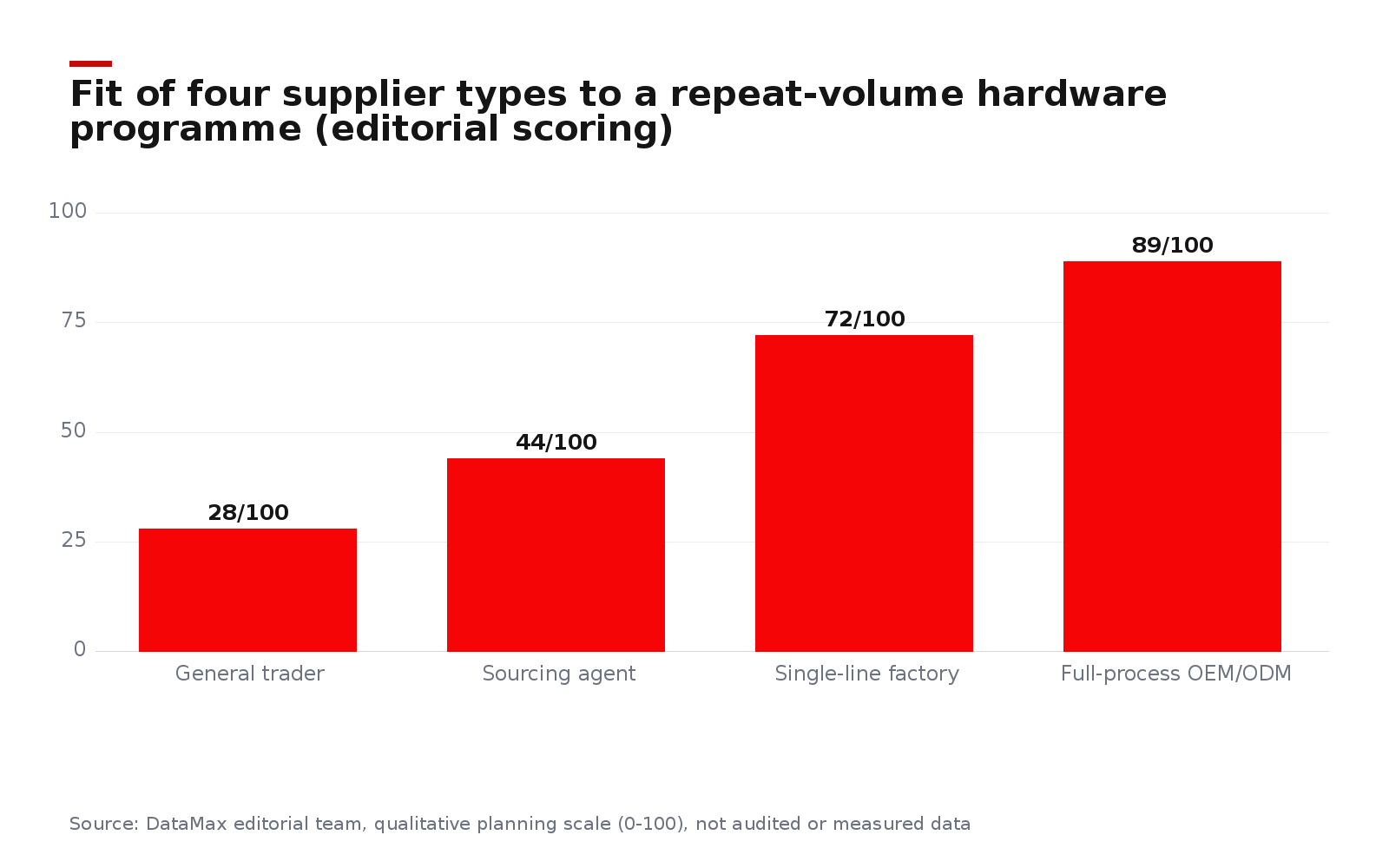
The same figures, in searchable form:
| Supplier type | Editorial score |
|---|---|
| General trader | 28 |
| Sourcing agent | 44 |
| Single-line factory | 72 |
| Full-process OEM/ODM | 89 |
The bill of differences is clearer than the score:
| Control point | Lower-commitment route | Commitment route |
|---|---|---|
| Product definition | Often assembled from catalogues | Locked by approved SKU and specification |
| Configuration consistency | Depends on available supplier lots | Controlled across the agreed build |
| Software baseline | May vary by shipment | Identified image and release process |
| Test evidence | May be limited to inspection reports | Traceable from line test to serial label |
| Change control | Usually informal | Requires approval before substitution |
| Accountability | Distributed across intermediaries | Defined across the manufacturing agreement |
| Panel substitution control | May be accepted within catalogue tolerance | Requires approval for brightness, resolution, optical, or interface changes |
| Accessory accountability | Adapter, bracket, cable, and player may be split | One accessory schedule names every supplied item |
| Application qualification | Often tested once during pilot | Repeated against locked firmware and release notes |
| Recovery responsibility | Can become unclear at handover | Named across supplier, operator, and installer |
| Scale-up control | New lots may differ from pilot units | Pilot SKU and production SKU are explicitly linked |
The lower-commitment route can be rational for a small, replaceable installation where exact configuration continuity has limited operational impact. It is weaker when the display is integrated into a wall enclosure, included in a managed content platform, or deployed in numbers across multiple buildings. The higher-commitment route costs more coordination before approval because it requires configuration ownership, test definitions, and change control, but it reduces ambiguity when the same digital signage display must behave consistently across a fleet.
A middle route can work when the agent provides strong specification discipline and requires documentary factory evidence even if production is distributed. The key is not the label “trader” or “agent”; it is whether the order names one authoritative configuration, one approval owner, and one evidence chain. The contract should state whether the intermediary is authorised to approve a substitution, who signs off the golden sample, and what notice period applies to changes in panel, power, memory, OS, wireless, or accessory scope.
For a pilot, use the lower-commitment route only if swapping hardware is operationally acceptable and qualification time is controlled. For fleet deployment, wall-box coordination, bedside devices, or security-sensitive content, use the commitment route so firmware, hardware, mounting, and acceptance can be reproduced. Use the TV box vendor selection checklist to extend supplier diligence to adjacent deployment controls without turning a hospital display order into a generic box comparison.
How the requirement actually works
Hospital signage has 3 operating layers: the display hardware, the content or signage application, and the site network. Selecting the hardware without defining the other 2 creates false confidence. A native Android panel, an HDMI receiver, and a network-attached commercial display may look interchangeable at purchase order, but they distribute control differently.
The display layer defines panel resolution, luminance, contrast, viewing angle, backlight life, input interfaces, touch construction, and power. The compute layer defines the SoC, memory, operating system, decoder, network interface, wireless options, camera, and audio. The application layer defines the playlist, scheduler, user interface, remote management, device grouping, content import, and exception handling.
For decode paths, distinguish native media support from browser playback. The documented capability of a platform should be tested using the actual content package. A panel with H.265 4K@60 decode still requires the chosen player, codecs, color handling, and file layout to be validated together. Do not infer playback from operating-system version alone.
A hospital’s digital signage display architecture should then be drawn as a data path. At the authoring end, an operator imports approved images, video, fonts, schedules, and emergency-message rules. The management service groups devices by site, ward, role, or duty state. Each endpoint receives a playlist, reports health, and returns logs. Where a clinical system supplies content, the interface may require approved credentials and an auditable update path rather than unrestricted file access to removable media.
Connectivity also changes the architecture. RJ45 100M can support ordinary signage traffic, while RJ45 1000M with optional PoE serves a different installation model. HDMI input may suit a separate player; HDMI output may suit a downstream display or kiosk arrangement. USB, TF, audio, and Bluetooth options should be matched to the service workflow rather than added as an undifferentiated feature list.
Power must be treated as part of the building interface. Confirm the device input, whether an adaptor is included, hospital electrical-engineering constraints, cable retention, and any optional PoE arrangement. For a wall unit, define whether the bracket is supplied by the hardware vendor or the AV integrator. For a bedside terminal, define whether power and network are delivered through a service unit or separate wall outlets.
Certification requires precise scope. Widevine L1 and HDCP2.2, where offered on a specific SKU, describe conditional digital-content capabilities. They do not by themselves establish EDLA certification, clinical safety, electrical compliance in every market, or approval of hospital software. Use the certifications and compliance resources to define the evidence request, then confirm the exact production model and destination-market requirements in the approved production file.
For each endpoint, define whether the digital signage display is a display-only target, an Android-managed endpoint, or a video source for another monitor. That distinction controls security, firmware ownership, and diagnostics. In a display-only target, the integrator owns the media player and its update cycle. In an Android-managed endpoint, the hardware and application suppliers need an agreed image, remote-management interface, credential process, and rollback procedure. In a bridged arrangement, the downstream device and its scaler become part of the acceptance system rather than an unexamined cable.
The platform shortlist with datasheet values
The shortlist separates 4 roles. DS43H addresses 43-inch wall signage; DP810U addresses compact desktop self-service; DP104R addresses a portrait L-shaped desk sign; DP02L addresses bedside infotainment. The DS43H is the relevant starting point for a hospital wall installation, while the other models represent different interaction and mounting geometries.
| Model | SoC | OS | RAM/ROM | Decode | Ports and options | Panel |
|---|---|---|---|---|---|---|
| DS43H | Hisilicon Hi3751 quad 32-bit A53, Mali-450 | AOSP Android 9 (datasheet) | 1GB / 8GB (PDP) | 1080P@60 + VP9 10-bit (no 4K/AV1) | HDMI in, LVDS in, USB2.0 x4, RJ45 100M (1G opt), DC12V/2A, 989x578.5x60.3mm | 43" TFT LED 1920x1080, 300 cd/sqm, 1500:1, 6ms, 89deg, backlight 50,000h, 0-50C |
| DP810U | Rockchip RK3562 quad A53 up to 1.2GHz, Mali-G52 1-Core-1EE | AOSP Android 11 (datasheet) | 2GB / 16GB (4GB optional) | H.265 4K@60, H.264/VP9 1080P@60 | HDMI out, USB2.0 x2, TF x2 (up to 128GB), 3.5mm, RJ45 100M, DC12V/2A, Wi-Fi + BT5.0 | 8"/10.1" capacitive touch, 1280x800 | 1920x1200, 1x3W |
| DP104R | Rockchip RK3566 quad A55, Mali-G52 1-Core-2EE | AOSP Android 11 or above | 2GB / 16GB (4GB optional) | H.265/H.264/VP9 4K@60 decode, 1080P encode, 8M ISP | HDMI out, USB2.0 x2, TF x2, 3.5mm, RJ45 100M, DC12V/2A, Wi-Fi + BT5.0 | 10.1" IPS capacitive touch, portrait 800x1280 | 1200x1920 (9:16), 5MP cam optional |
| DP02L | Rockchip RK3399 dual A72 + quad A53, Mali-T860 MP4 | AOSP Android 11 | 4GB / 32GB (8GB/64GB optional) | H.265 10-bit 4K@60, H.264 4K@30, Widevine L1/HDCP2.2 optional | USB2.0 x1 + USB3.0 x2, RJ45 1000M (PoE optional), Wi-Fi + BT5.0, DC12V/3A | 21.5" capacitive touch 1920x1080, 16:9 or 16:10, 16h/7d, 8MP camera, 2x3W + mic, 2x headset |
Several procurement constraints follow directly from the table. DS43H is a 1080P wall-signage configuration with documented Android 9, 1GB/8GB memory, and stated decoding limits; it should not be quoted as a 4K or AV1 platform. Its power configuration needs confirmation against the production datasheet because the supplied facts contain conflicting power descriptions.
DP810U and DP104R use Rockchip RK3562 and RK3566 respectively, with different panel geometries and optional configurations. DP02L is the bedside-oriented option because its facts include a 21.5-inch capacitive touch panel, 16h/7d operation, camera, microphones, and headset connections. Its DRM capability is explicitly optional, so the order must identify whether Widevine L1 and HDCP 2.2 are required and purchased.
For DS43H, the RFQ should carry the exact documented dimensions, 989x578.5x60.3mm, because the installer needs to check the enclosure cut-out, service clearance, cable bend, and bracket geometry. Its stated 0-50C operating range also belongs in the environmental review rather than a general “indoor display” line. The 89deg viewing angle, 1500:1 contrast, and 300 cd/sqm brightness should be treated as documented panel values, with the intended corridor lighting tested using representative content.
For DP810U, the 8-inch and 10.1-inch form factors share a platform row but must become separate SKUs with the applicable panel resolution: 1280x800 or 1920x1200. The optional 4GB memory value should appear explicitly if selected. TF x2 supports removable media up to 128GB per the documented facts, but the hospital’s content distribution and data-handling policy determines whether that function is enabled in the delivered image.
For DP104R, the buyer must preserve the documented portrait geometry—800x1280 or 1200x1920 in 9:16—and identify whether the 5MP camera is required. The photograph, portrait resolution, 4GB optional memory, and OS wording “Android 11 or above” all need SKU-level treatment. Do not inherit those values automatically from another platform in the shortlist.
For DP02L, distinguish standard from optional memory and DRM. The documented base is 4GB/32GB, with 8GB/64GB optional; Widevine L1/HDCP2.2 is also optional. RJ45 1000M with optional PoE can simplify cabling if the site supports it, but the unit’s DC12V/3A input and network arrangement still need engineering review. The camera, microphone, 2x3W speakers, and 2 headset connections create privacy and workflow requirements beyond ordinary wall signage.
For each model, request a signed configuration sheet listing the exact SoC, OS version, memory, panel module, power input, accessories, and certification scope. Ask DataMax to freeze those fields against one production SKU, then request samples through the sample request route before committing the fleet configuration. The sample should be tested against the actual application, mounting method, and content rather than against a generic launcher screen.
Where this matters in a deployment
Deployment context changes the weighting of each requirement. A hospital operator coordinating multiple facilities may prioritize fleet configuration and centralized content management. An AV integrator may prioritize mounting, signal distribution, and control interfaces. A ward operator may prioritize bedside interaction, audio, and serviceability. The hardware shortlist must follow that requirement rather than lead with a preferred model.
| Situation | Primary requirement | Model direction | Buyer check |
|---|---|---|---|
| Ward corridor or service-area wall | Continuous wall signage with HDMI and USB service access | Direction toward DS43H | Confirm mounting, power option, Android 9 baseline, and 1080P content profile |
| Reception or self-service point | Compact capacitive touch with network and removable media | Direction toward DP810U | Confirm size, Android 11, TF x2, and actual kiosk-software compatibility |
| Reception portrait directory | Portrait touch geometry and optional camera | Direction toward DP104R | Confirm portrait resolution, Android 11 or above, and camera requirement |
| Patient bedside terminal | Touch, camera, audio, headset, extended daily use | Direction toward DP02L | Confirm 16h/7d requirement, PoE option, DRM option, and hospital workflow |
| Multi-site operator programme | Locked SKU, repeatable firmware, traceable inspection | OEM/ODM control route | Require configuration baseline, change control, and serial-linked test evidence |
| Corridor display driven by an external player | Stable HDMI input, enclosure integration, service access | Direction toward DS43H or an externally driven equivalent | Decide who owns the player, adapter, signage agent, and HDMI cable |
| Registration desk with removable local content | Capacitive touch, compact enclosure, removable media | Direction toward DP810U | Confirm 8-inch or 10.1-inch SKU, memory, TF policy, and kiosk recovery |
| Retail-style wayfinding desk inside a hospital | Portrait 9:16 display, touch, optional camera | Direction toward DP104R | Confirm native portrait resolution and whether camera data is required |
| Bedside information and entertainment | 16:9 or 16:10 touch, audio, headset, camera, daily use | Direction toward DP02L | Confirm content rights, DRM option, PoE, privacy controls, and support workflow |
| Clinical service area with controlled content access | Network policy, removable-media control, traceable updates | OEM/ODM control route | Lock image, permissions, management credentials, and change approval |
An engineering review should use the same matrix as the commercial team’s shortlist. Bring the installation drawings, actual content package, network design, power plan, and acceptance checklist to a factory review. The photograph for that review should show a small hardware prototype, open laptops with abstract CAD outlines, and engineers comparing the installation assumptions rather than discussing an unverified catalogue image.

For a hospital deployment, the decision sequence is physical role, mechanical and electrical integration, software/media path, then production evidence. If the wall position supports DS43H, the buyer should still verify the exact power option, mounting boundary, signage agent, and production datasheet. If the deployment calls for a kiosk or bedside terminal, select from DP810U, DP104R, or DP02L according to interaction geometry, not screen size alone.
The deployment review should close each handoff explicitly. The hospital operator approves content ownership, uptime rules, emergency-message procedure, and account responsibilities. The integrator approves the mounting drawing, cable route, power plan, service access, and acoustic output for touch devices. The supplier approves the locked hardware, firmware, accessory, and test configuration. Each digital signage display approval should have a named person, date, and recorded result; otherwise a later firmware change can reopen a decision that appeared complete.
DataMax can support an engineering-led sourcing process, but the hospital owner must still define clinical-context requirements and destination-market compliance. Ask for the production configuration, sample, application test, factory evidence, and approval route through the inquiry process. The resulting purchase order should identify one hardware SKU, one software baseline, one accessory scope, one test standard, and one accountable approver.
Further reading
- One digital signage displays
- Google TV devices
- AV1 Android TV box guide
- AOSP vs Google TV guide
- HDR10+ Android TV box guide
- 43-inch hospital digital signage
- Compact kiosk display
FAQ
What is the first specification for a hospital wall display?
Specify the installation role before naming the model: location, viewing distance, orientation, mounting method, power, network, content source, and operating period. A 43-inch wall unit such as DS43H may fit the role, but its documented 1920x1080 panel, Android 9 baseline, interfaces, and power configuration must be confirmed against the production datasheet and actual signage workflow.
Can one model cover every digital signage display use in a hospital?
Not without different peripherals and content workflows. Wall wayfinding, reception directories, self-service kiosks, and bedside infotainment differ in touch, orientation, audio, camera, power, and operating requirements. The DataMax shortlist separates DS43H, DP810U, DP104R, and DP02L because their documented form factors and interfaces address different roles.
Which DataMax model supports bedside infotainment?
DP02L is the platform direction for bedside use because its documented configuration includes a 21.5-inch capacitive touch panel, 16h/7d operation, 8MP camera, microphones, and headset connections. Its AOSP Android 11 platform, RJ45 1000M with optional PoE, and optional Widevine L1/HDCP2.2 should be confirmed for the ordered SKU and intended application.
What evidence should a hospital buyer request before a volume order?
Request the locked SKU, approved datasheet, firmware baseline, component traceability, AOI coverage, functional test, visual or burn-in evidence, and serial-linked packaging record. The factory should also document power, boot, ports, network, display, and any fitted touch, camera, or audio functions. Ask for a video factory audit or project-specific evidence review.
Does hospital branding imply medical certification?
No. A hospital-oriented product description does not establish a particular clinical, antimicrobial, electrical, content-protection, or application certification. State each required standard, destination market, covered model, certificate number where applicable, issuing body, validity, and evidence scope. Confirm the exact production configuration against the approved compliance file.
How should conflicting catalogue and datasheet fields be handled?
Quarantine the specification until the conflict is resolved in writing. Identify every conflicting field, nominate the authoritative production datasheet, document any approved substitute, and bind the final values to one SKU on the purchase order. Do not accept alternative SoC, OS, RAM/ROM, brightness, power, wireless version, slot count, or orientation without explicit engineering and procurement approval.
When should a hospital pilot proceed to a fleet order?
Proceed only after the approved sample has passed installation, power, network, media, interaction, recovery, and readability tests under representative conditions. Confirm that the production digital signage display uses the same locked configuration as the pilot and that serial-linked evidence covers the first production lot. A successful application demonstration alone does not prove fleet consistency.


