Executive Summary: Commercial Projector Lifespan Is a Systems Decision
Installed LCD projector life is governed by 6 interacting variables: optical output depreciation, thermal design, ambient contamination, operating duty cycle, firmware lifecycle and maintenance access. A 1,000-ANSI-lumen unit operating 10 hours per day consumes about 130 kWh annually at the stated 130 W working consumption; a 500-ANSI-lumen unit at 86 W consumes about 31.5 kWh over the same schedule. These calculations exclude standby losses, controls infrastructure and labour, but they establish why power and replacement intervals belong in total-cost-of-ownership modelling.
- Use measured installation conditions: size from screen width, aspect ratio and measured ambient light rather than the consumer label “4K.” Native 1920 × 1080 resolution and support for 4K video decoding are separate specifications.
- Require optical traceability: specify ANSI lumens, projection ratio, native resolution, contrast, operating temperature and dust-control evidence in the production datasheet.
- Treat GP8 data as contradictory: the product title says 400 ANSI lumens, while the structured data says 450 ANSI lumens; confirm against the production datasheet before procurement.
- Select mounting geometry before brightness: GP8 is a 0.24:1 front-projection model for 30–200-inch images, while GP94C and GP96-GTV use conventional 1.35:1 and 1.2:1 ratios.
- Design the operating envelope: maintain intake and exhaust clearance, record intake/exhaust temperature, and trend lamp or LED current, fan speed and optical output under the approved duty cycle.
- Control the software lifecycle: Google TV 11 or 14, Android 9 and AOSP are different support domains; secure OTA, MDM or Android Management access before fleet deployment.
- Procure lifecycle evidence: require PCB-change notices, serial traceability, spare-part rules, warranty terms, AQL controls and a repeatable site acceptance test.

Why Consumer Projector Advice Does Not Transfer to Installed Systems
A home buying guide normally optimizes acquisition cost, room ambience and occasional portability. A commercial installation instead carries a service-level obligation, mounting structure, electrical circuit, network path, content-security policy and 3–7 year replacement plan. Leaving the projector powered off during a 30-minute meeting may reduce energy by 0.43 kWh for a 130 W model, but switching thermal cycles can also create an avoidable fault trigger. The facility team should follow the manufacturer’s power-state and cooldown procedure rather than applying an unconditional “turn it off” rule.
Consumer guidance also confuses 3 LCD projector categories. DLP projectors use a DMD light engine, while transmissive LCD and 3LCD systems use liquid-crystal panels. The GP8 record labels “LCD size” as “0.23" DMD,” which conflicts with its projector description; confirm the optical-engine architecture and production model designation. Dust-free design, if retained, must be supported by an airflow architecture and maintenance interval, not inferred from marketing language.
| Decision area | Home-guide assumption | Commercial requirement | Verification artifact |
|---|---|---|---|
| Use pattern | Rare or intermittent viewing | Defined daily hours, 7-day calendar and 3–7 year term | Duty-cycle schedule and TCO worksheet |
| Brightness | General “bright enough” claim | ANSI output retained after depreciation | Calibration report and field lux map |
| Lens cleaning | User-accessible routine | Controlled access, approved tools and ESD procedure | Maintenance method statement |
| Power use | Standby wattage | Working, standby and peak demand | IEC 62301-style test plan or agreed equivalent |
| Failure | Replace the unit | Swap within contractual response time | Spares, RMA and rollback procedure |
| Security | Consumer account login | VLAN, MFA, signed OTA and MDM ownership | Security architecture and key-rotation procedure |
Optical and Measurement Fundamentals
ANSI lumens and installed illuminance
ANSI lumens normalize projector light output through a weighted lumen measurement rather than equating directly to screen lumens. Screen performance still depends on screen gain, ambient light and calibration. A practical planning relationship is:
E ≈ L × G × A / (η × π × S), where E is average illuminance in lux, L is projector ANSI lumens, G is screen gain, A is projected area in m², η is optical efficiency and S is screen area in m². Because G/η remains an unverified system constant, field measurement is mandatory. For procurement, obtain ANSI lumens under the exact production optical configuration rather than accepting “LED lumens,” which may be a source-lumen claim.
- Measure ambient light at screen centre and 4 corners with the room in its approved operating state.
- Set projector brightness, picture mode and lamp or LED mode to the commissioning profile.
- Measure full-grid uniformity, focus, geometry, colour and input-switch stability.
- Record serial number, firmware, ambient condition and instrument calibration in the acceptance file.
| Metric | Procurement interpretation | Site acceptance method | Decision threshold |
|---|---|---|---|
| ANSI lumens | Normalized light-output claim | Instrumented output report plus installed grid | Accept against contract value and tolerance |
| Native resolution | Physical signal matrix | 1:1 pixel inspection with test pattern | 1920 × 1080 for supplied models |
| Contrast | Black-to-white ratio under stated mode | Full-field black and white readings | 1500:1, 1600:1 or 1200:1 as contracted |
| Throw ratio | Projection distance divided by image width | Measure lens-to-screen plane and image width | Within 5% of datasheet after warm-up |
| Noise | Acoustic level, condition unspecified | Record distance, room background and modes | 32 dB or 30 dB only when measurement conditions agree |
Resolution, contrast and image geometry
A 1920 × 1080 native panel has 2,073,600 addressable pixels. A 3840 × 2160 input contains 8,294,400 pixels, so downscaling adds interpolation rather than native detail. GP94C’s support for 4K video decoding describes signal processing, not a 4K native panel. Contrast values of 1200:1, 1500:1 and 1600:1 are model-specific ratios under unstated test modes; dark-room hotel or boardroom acceptance requires measured black level as well as ratio.
For a screen of width W and aspect ratio 16:9, image height is W/1.7778 and area is W²/1.7778. A 100-inch 16:9 image is approximately 2.214 m wide by 1.245 m high, or 2.757 m². Throw distance is approximately throw ratio × image width for a conventional lens. Ultra-short-throw distortion and tolerance must be validated physically rather than reduced to this nominal formula.
Auto focus, auto keystone, auto screen alignment and obstacle avoidance do not eliminate mounting engineering. A projector installed 1° out of plane can introduce geometry error that software correction attempts to remove. Specify lens centre, screen centre, permissible tilt, keystone limits and focus-hold margin in commissioning drawings. For zero-offset wall or table installation, validate shadow obstruction, ceiling-grid clearance and accidental touch access.
Light-source life and lumen depreciation
The GP96-GTV and GP94C records describe the LED light source as “10,000–10,500 lumens”; that is an output statement, not a rated 10,000-hour lifetime. No DataMax record provides LED lifetime or lumen-depreciation curves. Do not convert those figures into maintenance intervals. Require the production datasheet to state test mode, ambient temperature, drive level, lifetime definition and allowable output at end of life.
| Metric | Available DataMax statement | Data gap | Procurement control |
|---|---|---|---|
| GP8 light source | LED | No life or depreciation rating | Obtain L10 and maintenance-mode curve |
| GP94C light source | LED, 10,000–10,500 lumens | Unit context and life are absent | Confirm whether value means source output |
| GP96-GTV light source | LED, 10,000–10,500 lumens | Lifetime and end-of-life output absent | Require third-party or accredited report |
| Dust control | GP96-GTV title states dust-free design | No sealed optical-engine test evidence | Require ingress, particle and thermal evidence |
DataMax Model Comparison for Procurement
The comparison below uses only supplied records. Product #283 DM-P5 and product #280 have names but no structured specifications; they cannot be compared technically without the production datasheet. The GP8 brightness and light-engine contradictions are procurement blockers, not values to average.
| Model | Optical position | Platform | Mechanical and electrical | Interfaces | Data-quality action |
|---|---|---|---|---|---|
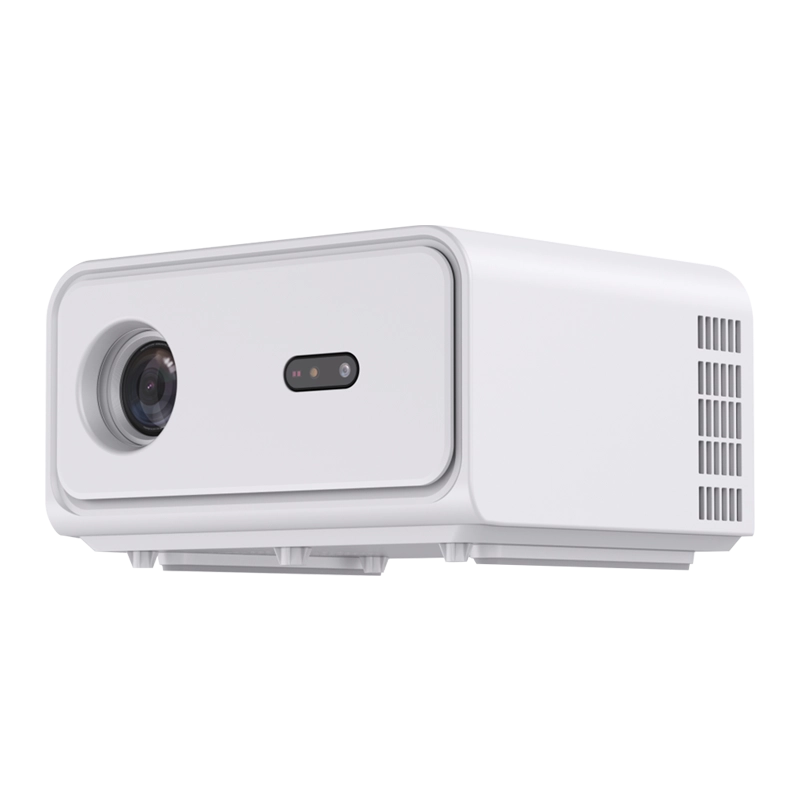
| GP8 | 0.24:1; 30–200 inch; 15–116 cm; native 1920 × 1080; 1200:1; title says 400 ANSI, data says 450 ANSI; LED; auto focus/keystone | Amlogic T972; Android 9; 2 GB RAM; 32 GB ROM | 94 × 71 × 190 mm; 0.88 kg; 89 W; 30 dB; AC100–240 V, DC 19 V 4.7 A | Wi-Fi 6; Bluetooth 5.0; 1 HDMI; 2 USB 2.0; 3.5 mm audio | Confirm against production datasheet: 400/450 ANSI and “0.23-inch DMD” labeled LCD size |
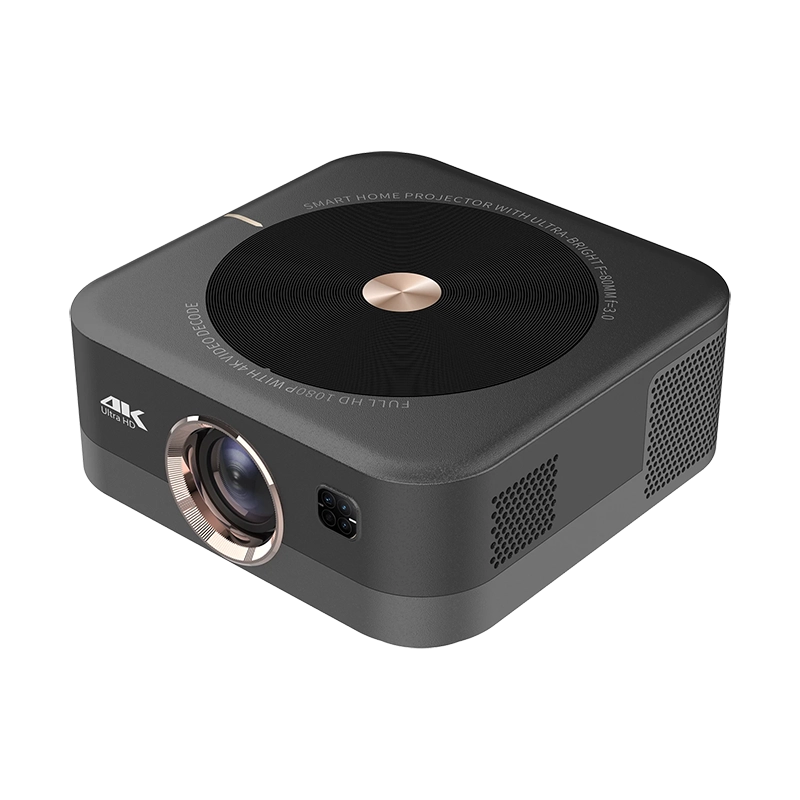
| GP94C | 1.35:1; best image 29–150 inch; best distance 1.15–6 m; native 1920 × 1080; 1500:1; title says 550 ANSI, data says 500 ANSI; 4.0-inch LCD; LED | MTK9269; Android 9; 1 GB RAM; 32 GB ROM | 315 × 305 × 155 mm; 2.42 kg; 86 W; 32 dB; AC110–240 V | Wi-Fi 6; Bluetooth 5.1; 1 HDMI; USB; mini-jack; 100M LAN | Confirm against production datasheet: 500/550 ANSI and all lifetime claims |
| GP96-GTV | 1.2:1; 80–120 inch; 1.26–3.5 m; native 1920 × 1080; 1600:1; 1000 ANSI; 4.45-inch LCD; LED stated as 10,000–10,500 lumens | Allwinner H137 plus Google TV dongle CPU S805X2/RTD1332; Android TV 11 or 14; 1 GB DDR4; 8 GB eMMC | 256 × 203 × 140 mm; 2.95 kg; 130 W; 32 dB; AC110–240 V | Wi-Fi 2.4/5 GHz; Bluetooth 5.0; 1 HDMI; USB; mini-jack; 1 IR receiver | Confirm against production datasheet: Android 11/14 configuration, exact dongle CPU and “dust-free” evidence |
| DM-P5 | Only “1080P LCD projector” in title | Not supplied | Not supplied | Not supplied | Obtain complete production datasheet before qualification |
| 1080P model #280 | Only “1080P LCD projector” in title | Android 13 stated in title | Not supplied | Not supplied | Auto-focus and keystone are title claims only; obtain full evidence |

Quantitative Selection Method and Worked Example
Start with the screen, not the catalogue. Record diagonal D in inches, aspect ratio a = w/h, projector-to-screen distance E, measured ambient level L_ambient, required content contrast and operating hours H. Select a candidate only after checking all of the following:
- For 16:9, calculate W = D × 0.0254 × 16/18 and H_image = D × 0.0254 × 9/18.
- Calculate nominal distance as D_nominal = throw ratio × W.
- Apply mounting tolerance, lens offset and software correction limits before accepting geometry.
- Use the installer’s photometric data to establish retained screen illuminance; do not derive it from ANSI lumens alone.
- Apply 10–20% optical reserve as an illustrative planning margin, then validate with a physical sample and measured ambient light.
- Calculate energy with E_year = working watts × scheduled hours/1000, then add standby, infrastructure and labour separately.
Worked 100-inch boardroom example
A 100-inch 16:9 screen is 2.214 m wide and 1.245 m high. GP96-GTV has a 1.2:1 throw ratio, producing a nominal distance of 2.657 m; its stated 1.26–3.5 m range accommodates that result. Its 130 W working consumption at 10 hours per day and 250 operating days equals 325 kWh/year, or 2.60 kWh per operating day. GP94C requires 2.988 m nominally at 1.35:1; at 10 hours per day and 250 days it consumes 215 kWh/year. The energy difference is 110 kWh/year before standby or infrastructure losses.
| Input or output | GP96-GTV example | GP94C example | Decision use |
|---|---|---|---|
| Screen diagonal | 100 inch | 100 inch | Fixed site requirement |
| Image width | 2.214 m | 2.214 m | Throw-distance calculation |
| Throw ratio | 1.2:1 | 1.35:1 | Nominal distance only |
| Nominal distance | 2.657 m | 2.988 m | Validate bracket and room geometry |
| Power | 130 W | 86 W | Compare only equal picture duties |
| 10 h/day × 250 days | 325 kWh/year | 215 kWh/year | Illustrative duty-cycle calculation |
Selection Matrix by Installation Constraint
| Constraint | GP8 | GP94C | GP96-GTV | Procurement decision |
|---|---|---|---|---|
| Very close wall/table installation | Best supplied fit at 0.24:1 | Not supported by nominal ratio | Not supported by nominal ratio | Choose GP8 only after resolving optical contradictions |
| Wired managed hospitality | Ethernet not supplied | 100M LAN supplied | Ethernet not supplied | GP94C is the strongest wired candidate |
| Google TV deployment | Android 9 supplied | Android 9 supplied | Google TV 11/14 supplied | Use GP96-GTV only with Google approval and account policy |
| Large installed image | Up to 200 inch stated | Best image up to 150 inch | 80–120 inch stated | Validate brightness, mounting and uniformity at the actual image size |
| High ambient light | 500-ANSI contradiction; inadequate | 500-ANSI contradiction; inadequate | 1000 ANSI, strongest supplied candidate | Validate with screen-gain and ambient-light measurements |
| Low installation power | 89 W | 86 W | 130 W | Balance brightness, picture mode and operating hours |
Deployment Profiles
Hotel and hospitality
Conditions: guest-room or suite installation, central content updates, PMS-linked service recovery and limited on-site technical staff. Mounting: use front, rear or hanging installation only after confirming the ceiling, lens orientation, ventilation clearance and screen location. Connectivity: GP94C’s 100M LAN is operationally useful, but the record does not specify Wi-Fi isolation, authentication or PMS API. Management: require PMS, CEC or network-control interfaces to be documented; otherwise define IP control, IR control and recovery procedures separately. Risks: guest power-off behavior, Wi-Fi contention, IR leakage, inconsistent room profiles and nontechnical replacement errors.
Corporate meeting room
Conditions: 100–120-inch display, 8–12 hours per day, predictable colour and low maintenance access. Mounting: ceiling or wall mounting with anti-vibration brackets, cable strain relief and service clearance. Connectivity: place the projector and any Google TV module on separate security zones if the platform boundary is uncertain. Management: use signed OTA, configuration baseline and per-room power control. Risks: 130 W consumption, 32 dB acoustic output in a quiet room, keystone-induced pixel nonuniformity and unmanaged app updates.
Education and training
Conditions: 8-hour teaching day, varied content, frequent power cycling and high replacement exposure. Mounting: ceiling mounting with tamper-resistant fasteners and a controlled lens-cleaning route. Connectivity: prioritise wired network where available, isolate student access from device administration and log failures by serial number. Management: define image-file, firmware and application approval windows. Risks: dust, room heat, unauthorised streaming, HDMI source confusion and insufficient replacement stock.
Retail and digital signage
Conditions: 12–18 hours per day, branded content and no frequent local intervention. Mounting: use a fixed ceiling or rear mount with tamper protection; maintain intake clearance despite retail packaging and ceiling dust. Connectivity: specify whether content is pushed by CMS, mirrored from a controller or stored locally. Management: require reboot recovery, health telemetry and a spare-unit exchange process. Risks: continuous thermal load, unattended app failure, display burn-in governance and unauthorised HDMI changes.
High-ambient lobby or command display
Conditions: daylight, reflective surfaces or bright architectural lighting. Mounting: orient the screen away from direct light where possible and specify a screen gain appropriate to the measured room. Connectivity: use stable wired input where available and isolate control traffic from content traffic. Management: schedule photometric checks by season. Risks: reduced effective contrast, thermal throttling, colour drift and power demand; GP96-GTV is the only supplied model with 1000 ANSI lumens, but field validation remains mandatory.

Platform, Network and Building-System Integration
Google TV versus Android and AOSP
Google TV is a certified platform relationship involving Google licensing, approved firmware, application distribution, security requirements and update policy; installing Android does not create Google TV equivalence. Android 9 on GP8 and GP94C and Android TV 11 or 14 on GP96-GTV require different security baselines, APIs and update mechanisms. The supplied records do not state Google certification, Widevine security level, Netflix status, Android CDD/CTS evidence or API level beyond the stated OS versions. Confirm those items against the production datasheet and compliance package.
AOSP can support controlled enterprise use when the operator owns the firmware image, application distribution and update authority. Google TV may be operationally easier for consumer applications but requires explicit account, certificate, content-rights and privacy governance. Before approval, request the exact Google TV edition, device certification report, Widevine L1/L3 declaration, HDCP path, secure boot statement and update-support window. Do not infer DRM capability from an Android label.
OTA, MDM, networking and security
- OTA: require signed packages, rollback partition, staged deployment, audit logs and recovery after interrupted power loss.
- MDM/Android Management: define device-owner or corporate-owned enrollment, policy ownership and application allow-listing.
- Network: separate projector management, guest access and content paths; document DHCP, DNS, NTP, firewall and VLAN rules.
- DRM: request Widevine security level, key delivery method, HDCP version and protected-path test results; confirm against the operator DRM reference.
- Remote support: record firmware version before any diagnostic action and prohibit remote reset without a change ticket.
| Layer | Required design artifact | Validation method | Failure consequence |
|---|---|---|---|
| Physical | Mounting and airflow drawing | Thermal soak and clearance inspection | Shutdown or accelerated depreciation |
| Network | VLAN and address plan | Connectivity and isolation test | Guest traffic disrupts control |
| Platform | Boot, update and rollback policy | Power-cut and signed-update test | Fleet-wide outage |
| Content | DRM and source matrix | License, HDCP and playback test | Black screen or protected-content failure |
| Audio | Speaker, mini-jack and room-audio path | Level, latency and mute test | Echo, distortion or failed wake-up |
Mechanical, thermal, noise and control integration
The GP8 weighs 0.88 kg and occupies 94 × 71 × 190 mm; GP94C weighs 2.42 kg; GP96-GTV weighs 2.95 kg. A bracket must be rated for static load, dynamic vibration and cable pull, with lens and exhaust paths unobstructed. The 30 dB GP8 and 32 dB GP94C/GP96-GTV figures cannot be compared fairly unless the measurement distance, background and picture mode are identical. Obtain a third-party acoustic report or field measurement at the operator’s location.
For hotel PMS or CEC control, specify the exact command set: power, input, volume, mute, audio routing and event feedback. A projector that accepts IR commands is not automatically controllable by a building system. Require dry-contact, network-API, CEC or documented serial-control options in the RFP. For audio, test whether the projector’s internal speakers are used, whether the 3.5 mm output is line-level or headphone-level, and whether external amplification introduces delay.
Compliance, Sealed Optical Engines and Lifecycle Evidence
Compliance is a file, not a logo. The supplier package should map each applicable requirement to a test report, certificate number, issuing body, model variant, firmware version and expiry or surveillance status. Applicable regimes can include CE/RED for wireless functions, EMC and electrical safety, RoHS, WEEE and national radio requirements; the exact legal applicability and current standards must be confirmed for the sale market. Google certification, Widevine, HDCP, Android CDD/CTS and Netflix status are separate commercial evidence classes.
- Electrical safety: request applicable IEC or national test reports for the exact adapter, projector and input configuration.
- EMC and radio: request test reports covering radiated and conducted emissions, immunity, Wi-Fi 6 or Wi-Fi 5 and Bluetooth by applicable regional rules.
- Environmental: request operating and storage temperature, humidity, altitude, vibration and shock limits.
- Optical engine: require particle-ingress, thermal-cycle and service-interval evidence for any “dust-free” claim.
- Software: request patch policy, signed-update evidence, open-component record, vulnerability-response process and end-of-support date.
| Evidence item | Acceptance question | DataMax record status | Required action |
|---|---|---|---|
| ANSI optical report | Which exact model and mode were tested? | GP8 and GP94C have contradictory values; GP96 states 1000 ANSI | Obtain accredited report or controlled comparison |
| Google/EDLA | Which model and OS are certified? | GP96 name says Google TV; edition 11 or 14 | Request certificate and authorization letter |
| Widevine | Is output L1, L3 or unspecified? | Not supplied | Require test declaration and protected playback sample |
| HDCP | Which version and source path are supported? | Not supplied | Require compliance evidence per HDMI path |
| Optical dust control | What does “dust-free” mean? | GP96 title states dust-free design | Confirm against production datasheet and test evidence |
| Lifecycle curve | What is L10 and output retention? | No hours or curve supplied | Do not approve replacement assumptions without data |
For TCO, calculate TCO = acquisition + installation + energy + connectivity + maintenance + replacement + downtime + disposal. The acquisition term excludes prices in this article but should include freight, rigging, brackets, screen, input sources and spares. Energy requires measured working and standby watts, duty-cycle hours, tariff escalation and HVAC load from rejected room heat. Maintenance includes lens cleaning, filters if designed, firmware labour and field service. Replacement should be tied to end-of-support, output retention, failure rate and the site’s tolerance for downtime rather than an assumed consumer lamp interval.
OEM/ODM Process, Customization and Supply Assurance
For an installed fleet, the commercial process should move from specification freeze to qualification sample, pilot installation, acceptance, controlled production and lifecycle review. Define the optical engine, platform, firmware, remote, power supply, bracket, packaging label and service accessories as controlled configuration items. Any substitution can affect brightness, thermals, RF certification, Android certification or mechanical drawings.
- Issue a controlled requirements matrix covering optical output, dimensions, power, interfaces, operating environment, platform and compliance.
- Receive golden samples with serial numbers, firmware hashes, test reports, approved BOM revision and packaging specification.
- Run a pilot across at least 3 representative installations: high ambient, long-hours operation and recovery after power loss.
- Approve AQL sampling, critical defects, major defects, minor defects and inspection method in the purchase agreement.
- Require PCN approval before changes to SoC, memory, light engine, power supply, PCB, firmware baseline, RF module or label.
- Define spare units, replacement boards, lenses if serviceable, remotes, power cords and mounting hardware by a 3–7 year horizon.
- Use warranty terms by serial number, failure-code definition, RMA turnaround, advance replacement and field-service documentation.
| Customization area | Acceptable scope | Change-control requirement | Lifecycle risk |
|---|---|---|---|
| Branding | Front badge, boot screen, packaging and label | Approve artwork and production revision | Unapproved mark affects certification or service |
| Firmware | CMS, kiosk mode, auto-start, update policy | Signed image and regression test | Boot loop, update failure or app regression |
| Remote control | IR, Bluetooth and key map | RF and pairing regression | Guest cannot recover device |
| Mechanical | Bracket, colour, logo and enclosure finish | Thermal and fit validation | Airflow obstruction or mounting failure |
| Packaging | Carton, insert and accessory layout | Drop and warehouse validation | Damage and missing accessories |

Weighted RFP and Ordered Decision Tree
| RFP criterion | Weight | Scoring method | Minimum evidence | Gate |
|---|---|---|---|---|
| Optical performance | 25 | ANSI, native resolution, contrast and measured uniformity | Exact-model report | Pass/fail |
| Mechanical and thermal fit | 15 | Dimensions, clearance, noise and temperature data | DRAW and test report | Pass/fail |
| Platform and security | 15 | OS, Google approval, DRM, OTA and MDM | Certificates and update policy | Pass/fail |
| Integration | 15 | HDMI, USB, LAN, Wi-Fi, audio, CEC/PMS API | Interface control document | Pass/fail |
| Reliability and service | 15 | Depreciation, MTBF evidence, spares and RMA | Lifecycle and service plan | Scored |
| Compliance and documentation | 10 | Exact model, report validity and traceability | Compliance matrix | Pass/fail |
| Commercial process | 5 | AQL, PCN, packaging and warranty controls | Quality agreement | Pass/fail |
- Step 1: reject any model whose required optical, safety or platform evidence cannot be tied to the production configuration.
- Step 2: calculate nominal throw distance for the selected screen; reject models outside the measured installation envelope.
- Step 3: compare measured installed illuminance and contrast against the content requirement under worst-case ambient conditions.
- Step 4: validate network, OTA, DRM, CMS, PMS/CEC and audio paths on a physical sample.
- Step 5: score lifecycle, TCO, spares and warranty after technical gates pass; do not let serviceability compensate for a failed safety or platform gate.
- Step 6: approve a pilot fleet only after site acceptance, failure logging and a documented rollback or replacement process.
Site Acceptance and Commissioning Test
| Test ID | Procedure | Instrument or record | Acceptance criterion | Failure action |
|---|---|---|---|---|
| OPT-01 | Run full-screen white and black at production mode after 30-minute warm-up | Photometer or calibrated lux meter | ANSI target and field target documented | Recalculate or reject model |
| OPT-02 | Display 1:1 grid, text and focus chart | Test pattern and camera record | No unacceptable focus drift or geometry error | Adjust or replace unit |
| ENV-01 | Operate at approved hours while logging intake and exhaust temperature | Temperature logger | No thermal shutdown; limits met | Correct clearance or duty cycle |
| NET-01 | Update signed image while connected to production VLAN | Firmware log and serial record | Successful update and verified rollback procedure | Block deployment |
| DRM-01 | Play protected content through every approved source | License and playback record | Required DRM and HDCP path confirmed | Remove unsupported source |
| CTL-01 | Exercise power, input, mute, volume and recovery | PMS/CEC/API test log | Commands and state feedback match ICD | Use documented fallback |
| ACU-01 | Interrupt power during update and reboot | Power-cut test report | Recovery within approved RTO | Escalate platform defect |
| DOC-01 | Verify serial, firmware, certificates and accessories | Asset register | 100% traceability | Quarantine shipment |
Troubleshooting by Symptom
| Symptom | Likely class | Diagnostic step | Corrective action | Escalation trigger |
|---|---|---|---|---|
| Image dim after 60 minutes | Thermal or drive-mode issue | Compare output, temperature and brightness mode before and after warm-up | Correct ventilation or select approved mode | No recovery after thermal cool-down |
| Keystone changes after reboot | Image preset or sensor | Record geometry, firmware and obstacle-detection state | Lock approved profile; disable unsuitable feature | Auto alignment repeatedly fails |
| No HDMI image | Source, EDID or HDCP | Test source directly, capture EDID and inspect license state | Correct cable, input or protected-path configuration | All approved sources fail |
| Device disappears from PMS | Network or control | Check DHCP, VLAN, time, heartbeat and IP address | Restore static reservation or control route | Intermittent across multiple units |
| Fan noise increases | Dust or bearing condition | Compare dB, RPM, temperature and intake blockage | Clean only per approved method; replace unit if rising trend persists | Rapid increase or abnormal vibration |
| Android app starts then exits | Firmware, memory or DRM | Capture logcat, app version, memory state and license response | Roll back image, update app or remove unsupported app | Boot loop after signed update |
| Projector shows wrong time | NTP or RTC | Check network access and time source | Configure approved NTP or local clock | All fleet clocks drift |
| USB storage not detected | Port, format or power | Test approved media and another USB port | Reformat within specification or change source | Failure on known-good media |
Expert FAQ
Does “dust-free” prove an LCD projector will last longer?
No. A dust-free claim must be supported by an optical-engine seal, airflow test, particle-ingress result and maintenance procedure. GP96-GTV’s title states a dust-free design, but the supplied record contains no test certificate; confirm against the production datasheet.
Is 4K video decoding the same as native 4K projection?
No. Native 1920 × 1080 creates 2.07 million addressable pixels, while a 3840 × 2160 input contains 8.29 million. GP94C’s stated 4K decoding support does not establish native 4K imaging.
Which supplied model is appropriate for a 100-inch boardroom?
GP96-GTV nominally fits with a 1.2:1 throw ratio at 2.657 m for a 2.214 m-wide screen. GP94C nominally requires 2.988 m at 1.35:1. Both require field validation for brightness, geometry, ambient light and mounting tolerance.
Can I compare 30 dB GP8 noise with 32 dB GP94C noise?
Only conditionally. Noise comparison requires identical measurement distance, background, acoustic weighting and operating mode. Obtain standardized reports or measure both products in the same room before selecting on noise alone.
Does Android 9 prove Widevine L1 support?
No. Android version, Google certification and Widevine security level are separate evidence items. The supplied DataMax records do not state L1 or L3; request a model-specific declaration and protected-content playback test.
How should a hotel control GP94C?
Use the supplied 100M LAN for a managed network path if the production firmware supports the required command set. PMS, CEC and serial-control support are not stated, so the ICD must confirm power, input, volume, mute, status feedback and recovery.
When should a commercial projector be replaced?
Use measured failure rate, retained output, firmware support, repair time and downtime tolerance. The supplied records provide no L10 curve, MTBF or service-life rating; confirm against the production datasheet rather than applying a consumer lamp interval.
What evidence should be placed in the purchase file?
Retain the exact model datasheet, optical report, serial-number golden sample, mechanical drawing, thermal and acoustic report, safety/EMC/radio evidence, Google or DRM evidence, OTA procedure, ICD, AQL plan, PCN process, spare list and warranty matrix.

Engineering Consultation
For a fleet RFQ, provide the screen diagonal and aspect ratio, measured ambient light, projection distance, mounting constraints, daily hours, source list, network requirements, content-protection policy, desired replacement term and site acceptance procedure. DataMax engineering can then validate model selection, optical contradictions, thermal clearances, integration interfaces and evidence requirements without assuming unlisted product specifications. The existing URL path for the projector-lifespan topic remains /tips-your-lcd-projector-longer; related procurement guidance is available in the ANSI lumens selection guide and OEM/ODM process reference.