

The procurement answer in one screen
Before approving an android tv box pre-installed app programme, confirm four items: the software baseline, the application ownership boundary, the content-security path and the physical acceptance evidence. Each has a different verifier. Software compatibility requires an OS build and a test installation on the production hardware. Application ownership requires a signed distribution agreement and an update route. Content security requires a device-specific Widevine, PlayReady or HDCP assessment. Physical acceptance requires line records, AOI results, aging evidence and an audit trail.
The route should then match the commercial commitment. Logo-only branding suits a short distribution run with limited firmware change. A branded launcher adds a persistent user-facing layer and requires launcher regression testing. A firmware feature branch supports operator-specific middleware and settings but creates a maintenance obligation. A joint hardware/software ODM engagement controls the bill of materials, enclosure, firmware and validation as one release train.
This angle covers the pre-installed application decision rather than the generic device taxonomy. For the broader ISP selection framework, use the canonical guide to android tv box for ISPs. For a product-fit discussion, send the required fields to the inquiry team: target model, AOSP version, app ownership, licence model, expected quantity band, network profile and required certification evidence. Avoid accepting “pre-installed” as a standalone specification. It describes a delivery state, not a testable requirement.
A practical sign-off sheet should have no unresolved cells. The selected model and memory configuration need a datasheet reference; the application needs a package manifest; the production image needs a checksum or build identifier; the protected-playback path needs a test result; and the shipment needs a serial-level acceptance record. If any item is blank, the buyer should not authorize mass flashing because the missing evidence could represent an unreviewed architecture change. This approach also separates cosmetic branding from functional pre-installation, which is the distinction most likely to alter the engineering release.
Options placed side by side
There are four practical engagement routes. They are not interchangeable: each adds control, release work and validation obligations. A buyer should price the complete lifecycle rather than treating the initial image load as the finished deliverable.
| Route | Application scope | Firmware control | Acceptance burden | Best-fit use |
|---|---|---|---|---|
| Logo print only | No pre-installed application | Minimal visual identification | Physical inspection | Short distribution campaign |
| Boot logo plus launcher | Operator-selected launcher entry | Launcher and boot presentation | Boot, navigation and regression tests | Branded retail channel |
| Firmware feature branch | Pre-installed application with controlled build | Application, settings, middleware and update policy | Versioned build, provisioning and upgrade tests | Operator service with managed middleware |
| Joint hardware/software ODM | Application aligned to hardware and enclosure | Hardware, firmware and application release ownership | Full traceability and cross-functional validation | Scaled IPTV, OTT or venue deployment |
The scoring below is an editorial planning aid. It indicates the relative depth of customisation that each engagement can support, not a measured production result.
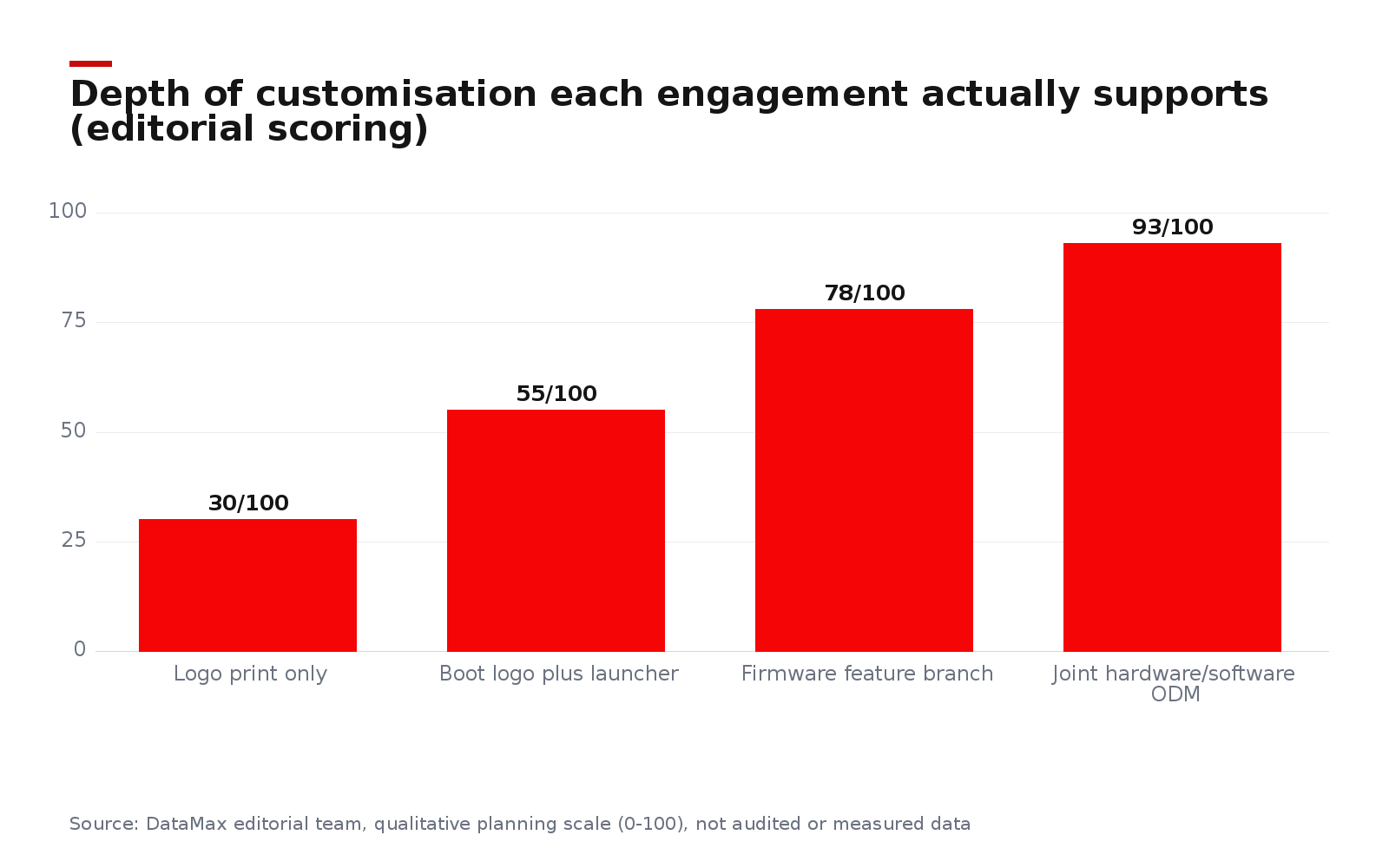
The same figures, in searchable form:
| Engagement | Editorial score |
|---|---|
| Logo print only | 30 |
| Boot logo plus launcher | 55 |
| Firmware feature branch | 78 |
| Joint hardware/software ODM | 93 |
Source: DataMax editorial team, qualitative planning scale (0-100), not audited or measured data.
The commercial difference is where the application sits. A pre-installed application becomes a product component when it is baked into the system image, granted privileged permissions, tied to operator middleware or enrolled through a device-management service. That decision determines the security evidence, update responsibility and failure-recovery path. A launcher route can be less invasive, but it does not remove the need to test storage pressure, network assumptions, user reset behaviour and app interoperability.
A quotation should make the boundary explicit. One option may cover only device branding and a boot splash; another may add the launcher but exclude operator middleware; a third may accept an APK supplied by the customer without integration testing. Add rows for application signing, privileged permissions, server enrollment, first-boot activation, remote update, rollback and certification support. Unless those rows are priced and accepted, the routes appear more similar than they are.
The delivery model also changes where defects surface. A logo route normally fails at visual inspection. A launcher route can fail after navigation, account entry or an application update. A feature branch can fail during operator provisioning or middleware enrolment. A joint hardware/software ODM route exposes issues across the enclosure, thermal design, boot sequence, display path and application lifecycle. The most expensive route is not automatically the correct one, but it is the route with the widest set of interfaces that must be accepted together.
Definitions a buyer cannot outsource
“Pre-installed application” describes where the package enters the device lifecycle. It does not define who owns the package, who controls updates, where the APK originates or whether the application remains usable after a factory reset. A contractual definition should identify the package name, signing authority, initial version, system-app status, permitted permissions, update channel and removal policy. If the operator controls all three, the RFQ should say so directly.
AOSP is the upstream Android open-source software platform. An AOSP Android 11 or Android 14 build can support operator middleware, IPTV clients and OTT applications, but its distribution layer may differ from a Google-certified Android TV build. Buyers should ask which applications, services, Widevine level and update mechanisms are included in the production image. The AOSP versus Google Android TV comparison provides the wider framework; the purchase specification must still identify the exact build and application set.
DRM is a separate acceptance axis. Widevine L1 protects protected playback when the application, device, display path and licence flow operate together. PlayReady licensing introduces its own application and server requirements. HDCP 2.2 optional means the corresponding configuration must be confirmed against the production datasheet and test setup. The presence of “Widevine L1” in a feature list does not by itself prove that the exact pre-installed application, HDMI output mode and content service complete a secure playback path.
The application architecture also determines failure isolation. A system application, a dedicated launcher, a companion mobile application and a web application impose different update and recovery requirements. An APK in a system partition requires signed-image governance and controlled rebuilds. A user-installed APK is easier to update but can be removed and may receive different permissions. A managed application can be silently installed and policy-controlled only when the deployment and device-management architecture support those actions.
For an android tv box contract, separate the application from the screen experience, the playback engine, the network service and the operator identity layer. A 4K decoder capability does not prove that a chosen codec profile, frame rate, HDR path or protected stream is available in the target application. Test the application with its actual manifest, account flow, DRM configuration and playback catalogue.
“System application,” “pre-installed user application” and “managed application” should never be used as synonyms in an RFQ. A system application can be present in the production partition and regain presence after reset, but its update may depend on a new image. A pre-installed user application can be restored by provisioning but may be removed and then require a recovery policy. A managed application can be controlled remotely only if the device is enrolled, online and permitted by the selected management architecture. The purchasing document should state the desired state after reset, after failed update and after network loss.
A signature is another boundary. The APK package and its signing key are separate assets. If the operator owns the key but the ODM builds the image, the release process must transfer the package through a controlled channel without exposing the private key. If the ODM owns the key, the contract must define revocation, version approval and emergency update authority. Naming an APK is insufficient unless the signing owner and release gate are attached to the build record.
Real DataMax platforms, field by field
The DataMax CROSS family offers distinct baselines for IPTV, OTT, premium UHD and gaming-oriented deployments. The table below reproduces only the supplied product facts. Missing configuration must be confirmed against the production datasheet rather than inferred from a family relationship.
| Model | Application and deployment direction | SoC and OS | RAM / ROM | Decode and DRM | Ports |
|---|---|---|---|---|---|
| DM21P | 4K IPTV / operator middleware set-top box | Amlogic S905Y4, quad Cortex-A35; AOSP Android 11 | 2GB / 8GB; 4GB; 16/32/64GB optional | AV1 [email protected], VP9/H.265 4K@60, H.264 4K@30; Widevine L1 / PlayReady / HDCP 2.2 optional | HDMI 2.0b out x1, USB2.0 x2, TF, S/PDIF, 3.5mm AV, RJ45 100M, Wi-Fi6 2x2 + BT5.4, DC 5V/2A |
| DM21S | 4K Android TV box for IPTV/OTT white-label | Amlogic S905Y5, quad Cortex-A55; AOSP Android 14 | 2GB / 16GB; 2/4/8GB; 16/32/64GB optional | AV1 / H.265 [email protected] 4K@60; Widevine L1 / PlayReady optional; Dolby Vision/DTS | HDMI 2.0b out, S/PDIF, AV, USB2.0 x2, TF, RJ45 100M; 1G optional; Wi-Fi6 2x2 + BT5.4 |
| DM21T | Premium UHD / cloud-gaming box | Amlogic S905X5, quad Cortex-A510 (ARMv9); AOSP Android 14 | 4GB / 64GB; family options | H.266/VVC [email protected] 4K@120, AV1/VP9/H.265 4K@120, AVS3 4K@120, H.264 4K@60; inline AI-SR; Widevine L1 / PlayReady optional | HDMI 2.0b out, no HDMI in; USB2.0 x1 + USB3.0 x1, TF, S/PDIF, AV, RJ45 100M; 1G optional; Wi-Fi6 + BT5.4 |
| DM22Q | Gaming-oriented Android TV box | Amlogic S905X5M, quad Cortex-A55 up to 2.5GHz; AOSP Android 14 | 4GB / 64GB; 2/4/8GB; 16/32/64GB optional | AV1/H.265 L5.1 4K@60; inline AI-SR, with no NPU TOPS stated; Widevine L1 / PlayReady optional; Dolby Vision/DTS | HDMI 2.0b out, USB2.0 x2, TF, S/PDIF, AV, RJ45 100M; 1G optional; Wi-Fi6 2x2 + BT5.4 |
The supplied facts cap DM21T and DM22Q output and decoding at 4K, not 8K. Do not carry an “8K” claim into an RFQ, certificate application or customer-facing specification.
For an android tv box pre-installed app, platform selection should follow the workload. The DM21P direction suits an operator middleware programme. The DM21S direction suits an IPTV/OTT white-label application. The DM21T direction adds higher-format decode capability for premium UHD or cloud-gaming use. The DM22Q direction targets a gaming-oriented application. These fit descriptions are product positioning, not proof that a particular APK will pass performance or certification testing.
Confirm optional items in writing. For example, RJ45 1G is optional on DM21S, DM21T and DM22Q; HDCP 2.2 is optional on DM21P; DRM options and codec combinations must match the selected order. If a deployment depends on Ethernet speed, protected output or a specific memory configuration, put that dependency into the purchase order rather than assuming it from the displayed family.
The application workload must also be translated into a hardware configuration. An operator client with continuous background middleware, large catalogues and account state may justify a different memory choice from a simple launcher-only product, but the supplied facts do not establish application performance limits. The buyer should request a test that installs the actual package, loads the production data set, exercises the planned navigation path and records memory pressure, response time and sustained playback on the exact configuration.
Port selection follows the service design. A set-top-box deployment may depend on Ethernet, S/PDIF, AV or USB service peripherals; a gaming-oriented deployment may attach input or storage hardware, but the supplied DM22Q facts list USB2.0 x2 and no HDMI in. Do not assume that a television signal can be passed through that model. Likewise, the presence of a 3.5mm AV connector on DM21P does not define its signal format; confirm that against the production datasheet and the venue installation.
DRM configuration should be selected as a combination, not as an isolated badge. On DM21P, Widevine L1, PlayReady and HDCP 2.2 optional are the stated entries; on DM21S, DM21T and DM22Q, Widevine L1 and PlayReady are optional. The buyer must state which option is required and then require a protected-stream result using the intended application, output mode and display. If the application requires a service-specific licence flow, the server-side entitlement path belongs in the acceptance plan.
The operator, the integrator and the venue
An operator typically prioritises managed middleware, predictable provisioning and software release control. An integrator prioritises signal compatibility, network behaviour and a device that can be deployed without a site engineer rebuilding the image. A venue or signage buyer may prioritise a fixed launcher, controlled content and recovery after power loss. One RFQ should not collapse these situations into a generic “pre-installed app” line.
| Situation | Controlling requirement | Application route | Model direction | Evidence to request |
|---|---|---|---|---|
| IPTV operator | Middleware lifecycle, identity, entitlement and recovery | Firmware feature branch or joint hardware/software ODM | DM21P or DM21S | Build manifest, provisioning sequence, signed release and upgrade test |
| AV integrator | HDMI, network, control and repeatable site commissioning | Launcher with managed application or feature branch | DM21S, with DM21P considered for operator middleware | Port configuration, boot test, network test and field restore procedure |
| Streaming brand | White-label experience and catalogue playback | Launcher plus branded application | DM21S | Application compatibility report and DRM playback evidence |
| Premium UHD service | High-format decode and protected playback | Joint hardware/software ODM | DM21T | Codec-profile matrix, protected-stream test and configuration record |
| Gaming venue | Responsive UI, sustained application operation and output integrity | Feature branch or joint hardware/software ODM | DM22Q | Thermal, endurance, application and output test evidence |
| Digital-signage operator | Fixed entry point, unattended operation and central control | Launcher or managed application | Confirm against the production datasheet | Power-cycle recovery, remote-control access and update rollback evidence |
A useful ownership split prevents each party from assuming another party’s task. The operator defines the user journey, accounts, content rights and service objectives. The application owner supplies or approves the package, signing material and release cadence. The ODM owns the image integration, production flashing and defect evidence. The integrator owns site network, display and input configuration. The venue owns power, mounting, local permissions and physical access.
For an android tv box programme, a distributor may sit between these roles. The distributor needs a clear acceptance record, serial-number traceability and a controlled escalation path. It does not need to decide Android internals, but it does need to know who may approve a firmware revision, who can replace a device and which evidence accompanies the shipment.
The operator example is a managed IPTV deployment with daily content updates and strict entitlement controls. Its critical path is not hardware booting; it is identity, middleware enrolment and update recovery after a network interruption. The integrator example may deliver the same application into hospitality rooms where no person is available to repair it after reset. Its critical path is deterministic boot, remote recovery and a documented site procedure. The venue example may operate digital signage on fixed displays with daily power cycles, so the selected route must recover to the intended entry point without manual interaction.
These situations also expose different evidence gaps. An operator may accept a signed firmware release and server-side logs but still need serial traceability for fleet faults. An integrator may have a site acceptance sheet but lack the application package manifest. A venue may verify visual playback but not confirm the image identifier behind it. A common release record closes those gaps by binding the physical unit, software build and application package.
For a brand-led channel, the launcher may be the minimum acceptable route when customers must not see another vendor’s interface. If the customer requires application removal after activation, the device-management and provisioning architecture must support that state. If the application must remain after factory reset, the package’s system-app status and the agreed reset policy must be verified rather than assumed.

A quotation-desk review should compare three records from the same revision: the commercial scope, the technical specification and the acceptance plan. A mismatch between them is actionable. For example, the commercial sheet may include “operator app,” the technical sheet may name only the launcher, and the acceptance sheet may test boot without opening the application. Procurement should return all three for correction before asking for a production sample.
How to choose, step by step
Turn the purchase decision into testable lines. A verbal assurance that an app “will be pre-installed” is not enough. The following sequence moves from application scope to a controlled production release.
- Define ownership Record the package name, signing owner, source repository, target version, system-app status, permissions, update channel and whether the customer may remove the application.
- Map the platform Select the AOSP version and target model, then confirm processor, RAM/ROM, OS, codec and DRM requirements against the production datasheet.
- State the user journey Describe boot entry, authentication, playback, network fallback, settings access, update behaviour, reset behaviour and recovery after application failure.
- Freeze the build Assign a build identifier to the system image, launcher configuration, pre-installed package list, boot assets and operator middleware versions.
- Define test evidence Require installation, launch, account flow, playback, network loss, upgrade, reset, storage pressure and factory-reset results on the production hardware.
- Control the exception Record how an application update, a firmware correction, a failed licence request or a device recall moves through approval and distribution.
- Approve production Link the golden sample, signed build, test report, line inspection record and shipment serial range to one release record.
The first message to DataMax should contain the exact fields relevant to this topic: target model, AOSP version, application owner, package name if known, system or user installation, signing authority, required codec and DRM profile, connectivity profile, required peripherals, update policy, target certification evidence and the planned quantity band. This converts a broad sourcing request into a testable firmware and manufacturing scope.
A pasted RFQ line should resemble this: “Install the operator-specified application package at build [ID] on [model] and [AOSP version], with [system-app or user-app] status, [permissions], [signing owner], [update method], and [DRM/codec] acceptance tests. Provide the golden sample, application manifest, test report, image checksum and serial traceability.” Blank fields are deliberate controls, not omissions; they prevent the supplier from selecting an unstated architecture.
Add a second line for the customer journey: “On first boot, present [entry point]; after authentication, launch [application]; on network loss, display [state]; after update failure, restore [release]; after factory reset, retain or remove [application] according to [policy].” This line forces the supplier to test the service state rather than merely show the package installed.
A third line should establish the configuration boundary: “Order [model] with [RAM/ROM], [Ethernet option], [DRM option], [peripherals] and the image identified by [build]. No substitution is permitted without written approval.” Optional network and DRM entries should be copied from the accepted datasheet rather than inferred from the model name.
The final line should define evidence and deviation control: “Attach serial-linked application, playback, line-test and aging records; list every open deviation; require written approval before changing the package, OS build, launcher, permissions or hardware configuration.” This is the line that converts sample approval into a repeatable production baseline.
For an android tv box selection, the order matters. Start with the application and service obligation, map that workload to the platform, freeze the image, test on production hardware, and only then release the factory instruction. Choosing the model first and asking the supplier to make the application fit later transfers integration risk into the production window.
What goes wrong after the PO
The most frequent divergence is the application package itself. One quotation assumes an operator-controlled APK; another assumes the supplier supplies it; a third includes only a sample build. Package ownership, signing authority and version freeze must appear in the order. Otherwise, production can begin with an application that cannot be updated because the private key is unavailable.
The second failure is a hardware-software mismatch. A buyer may read a family decoder capability as universal application support. The RFQ needs the exact codec, profile, resolution and frame-rate matrix tied to the selected model and output configuration. This matters because DM21T supports specified 4K@120 decode paths while DM22Q is stated at 4K@60. For DRM, the application, device, display and server must be tested as a system; an optional DRM statement is not a production entitlement.
Field trap 1
The quotation says “Android TV box with all apps installed,” but the production image lacks the operator APK, middleware agreement, account data or remote-update authority. The shipment can pass a boot check yet fail at authentication or service activation. Require an application manifest and signed build identifier, not a bundle description.
The third failure is incomplete update and recovery design. A pre-installed system app may consume storage, retain logs or block reboot into a known-good image. An operator may also expect updates to arrive through a control platform while the AOSP baseline provides a different mechanism. Define rollback responsibility, update failure handling, factory-reset behaviour and the period during which the operator or supplier must support the previous build.
Field trap 2
The RFQ omits “HDCP 2.2 optional” or “RJ45 1G optional.” A sample ordered from the wrong configuration row can fail the site’s protected-content or network test. Put each option into the BOM, image acceptance record and shipment label; do not leave it in an attachment that is not revision-controlled.
Certification can fail late if the application name, device branding and operator identity are handled inconsistently. Android TV compliance, operator security review, network-provider policy and content-labelling duties are separate tracks. The model’s DRM list does not satisfy an operator’s account architecture, and AOSP alone does not answer Google Play certification questions. Procurement should ask the supplier to identify which certifications apply to the exact production configuration and application set.
Storage is another common post-order divergence. A system application consumes storage beyond the downloaded package, and logs, cached content or an update staging area can affect available space. The quote may have been based on a nominal RAM/ROM configuration while the production image contains additional middleware. Acceptance should state a minimum free-space condition before and after application installation, then include a low-storage test that verifies the intended recovery behaviour.
Thermal and sustained-operation failures can also arrive after installation. A short demonstration may pass while the application, output mode and network transfer run continuously. For a gaming-oriented or premium UHD product, ask for a defined endurance scenario with the intended display resolution, frame-rate target, application path and network activity. The result should be attached to the same build and configuration; otherwise, it cannot diagnose whether the issue is application logic, decode load, thermal behaviour or site configuration.
A final commercial failure is the undefined support boundary. The PO may include “one app pre-installed” but omit application adaptation, server integration, failed-certificate remediation, field replacement or version support. Add named deliverables for source-package intake, integration defects, licence configuration, firmware regression, first-article approval and production deviation. A supplier may perform each task competently, but the buyer remains responsible for defining which task belongs to the order.
Verification you can ask for on paper
Factory verification should produce a chain of evidence from component inspection to the shipped unit. For an android tv box with a pre-installed app, the chain must connect hardware identity, image identity and application identity. SMT and AOI records establish board assembly quality. Aging evidence establishes that the unit was exercised beyond a simple power-on. A dark-room test supports display-path inspection, while the application and playback record establishes that the intended experience works on the selected hardware.
- Incoming and board control Link component lot, PCB revision, SMT line record and AOI result to the production board identifier.
- Hardware inspection Record port checks, power consumption, network connectivity, storage condition and display output before application flashing.
- Image flashing Record the system image identifier, checksum, pre-installed package manifest, launcher version and boot configuration.
- Dark-room verification Record the display test condition, output configuration and any detected panel or signal defect.
- Aging and stress Record the defined burn-in or aging procedure, duration, failures, retest result and thermal observation.
- Application validation Attach the boot, login, navigation, playback, network recovery, update, reset and failure-handling results.
- Audit and dispatch Link the accepted unit, serial number, release record, carton label and shipment batch before dispatch.
Acceptance evidence should bind 1 physical unit, 1 serial number, 1 system-image identifier and 1 application-package manifest. A report showing a successful sample test without serial-level traceability does not prove which units in the shipment were tested.
The paper package can be concise if its identifiers agree: approved BOM, golden-sample photographs, build manifest, application compatibility report, playback and DRM matrix, AOI summary, aging procedure and results, dark-room record, final test sheet and serial-range list. Any deviation should have an approval record naming the authorised decision-maker and the affected build.
SMT and AOI evidence should identify the board revision and inspection result, not merely state that inspection occurred. The image record should identify the OS build, pre-installed package versions and checksum. The application record should identify the signer or approval, launch result and tested service path. These identifiers should agree across documents; a mismatch between the aging unit and the shipment build invalidates the chain.
For a deeper audit, request a video factory audit through DataMax, with the camera following SMT, AOI, image flashing, aging, dark-room inspection and final dispatch inspection. Alternatively, ask the manufacturer team for SMT/AOI/aging evidence specific to the selected model and application build. Sample requests can be coordinated through the sample order route; the sample itself should be tested against the same written acceptance criteria planned for production.
The audit request should include four checkpoints: observe the physical line, trace one board identifier through inspection, observe the flashing and application-validation stations, and reconcile one serial number against the final shipment record. A camera tour without document reconciliation proves that a process exists; it does not prove that the intended process governed the shipped batch.
For an android tv box pre-installed app programme, a well-structured paper package lets procurement release the shipment without rebuilding the factory facts from interviews. The operational question is not whether a factory has an AOI station or an aging room. It is whether the selected release record identifies what passed, on which unit, under which image and against which application manifest.
Further reading
- Guide android tv box for isps
- H.265 HEVC Android TV box guide
- Widevine L1 certification guide
- Dolby Atmos Android TV box guide
- TV box vendor selection checklist
- DataMax DM21P specifications and fit
- DataMax DM21S specifications and fit
FAQ
What is the difference between a pre-installed app and a launcher app?
A pre-installed package is integrated into the manufacturing image, while a launcher app controls the screen entry point and may open another application. Their update paths differ: a system image normally requires controlled rebuilding and flashing, whereas a launcher can be updated separately. The RFQ should identify whether the application is a system app, how it is signed, who owns updates and whether factory reset removes it.
Can an AOSP Android TV box support operator middleware?
Yes, where the selected hardware, OS baseline and application architecture support the required functions. AOSP provides the Android platform foundation, but operator middleware also depends on privileged permissions, provisioning, device management, update control and backend integration. Confirm the exact AOSP version, production image, application package and acceptance tests with the supplier.
Which DataMax model supports an IPTV middleware application?
The DM21P is positioned for a 4K IPTV and operator middleware set-top box, while the DM21S is positioned for a 4K IPTV/OTT white-label application. Neither positioning proves compatibility with a specific middleware build. Package the APK, account flow, codec requirements and DRM test plan into the RFQ, then confirm against the production datasheet.
Does Widevine L1 guarantee protected playback?
No. Widevine L1 is one part of a protected-playback chain. The application must support the device security level, the licence server must issue valid entitlements, and the display path must satisfy the relevant output protection requirement. PlayReady, HDCP and content-service policies may be separate conditions. Validate the exact application, model configuration, display and service together.
How should updates to a pre-installed operator app be controlled?
The purchase document should name the update authority, channel, trigger, signing owner, failure behaviour and rollback responsibility. A system application may require a new signed image, while a user-install or managed-application route may support a different lifecycle. The RFQ must define whether updates occur at first boot, by schedule, on server command or during production flashing.
What factory evidence proves the app was installed?
Require a serial-linked chain covering the approved system-image identifier, image checksum, application-package manifest, application version, test result and unit serial number. SMT, AOI, aging and dark-room records support hardware acceptance but do not prove application installation on their own. Ask for a sample unit whose identifiers match the production release record before shipment approval.
Who should own the application signing key?
The owner depends on the release model. If the operator controls updates, it may retain the signing key and provide signed packages to the ODM. If the ODM controls the image release, the contract can assign it key custody but must still define package approval, revocation and emergency release authority. The RFQ should name the signer and the approval gate; placing an APK on a device does not establish who can update it safely.
What should a production sample prove?
The sample should prove the complete accepted configuration, not merely that the application opens. Its serial number should connect to the BOM, memory and optional-feature selections, OS image, application manifest, launcher version and DRM configuration. Testing should cover authentication, catalogue playback, network loss, update, reset and recovery. Once signed off, the sample becomes the golden reference against which production units and image changes are compared.


