

The procurement answer in one screen
If the operator owns the launcher, middleware, user interface and application portfolio, procure a platform for controlled pre-installation and lifecycle management. If the retailer or brand owns the experience, specify an android tv box with a white-label route and a defined application partition instead. Most enterprise enquiries sit on the operator side: the android tv box is not merely a display product, but the endpoint that must preserve a controlled software baseline after production.
For a pre-installed application agreement, settle five terms before comparing hardware. “Pre-installed” identifies the application present in the factory image, but it does not identify the licensor, updater, data controller, support owner or removal right. “Bundled” means the application ships as part of a defined package. “Preloaded” describes the delivery state, not necessarily the commercial relationship. “System application” should be used only when the application has the corresponding Android privileges and update path. “Licensed application” means the distributor is authorised to distribute the application on the specified hardware and territory, subject to the relevant provider terms.
The quotation should separate device facts from application facts. Device facts include operating-system baseline, CPU, memory, storage, connectivity, output interfaces and codec position. Application facts include package identity, signing source, installer authority, update mechanism, launch entitlement, network dependencies and support responsibility. A factory audit or an evidence request should then test whether the supplier can prove the stated software baseline rather than merely repeat a feature list.
This page focuses on that ownership and terminology angle. For the wider platform selection context, see Android TV Box for ISPs.
Field trap
“Pre-installed” does not mean “permanently installed”. A launcher entry can be removed, disabled or hidden, and an application can lose service after its licence, certificate, backend or distribution agreement expires.
Failure modes that reach the field
The first failure is ownership ambiguity. A retailer may believe the supplier will maintain the application, while the supplier treats each image as a one-time production task. The visible result is a device with a valid application at shipment but no party responsible for a broken update, certificate rotation or menu policy. The commercial loss is paid deployment: drivers, replacements, support tickets and stalled field launches.
The second failure is licence mismatch. A quotation may describe an android tv box with Widevine L1, PlayReady, Dolby Vision or DTS, yet omit the application’s actual playback matrix, licence acquisition requirements, device-binding model, or regional entitlement. Hardware support does not prove that the application can obtain the required licence. The RFQ must identify the provider, content protection system, device class, output path and test content separately.
A third failure occurs when “system app” becomes an architectural claim. Privilege level affects installation, update and removal, but the authorised updater still determines whether a compromised or divergent package can replace the application. Another mismatch arises when the application targets mobile Android assumptions: no launcher contract, no 10-foot UI, no remote navigation, no leanback feature declaration, or no Play Store distribution path. Another common error is treating an AOSP image and a certified commercial distribution build as equivalent. They are different release objects.
Quote-control trap
A quotation that lists only “pre-installed app” cannot be compared. Require the exact package identifier, version policy, signing source, update owner, removal policy and evidence location. Without these lines, acceptance testing and warranty triage become ambiguous.
A fourth failure is storage accounting. RAM and ROM alone do not describe the usable application partition. A pre-installed package may consume system space, leave too little free storage after updates, or alter OTA image size assumptions. A fifth is network and backend readiness: the application may need IP addressing, DNS, entitlement APIs, time synchronisation, analytics endpoints or a captive portal. The hardware quotation should therefore separate device acceptance from service integration.
A sixth failure is the mismatch between a golden sample and production variance. A sample can pass with one board revision, image and serial-number procedure, while the production lot contains substituted components, a different launcher package or an unrecorded partition change. Release-control failures often appear as a small number of units that boot into the wrong experience. Serial linkage, approved image identity and a controlled substitution process reduce that risk.
A seventh failure is an incomplete reset procedure. If factory reset removes the operator application, the device-management enrolment, or the licence state, field recovery may not restore the intended baseline. Specify whether reset is a supported operator action, whether it removes the package, and whether re-enrolment requires network access. A hotel or retail deployment can also expose a language, channel, keyboard or regional-content error that a factory launch test never exercises.
The evidence trail from SMT to shipment
The evidence trail should begin before the first article is populated. Define the application master, signing authority and image baseline, then trace the approved build into the production order. The object under control is not a generic android tv box but a specific software and hardware configuration identified by an immutable order record.
- Baseline lock Record the SoC, AOSP Android version, RAM/ROM configuration, package identifiers, versions, signing sources and approved launcher behaviour.
- Pre-SMT evidence Confirm the board configuration, component substitutions, fixture status and any application-related partition or provisioning requirement before placement.
- Post-SMT inspection Use AOI evidence to verify placement and soldering, then reconcile defects and repairs against the serialised unit record.
- Image provisioning Capture the approved image hash or release identifier, application package and version, signing status, boot result and provisioning method.
- Functional and aging checks Verify boot, launch, remote navigation, network registration, application entry, playback where applicable, reboot persistence and thermal or runtime stability.
- Audit and release Compare the sampled unit against the golden sample, archive the inspection record and link every shipment lot to its approved software release.
Procurement evidence rule: “present at shipment” is a visual observation; “controlled configuration” is a linked record. Require the latter for production programmes.
Software and firmware deserve separate audit layers. Hardware AOI cannot prove that the correct application was installed, while an application screenshot cannot prove correct port assembly or radio operation. The release packet should combine hardware inspection, software identity, functional results and shipment reconciliation.
Production aging should use the intended power, network and accessory configuration. An application that fails after repeated reboot, standby resume or network reconnection has not passed a practical field lifecycle even if it starts correctly from a cold boot. Where a dark-room check is required, define what is actually observed: display output, IR handshake, boot stability, or leakage into the imaging path. Do not use “dark-room tested” as an unqualified phrase.
A useful release packet has six separable records: the approved hardware configuration, the software image identity, the application package list, the functional test result, the aging result and the lot reconciliation. A supplier may have all six pieces but not connect them. The buyer should ask which record identifies the serial number, which record identifies the production lot, and which person authorised any exception. That closes the gap between evidence possession and evidence traceability.
For example, an operator rollout can require a sampled first-boot test on every lot, a stricter audit on the first lot, and serial-level reconciliation whenever an application package is absent or a board revision changes. The acceptance rule should be written before production. Otherwise, a supplier can define “sample testing” differently from the operator’s deployment policy, creating a dispute after units have already been assembled.
DataMax can support a video factory audit or a request for SMT/AOI/aging evidence specific to pre-installed application control through its factory quality resources. The audit request should name the target SKU, application package, firmware release and the records expected for the shipment lot.
Options placed side by side
The principal fork is between a managed operator configuration and a white-label commercial configuration. Neither is automatically “more pre-installed”. They differ in control, evidence and operational responsibility. A managed configuration normally provides a stronger baseline for fleet visibility and release traceability. A white-label configuration normally gives the brand greater control over storefront presentation, consumer-facing updates and commercial packaging.
| Decision line | Operator-managed route | Brand white-label route |
|---|---|---|
| Application portfolio | Defined operator service set | Brand-selected application set |
| Release control | Fleet baseline and staged deployment | Commercial build and brand approval |
| Launcher ownership | Operator or agreed middleware owner | Brand or retail experience owner |
| Application update route | Controlled device-management or OTA path | Brand-defined update service |
| Evidence emphasis | Per-lot traceability and signed release records | Brand acceptance and packaging compliance |
| Commercial dependency | Operator integration and service agreements | Brand distribution rights and support ownership |
A third route is a preloaded commercial application without operator control. It can be appropriate for a short promotional programme or a retailer-specific bundle, but it offers less fleet governance. The application may be present at manufacturing yet use a consumer update channel outside the operator’s device-management policy. Buyers should specify whether that behaviour is allowed before approving the route.
The comparison also has a hardware dimension. Memory and storage affect application availability and update headroom; CPU and codec support affect content experience; Ethernet and Wi-Fi affect integration; HDMI and audio interfaces determine the installation path. These factors do not determine ownership, but they determine whether the chosen ownership model can work technically.
For the evidence hierarchy, use the following editorial ranking. It is a qualitative planning scale, not measured data.
The useful procurement move is to request the strongest evidence available for each assertion, rather than one generic “certificate” covering unrelated claims. A supplier claim may be adequate for an internal prototype, while a fleet programme should request a standard-specific report or a certificate with public registry lookup. The score is an editorial ranking, not a substitute for legal, technical or certification review.
The application bundle should also be compared by update behaviour. An operator-managed image may be staged through a device-management system and tested against a defined rollback point. A brand build may use a consumer store route and provide a different user experience. A promotional bundle may update independently. These routes have different support contacts, data flows and failure thresholds. Record the route in the commercial schedule, not only in the factory work order.
Where the terminology comes from
“Pre-installed application” is a supply-chain status. It says the package is included before the device reaches the customer. The application itself may be a launcher, middleware, live-TV client, streaming client, store, voice assistant, analytics component or regional service.
“Preloaded” often functions as an equivalent commercial expression, but the quotation should still identify the package. “Bundled” normally identifies a group of software supplied together; it does not determine who owns the bundle. “Installed” means the package exists on the device. “Provisioned” often describes the act of applying a device-specific configuration or entitlement. “Activated” may describe service registration rather than installation.
“System app” describes the package’s integration status and requested privileges. It does not transfer responsibility for signing, update traffic, licence renewal or data handling. “Third-party app” identifies a party other than the platform provider, but does not imply that the application is externally controlled once deployed.
In Android TV architecture, the launcher, package manager, update mechanism and policy controller form separate control points. AOSP describes the open-source software foundation; it is not proof that a distribution build includes Google Play services or that the device has completed Android compatibility testing. The Commercial Device Compatibility Programme and Android CDD/CTS processes concern device compatibility, while GMS and EDLA certification concern separate distribution and licensing frameworks. Do not merge those approval statements into a single “certified” claim.
Widevine L1, PlayReady and HDCP describe different protection functions. Widevine and PlayReady are DRM systems; HDCP is an output-protection mechanism. Dolby Vision and DTS refer to proprietary audiovisual technologies whose use depends on the relevant licence and implementation. An application can support an application-level licence while the selected output path lacks the required protected-content capability.
“OTA update” describes a delivery route, not an ownership model. “MDM policy” describes administrative control. “Application sandboxing” describes isolation between packages. “Rollback” describes recovery to an earlier approved state. Each mechanism must be named in the RFQ.
The distinction between a package, a product and a service prevents most quotation disputes. The package is the software artifact identified by its application ID and version. The product is the commercial service, including entitlement, territory and support. The device is the hardware and OS baseline on which the package runs. A factory may prove package presence while the application provider controls product access and the operator controls device policy. Each proof belongs to a different party.
- Commercial layer licence, territory, support, removal rights
- Release layer package, version, signature, image, update channel
- Device layer SoC, AOSP version, memory, storage, interfaces
- Evidence layer build record, inspection, functional result, shipment lot
A standards-focused buyer can use the same layers to avoid a common error: treating an AOSP baseline as a commercial distribution approval, or treating a DRM label as proof that the application can obtain a licence. The RFQ should request the relevant standard-specific evidence for the claim being made, while keeping the software baseline and hardware configuration separately identifiable.
Five production SKUs compared
Four DataMax production SKUs are relevant to this angle. Their application-planning fit differs by operating system baseline, memory, decode capability, interface mix and intended use. The specifications below are reproduced from the provided product facts; confirm all production details against the current datasheet before an order.
| Model | SoC and OS | Memory and storage | DRM and decode | Interfaces |
|---|---|---|---|---|
| DM21P | Amlogic S905Y4, quad Cortex-A35; AOSP Android 11 | 2GB / 8GB; 4GB; 16/32/64GB optional | Widevine L1 / PlayReady / HDCP 2.2 optional; AV1 [email protected], VP9/H.265 4K@60, H.264 4K@30 | HDMI 2.0b out x1, USB2.0 x2, TF, S/PDIF, 3.5mm AV, RJ45 100M, Wi-Fi6 2x2 + BT5.4, DC 5V/2A |
| DM21S | Amlogic S905Y5, quad Cortex-A55; AOSP Android 14 | 2GB / 16GB; 2/4/8GB; 16/32/64GB optional | Widevine L1 / PlayReady optional; Dolby Vision/DTS; AV1 / H.265 [email protected] 4K@60 | HDMI 2.0b out, S/PDIF, AV, USB2.0 x2, TF, RJ45 100M; 1G optional; Wi-Fi6 2x2 + BT5.4 |
| DM21T | Amlogic S905X5, quad Cortex-A510 (ARMv9); AOSP Android 14 | 4GB / 64GB family options | Widevine L1 / PlayReady optional; H.266/VVC [email protected] 4K@120, AV1/VP9/H.265 4K@120, AVS3 4K@120, H.264 4K@60; inline AI-SR | HDMI 2.0b out; no HDMI in; USB2.0 x1 + USB3.0 x1, TF, S/PDIF, AV, RJ45 100M; 1G optional; Wi-Fi6 + BT5.4 |
| DM22Q | Amlogic S905X5M, quad Cortex-A55 up to 2.5GHz; AOSP Android 14 | 4GB / 64GB; 2/4/8GB; 16/32/64GB optional | Widevine L1 / PlayReady optional; Dolby Vision/DTS; AV1/H.265 L5.1 4K@60; inline AI-SR; no NPU TOPS stated | HDMI 2.0b out, USB2.0 x2, TF, S/PDIF, AV, RJ45 100M; 1G opt; Wi-Fi6 2x2 + BT5.4 |
The “Five production SKUs” basis is retained as the comparison topic, but only 4 models are supported by the supplied production facts. A fifth model is not stated because inventing a fifth DataMax configuration would breach the evidence boundary.
For an operator middleware programme, DM21P is identified as a 4K IPTV and operator middleware fit, while DM21S is identified as a 4K Android TV box for IPTV/OTT white-label use. DM21T is identified as a premium UHD and cloud-gaming fit. DM22Q is identified as a gaming-oriented Android TV box. These fit statements help frame application load; they do not guarantee that a particular operator application supports every model.
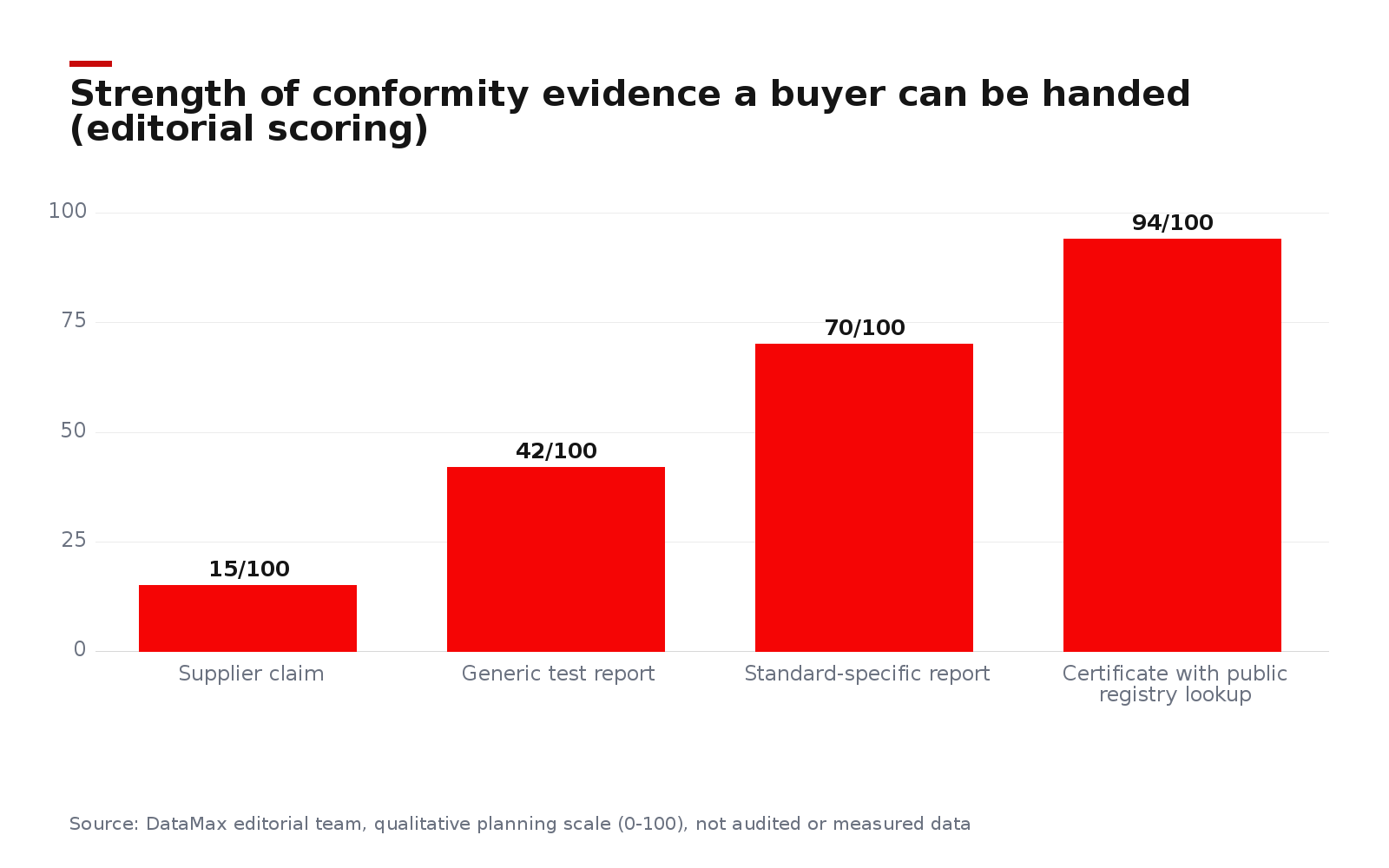
The same figures, in searchable form:
| Evidence option | Editorial score |
|---|---|
| Supplier claim | 15/100 |
| Generic test report | 42/100 |
| Standard-specific report | 70/100 |
| Certificate with public registry lookup | 94/100 |
Do not infer that the presence of Widevine L1 guarantees the target application’s licensing path. Confirm the application, content, output route and provider requirements against the production datasheet and an integration test.
The operator, the integrator and the venue
The ownership angle changes with the buying situation. An operator usually needs fleet visibility, deterministic launch behaviour and a controlled update route. An AV or IT integrator may prioritise installation interfaces, remote-control behaviour and recovery. A hotel, retail venue or hospitality operator may need a branded entry point, room-account integration and a simple recovery path.
| Situation | Primary requirement | Application or update control | Model direction |
|---|---|---|---|
| Operator IPTV fleet | Middleware entry, stable boot and managed release | Operator-defined baseline and OTA or MDM route | DM21P or DM21S, subject to integration fit |
| Brand white-label retail | Brand launcher, commercial bundle and release ownership | Brand approves build and update responsibility | DM21S, subject to branded software requirements |
| Premium UHD or cloud gaming | Higher-resolution decode path and performance headroom | Platform-specific service and application compatibility | DM21T, subject to content and service tests |
| Gaming-oriented deployment | 4K@60 media path and application stability | Defined launcher, update route and store relationship | DM22Q, subject to application certification |
| AV/IT integrator | HDMI, USB, Ethernet, audio and remote integration | Site acceptance plus OEM recovery path | Select by verified interfaces and control protocol |
| Hotel or hospitality venue | Simple guest entry, network onboarding and reset | Venue experience owner with OEM fallback | Select by launcher policy and recovery workflow |
The integration test should use the real application package rather than a demo page. It should cover first boot, remote focus movement, application launch, network authentication, entitlement retrieval, playback, application update, reboot persistence and factory reset. It should also identify what happens when the backend is unavailable: local shell, cached rights, error state or blocked launch.
An operator’s test should include the complete network path from DHCP or static IP configuration through DNS, entitlement API, time synchronisation and service playback. The acceptance report should state whether failure is caused by the endpoint, the local network or the service backend. For an operator fleet, that separation determines whether a remote support team can correct the device without replacing it.
An integrator’s test should begin with the physical installation. Check HDMI output against the display, audio output against the amplifier or sound bar, Ethernet through the site switch, Wi-Fi coverage, USB peripheral behaviour and the supplied remote. Then check whether the application survives input changes, standby, reboot and a site network interruption. The pre-installed application must remain usable in the physical installation, not merely in a factory network.
A venue’s test should reflect housekeeping and guest operations. Define the recovery action for a powered-off unit, a locked screen, an expired entitlement and a failed network onboarding. If the venue can return a unit to a known state without engineering intervention, the model choice and application policy become part of the operating process. If it cannot, the buyer should demand a documented reset path and a named fallback owner.
A retail brand should also test packaging and store presentation separately. The application icon, launcher order, default account screen, privacy notice, market-specific legal copy and update behaviour can all affect the customer experience. These checks belong in brand acceptance rather than in a generic factory smoke test.

The photograph should be treated as an editorial procurement scene, not evidence of a specific facility. For actual acceptance, request a live or recorded line review tied to the ordered configuration.
How to choose, step by step
Start with ownership rather than model number. Name the party that owns the launcher, the party that signs the application, the party that serves updates and the party that responds to field failures. Then turn those answers into RFQ lines that a factory and an application provider can both sign.
operator, brand or retailer
packages, signatures, updates
SoC, OS, memory, I/O
audit, tests, traceability
- State the deployment route Write: “Operator-managed IPTV application baseline”, “brand white-label application baseline” or “retail preloaded bundle”.
- List the application objects Give each package identifier, version, owner, signing authority, launch surface and update authority.
- Define acceptance tests State boot, launcher, remote navigation, network, entitlement, playback, reboot, reset and offline or degraded-mode requirements.
- Select the hardware evidence Request the exact SoC, AOSP Android version, RAM/ROM, output, network and interface configuration that will ship.
- Attach the evidence packet Require SMT/AOI records, approved image identity, application presence, functional results, aging results and shipment-lot traceability.
- Close the lifecycle Assign responsibility for certificate rotation, application updates, backend outages, application removal, inventory exceptions and field recovery.
Pasteable RFQ lines include: “Install the exact approved package and version on every unit”; “Use the OEM-controlled signing and update path”; “Provide serial-linked SMT/AOI, provisioning and functional records”; “Demonstrate the application after reboot and application update”; “Do not substitute the application, launcher or AOSP baseline without written approval”; and “Confirm protected-content and DRM behaviour using the agreed test service”.
Add one line for exception handling: “Any changed package, image, board revision or configuration must be recorded against the affected lot and approved before shipment.” Add another for lifecycle ownership: “The RFQ must identify the party responsible for certificate rotation, update service, entitlement support, factory reset and field recovery.” These lines reduce ambiguity when the original commercial owner is no longer reachable.
A buyer can use a three-document handover: a software schedule listing packages and update authority, a hardware schedule listing the exact model configuration, and an evidence schedule listing inspection, functional, aging and traceability records. DataMax can turn these requirements into a model-specific production quotation. Discuss the SKU list and target market or request evaluation units before locking the software baseline. The engineering review should include the application package, launcher design, middleware stack, store route and update mechanism.
For an evidence-led handover, email [email protected] with the requested SKU list, approved application package identifiers, target-market certification requirements, middleware and DRM checklist, and evidence list covering SMT/AOI, aging and shipment traceability. Confirm every configuration against the production datasheet before release.
Further reading
- Guide android tv box for isps
- TV box vendor selection checklist
- Industry solutions
- Allwinner Android TV boxes
- AOSP Android TV boxes
- DataMax DM21P specifications and fit
- DataMax DM21S specifications and fit
FAQ
What is the difference between a pre-installed and a preloaded application?
Both terms normally describe an application present before delivery, but neither defines commercial ownership or update control. A procurement record should add the package identifier, version, signer, licence owner, update authority and removal policy. Otherwise, two quotations can describe the same visible icon while carrying different liabilities.
Does “system application” make an application permanent?
No. The term describes Android integration and privilege, not permanence. Removal, disablement, update and rollback remain controlled by the platform architecture and authorised update mechanism. The RFQ must specify who can replace the package, how updates are signed and what happens after revocation or licence expiry.
Can an AOSP Android 11 device support an operator application?
It may, depending on the application’s supported Android release, launcher contract, media path and update architecture. The hardware listing alone cannot prove application compatibility. Require a test build, target-market requirements and an acceptance report on the exact production configuration.
Is Widevine L1 proof that an application will play protected content?
No. Widevine L1 describes the device’s stated DRM position, not the application’s licence acquisition or entitlement result. The application provider, content service, output route, test asset and protected-output behaviour must also be verified. For production acceptance, use the agreed service flow rather than a generic playback test.
Which DataMax model should an operator choose?
Selection depends on the operator middleware, application compatibility, memory, connectivity, output and update route. DM21P is positioned for 4K IPTV and operator middleware; DM21S for 4K IPTV/OTT white-label use. These are fit statements, so confirm the actual package, AOSP baseline and interfaces against the production datasheet.
What evidence should accompany a pre-installed application quotation?
Request an approved software baseline, exact package versions, signing and update ownership, serial-linked SMT/AOI records, provisioning identity, functional results, aging results and shipment-lot traceability. A feature claim is weaker than a standard-specific report, while a certificate with public registry lookup provides the strongest editorial evidence path.


