
The procurement answer in one screen
A hospital RFQ can land with two incompatible instructions: mount a screen in a ward and run content locally, or install a central player and distribute media over the network. For a digital signage display, the decisive issue is not simply whether the unit is called a player or a panel. It is whether the screen, compute module, operating system, content workflow, connectivity, power, and service responsibility are specified as one deployable configuration.
For a large-format wall position with direct HDMI or LVDS input and local playback, a standalone commercial panel is generally the more coherent architecture. The DataMax DS43H fits that direction: it combines a 43-inch TFT LED panel with HDMI in, LVDS in, four USB2.0 ports, an RJ45 100M connection with a 1G option, and a HiSilicon Hi3751-based Android platform. If the requirement is bedside care, self-service, or portrait interaction, the correct architecture changes because touch, camera, audio, mounting, and workflow needs differ.
Buyers should not approve a generic “player or panel” line. Require the quotation to identify the exact SKU, screen and chassis role, media path, network interface, power method, OS baseline, memory, content agent, signage software, mounting method, and certification evidence. For the broader category, see digital signage displays. A player/display category decision made from a catalogue image is a field-rework risk, not a procurement decision.
The decision can be compressed into 5 acceptance questions. First, does the approved SKU contain the media compute, or is that function external? Second, does the display path terminate in HDMI, LVDS, or an integrated panel? Third, which device receives content updates and logs? Fourth, which power method is physically available at the installation? Fifth, which evidence identifies the exact production configuration? A supplier that answers these questions with a model family rather than a SKU has not completed the technical specification.
A hospital buyer also has to define the operational boundary. If the display is outside a controlled clinical workstation, scheduled wayfinding and patient-information content may be sufficient. If a clinician or patient will enter data, touch calibration, account handling, camera privacy, headset behavior, and application support become part of acceptance. The digital signage display classification should never substitute for a use-case review.
Where this matters in a deployment
The deployment scene determines which components must live together and who owns each failure domain. A waiting-area sign may only need scheduled playback; a nurse-station board may need operator-managed content and wired reliability; a bedside terminal may combine video, calling controls, camera hardware, and patient-access workflows. These are different products even when each appears under the same digital signage display purchasing heading.
| Deployment situation | Primary requirement | Model direction |
|---|---|---|
| Ward or corridor wall signage | Large-format direct display, scheduled media, wired network, controlled mounting | DS43H standalone-panel direction; freeze panel, power, and network options in the PO |
| Reception or self-service kiosk | Compact touch display, kiosk application, removable media, controlled networking | DP810U desktop kiosk direction |
| Retail, hospitality, or service counter | Portrait touch display with compact desk installation | DP104R portrait L-shape direction |
| Patient bedside infotainment | Touch, audio, camera, connectivity, patient controls, 4K media capability | DP02L patient-terminal direction |
| Central player feeding an external panel | Compact compute, OS, network, storage, and reliable media output | Use a dedicated player architecture; do not assume the wall display is also the player |
The procurement consequence is straightforward. A display purchased without a compute path may need an external player, USB source, or network encoder. A player purchased without a suitable panel may add an unsupported converter, mount, power supply, or control interface. In hospital work, that additional equipment also affects infection-control surfaces, cable routing, cleaning access, and service access.
The photograph for this decision is operational rather than decorative: buyers should walk the actual assembly route and inspect how the machine reaches the final integration point.
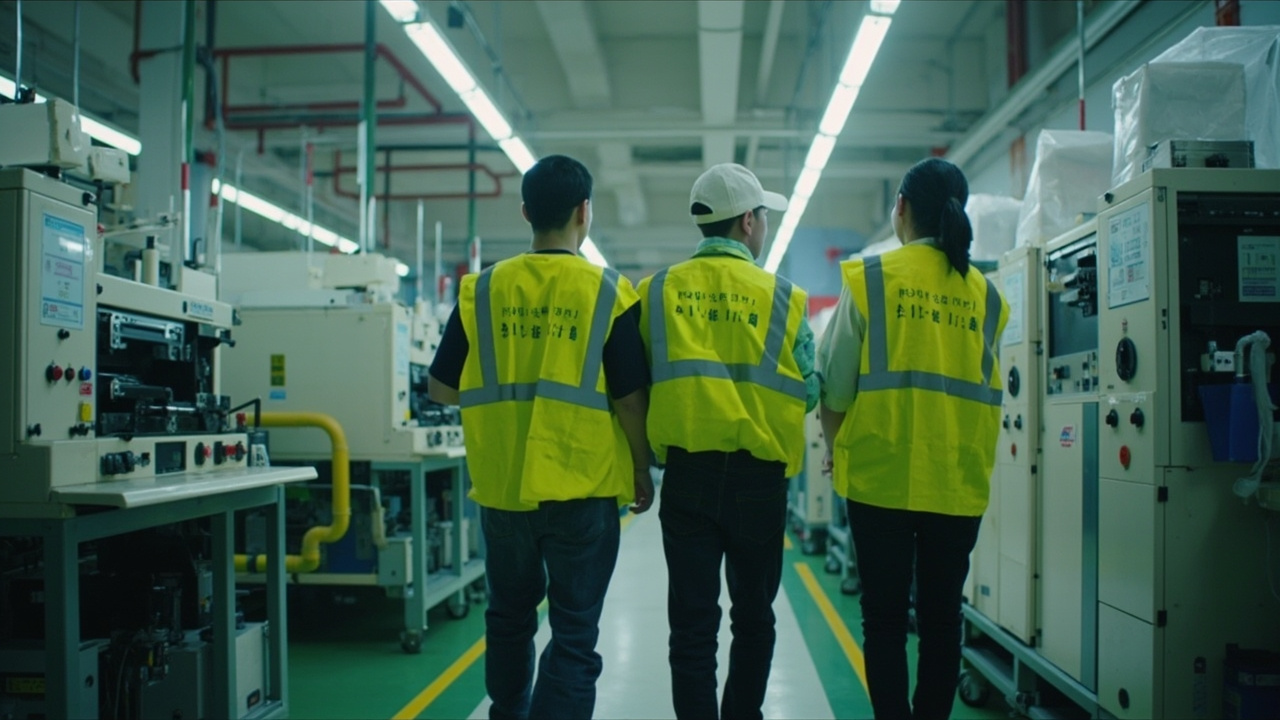
A factory audit is useful when it follows the physical route from SMT assembly through display integration, burn-in or aging, functional inspection, and packing. If a supplier cannot connect a process station to the exact ordered SKU, the evidence remains generic. Request that trail during the commercial review, rather than after the first shipment reaches the staging warehouse.
For a ward installation, the procurement team should include facilities, infection control, clinical engineering, security, and facilities maintenance in the review. Facilities can confirm wall geometry, cable routes, and cleaning access; clinical engineering can identify device-management and service boundaries; security can review camera, network, and account requirements. A product comparison prepared only by marketing will miss those interfaces.
The same model can produce different outcomes in different scenes. DP104R is specified for a portrait L-shape desk sign, so it should not be selected for a landscape menu board without a controlled orientation decision. DP810U is specified for a desktop self-service kiosk, so a reception application requiring portrait content needs an artwork and enclosure review. DP02L is specified for bedside infotainment and care terminals, so its camera, headset, and 16h/7d operating profile belong in the clinical acceptance plan rather than in a generic signage checklist.
The installation owner must also be named. If the display is cleaned by ward staff, the enclosure and exposed surfaces matter. If technicians can remove only the front bezel, service access may affect camera, touch, and cabling. If signage content is managed centrally, the buyer needs a named CMS owner and network path. These are digital signage display deployment decisions that can be answered during the RFQ, not after installation.
The selection sequence that removes rework
The selection sequence should convert a broad digital signage display requirement into RFQ lines that engineering, operations, and procurement can verify against the same configuration. Start with the output, then add interaction, then constrain the hardware and software boundary.
- Fix the installation role Record whether the product is a self-playing panel, a player with external display, a desktop self-service kiosk, a portrait counter display, or a bedside terminal. State screen size, orientation, mounting, and expected daily use.
- Define the media path Identify whether content arrives by USB, local storage, managed network distribution, HDMI or LVDS input, or a hosted workflow. State the required resolution and frame rate instead of saying “HD” or “4K.”
- State interaction and peripherals Add capacitive touch, camera, microphone, speakers, headset connections, card slot, or serial accessory requirements only where the use case requires them.
- Freeze compute and connectivity Specify the SoC, RAM/ROM option, OS baseline, Ethernet speed, Wi-Fi and Bluetooth requirements, video decode formats, and output interfaces.
- Define operational responsibilities Identify the signage application, content agent, remote-management owner, update method, logging requirement, device enrollment process, and who supports the installed base.
- Attach compliance evidence Name the destination-market certificates, electromagnetic and radio evidence, display expectations, and any optional DRM requirements. Mark optional items as options rather than accepted facts.
- Lock the order baseline Require the quotation and PO to identify the exact model, configuration, power method, firmware, accessories, and approved sample. Route every later change through revision control.
A buyer-ready specification line can look like this: “43-inch standalone Android signage panel, 1920x1080, 300 cd/sqm, scheduled local media, Ethernet interface, controlled wall mount, exact power option, production OS baseline, approved golden sample, and destination-market compliance evidence.” It sounds severe because it prevents a 1920x1080 panel from being promised with an unspecified 4K decoder, or a 12 V DC unit from being shipped where the site expects mains AC input.
The ordering point matters. A golden sample should represent the proposed production configuration, not a showroom configuration. If the factory treats sample approval and production equivalence as separate activities, the pilot batch needs a documented sign-off that connects them.
The sequence also prevents silent substitutions. Suppose a purchasing system records only “43-inch hospital display.” A later quotation can change the SoC, memory, brightness, power input, or Android baseline without triggering a technical review because the line item still appears unchanged. By writing those attributes as separate controlled fields, the buyer creates a revision trigger whenever one changes.
For network-managed deployments, specify whether Ethernet is the required production path, whether Wi-Fi is permitted as a fallback, and whether the device must boot without a network after content is cached. For USB workflows, state the expected media format, file naming method, playback restart behavior, and whether removable media is permitted in the target environment. These acceptance details turn the digital signage display requirement into testable behavior.
For content security, identify whether the display handles only public information, protected commercial media, or access-controlled patient information. Specify DRM only when the content owner requires it, and attach the middleware, licence-service, display-path, and certificate checklist. For patient-facing systems, add privacy, account, camera, and session requirements as separate lines.
Failure modes that reach the field
Most field failures originate from boundary mismatches that appear harmless in a quotation. The panel is ordered, but the signal source is omitted. The player is approved, but the display cannot accept its output format. The operating system is named, but the media application is not supplied. Each defect is easy to conceal behind the broad phrase digital signage display.
Field trap
A 43-inch wall installation may be quoted with external media playback, but the supplied unit may have only input interfaces. The same unit may also carry conflicting Android, power, memory, or brightness descriptions across a catalogue and product page. Specify the production SKU and power method in the PO; otherwise the site team receives a screen whose intended signal source and supply are undefined.
Video capability is another common mismatch. A 1080P decoder can be entirely adequate for 1920x1080 content yet unsuitable for a 3840x2160 workflow. Conversely, “4K decode” does not prove that the panel itself is 4K. Record native panel resolution separately from maximum decode resolution.
Field trap
Do not equate optional DRM with certified deployment readiness. A platform can offer Widevine L1 and HDCP2.2 as options while the shipping SKU, display path, licence service, and destination-market content rights remain unproven. Add the DRM and middleware checklist to the order review.
Other failures occur at the handover boundary. A kiosk may be installed without a stable network path, a bedside terminal without agreed charging or service access, or a portrait display with a landscape assumption in the CMS artwork. Ethernet speed, mounting geometry, touch orientation, cleaning access, and service responsibility need named owners. The cost of getting this wrong is not merely a replacement screen: it can require structural work, software correction, recertification, and reopening the ward.
A frequent procurement error is to specify the panel by diagonal size and “commercial quality.” That description does not establish native resolution, brightness, contrast, viewing angle, backlight rating, temperature range, touch construction, or interface inventory. A later sample may appear visually acceptable in an office while failing ward-level expectations. The RFQ should state measurable values and identify which values come from the production datasheet.
Another failure is treating “Android” as the content platform. AOSP Android supplies an operating-system baseline, but it does not define the signage player, content agent, CMS, update policy, device enrollment, touch behavior, or supported codec set. If the quotation says only “Android display,” the buyer has not selected a content workflow. Attach an application checklist to every digital signage display line.
Timing errors create a similar exposure. A pilot may be approved before the final mounting bracket, power supply, wall box, or network path is fixed. Production units can then differ from the sample because a required accessory was not part of the comparison. The approval record should list the enclosure, bracket, power method, firmware, application, content source, and test display used during acceptance.
Questions to put in the supplier review
Factory assurance should be traced to the ordered configuration. The supplier review should ask where the exact SKU enters the process, which checks are automated, which are manual, and what evidence survives the shipment. Generic “quality system” language is insufficient because it does not reveal how display, player, and firmware options are controlled.
- Map the build route Ask which route handles the ordered model: SMT, AOI, display-module integration, firmware flashing, aging, functional test, packaging, and final inspection.
- Connect inspection to defect classes Request evidence showing how AOI or other inspection detects assembly defects, and how display integration checks address image quality, touch, audio, ports, buttons, and indicators.
- Review aging criteria Obtain the aging duration, environmental conditions, sample coverage, and acceptance criteria applicable to the SKU. If those fields are not documented, request them as controlled production records.
- Trace configuration control Ask how RAM, ROM, SoC, OS, panel brightness, power, DRM, connectivity, and regional certification are tied to the SKU code and purchase order.
- Validate the golden sample Review how the approved sample is serialized, photographed, tested, and matched to the production line. Record what constitutes sample approval and what triggers re-approval.
- Close the evidence trail Link serial or batch records to inspection results, firmware version, packaging, and shipment documents. Require corrective-action records for escaped defects.
Evidence bundle to request: the controlled product specification, sample-to-production comparison, aging record format, AOI coverage statement, firmware release record, certification matrix, and the approved pilot-batch sign-off. Ask for a video factory audit or the equivalent records through the DataMax factory-quality review. The audit should follow this product’s actual route rather than a general showroom tour.
The software boundary needs the same discipline. Confirm whether the quotation includes the operating system, signage player, content agent, CMS, device-management enrollment, touch driver, camera handling, and update policy. For clinical workflows, also define application interfaces, service access, and operator permissions. The display is only one part of the evidence chain.
Ask the supplier to demonstrate change control with a concrete example. Select one configurable field—such as RAM/ROM, power, panel brightness, or Wi-Fi—and follow it from quotation to purchase order, production record, final inspection, and packing list. The same example can then be tested against the golden-sample record. This makes the configuration-control claim auditable instead of declarative.
The review should also establish what happens when a test fails. Identify the disposition process for image defects, dead pixels, touch failures, missing ports, network faults, storage faults, and incorrect firmware. Ask whether failed units are repaired, scrapped, quarantined, or reworked, and how the result is linked to the serial number. A factory that can show this evidence has a more credible escape-defect process.
For a multi-model hospital project, ask for a consolidated configuration matrix. Each row should represent a production SKU; each column should identify panel, compute, memory, OS, ports, power, software, accessories, and certification status. A change in one cell should visibly trigger review. Without that matrix, a 43-inch wall panel, desktop kiosk, portrait desk sign, and bedside terminal can be governed as 4 unrelated purchases.
The comparison buyers actually make
The practical comparison is between architecture commitments, not labels. A standalone panel integrates display and compute into one chassis. A player-and-panel split separates media computation from image output. A kiosk adds touch and an application workflow. A patient terminal adds camera, audio, and patient-facing interfaces. Buyers should price the complete installed function rather than compare catalogue prices alone.
| Decision | Standalone panel | Player plus external panel | Interactive terminal |
|---|---|---|---|
| Media execution | Compute and display in one approved unit | Player executes media and feeds a separate panel | Interactive application and media share a touch terminal |
| Main failure boundary | Panel, compute, software, power, or mount | Player, cable, converter, panel, or network | Application, sensor, audio, touch, patient workflow, or network |
| Content update | USB, local, or managed network method defined by software | Update applies to the player, not the passive panel | Application update path and remote policy required |
| Acceptance evidence | Complete panel, playback, mount, and power test | End-to-end signal and media test | Touch, camera, audio, headset, workflow, and privacy test |
| Best-fit use | Fixed ward or corridor wall signage | Retrofitted panel or centrally managed media network | Self-service, reception, or bedside care |
A second comparison is entry configuration versus committed configuration. The entry tier may meet a basic media need with a defined panel resolution and local playback. The commitment tier adds specific evidence: a production OS baseline, exact memory, controlled power, approved sample, network method, application workflow, and pilot sign-off. Those are not decorative options; they reduce ambiguity.
The editorial score below ranks planning maturity. It is not measured performance, and it must not be used as a substitute for engineering review.
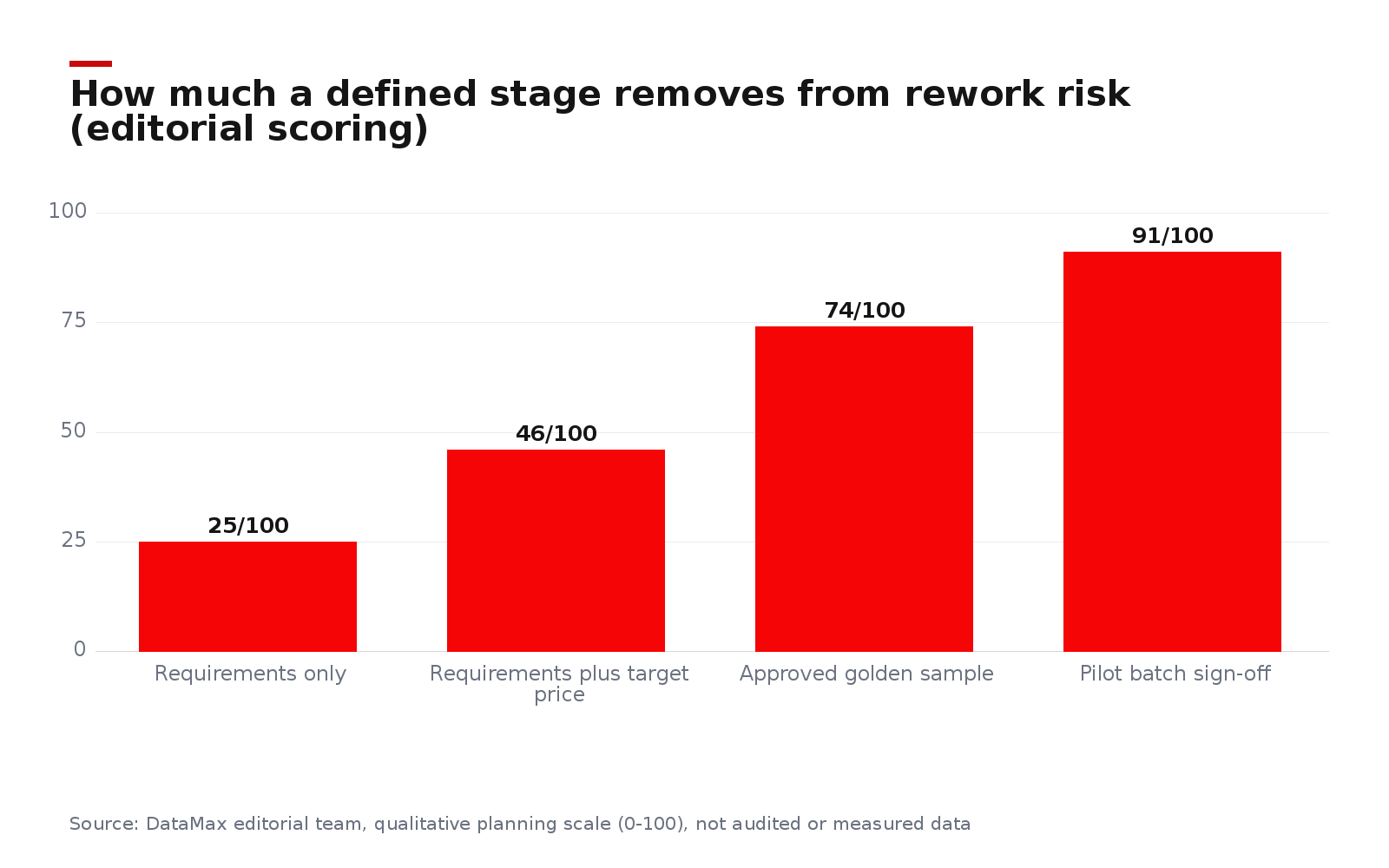
The same figures, in searchable form:
| Planning stage | Editorial score |
|---|---|
| Requirements only | 25/100 |
| Requirements plus target price | 46/100 |
| Approved golden sample | 74/100 |
| Pilot batch sign-off | 91/100 |
Source: DataMax editorial team, qualitative planning scale (0-100), not audited or measured data.
The procurement rule is to specify the last stage that the project can realistically control. A pilot sign-off is more rigorous than requirements alone, but it is useful only if the pilot hardware, firmware, accessories, software, and test conditions match the production commitment.
The comparison should also include ownership after delivery. An integrated panel can present fewer separate boxes, but it still requires an owner for firmware, content, certificates, and repairs. A split architecture can reuse an existing display, yet it introduces signal compatibility, cable, mount, and separate-player support tasks. A patient terminal can consolidate several functions, but its camera, microphone, headset, touch, and application workflow create more acceptance cases. The correct architecture is the one whose failure domains match the hospital’s service capability.
For a deployment spanning several zones, the buyer should compare 3 concrete acceptance paths: scheduled corridor playback, operator-managed reception content, and bedside interaction. For each path, identify the hardware, software, network, power, mounting, and support owner. If one SKU cannot satisfy all 3 paths, maintain separate RFQ lines instead of forcing a single compromise configuration. That approach keeps the digital signage display decision traceable to each operating scenario.
Where the terminology comes from
A digital signage display can refer to the physical display endpoint, the combined panel-and-player appliance, or the complete managed playback system. The ambiguity is conventional, not technical. Contract documents should assign each term a scope using a functional block diagram.
USB, CMS, network
Android, storage, decode
HDMI, LVDS, internal panel
Viewing or touch
In an integrated Android panel, the panel driver, compute module, media decoder, operating system, and signage application cooperate as one appliance. In a split architecture, the player converts content into a signal for a separate display. A central architecture can also distribute multicast or unicast streams, but the endpoint still needs a defined receiver, decoder, output, and management path.
AOSP Android denotes the upstream Android system used as the platform baseline; it does not by itself establish Google certification, Widevine conformance, clinical suitability, or signage-management readiness. EDLA and GMS are separate certification paths. HDCP is a digital-content protection mechanism, while Widevine licensing governs protected media playback. A buyer must verify which terms apply to the actual production SKU and content source rather than infer them from an OS label.
The same distinction applies to touch panels and patient terminals. A capacitive touch panel is an input method, not an application. A camera is not automatically a clinical integration. A 4K decoder is not a 4K native panel. The architecture specification should name resolution by purpose: native panel resolution, maximum decoder input, output resolution, and supported frame rate.
- Endpoint layer
- Panel, backlight, viewing angle, touch, camera, audio, controls, ports
- Compute layer
- SoC, RAM/ROM, OS, decode, storage, boot behavior
- Connectivity layer
- Ethernet, Wi-Fi, Bluetooth, HDMI, LVDS, USB, optional PoE
- Application layer
- Signage player, CMS, content agent, touch application, DRM workflow
- Governance layer
- Configuration control, certification, security, updates, service ownership
This vocabulary belongs in the RFQ. It lets engineering compare products without allowing “player,” “panel,” and “display” to conceal incompatible responsibilities.
The terms also identify different test responsibilities. “Panel” usually implies visual output, electrical input, mounting, and display performance. “Player” implies a bootable compute system, media storage, decode, content scheduling, connectivity, and update management. “Terminal” implies an application-oriented endpoint with touch, peripherals, session behavior, and workflow integration. A contract can use all 3 terms only if the supplier states which physical unit owns each function.
Protocol names should be used precisely. HDMI and LVDS describe interfaces rather than content-management systems. Ethernet, Wi-Fi, and Bluetooth describe connectivity rather than remote device management. AOSP Android identifies an OS baseline rather than a signage application. Widevine L1 and HDCP2.2 describe content-protection mechanisms rather than proof that a specific deployment can retrieve protected streams. When these features appear on a digital signage display quotation, request the certificate or configuration evidence that connects the feature to the shipped SKU.
Five production SKUs compared
The CROSS range contains four production platforms in the supplied facts, so this review uses four rather than inventing a fifth SKU. The models serve different hospital-facing roles; a larger panel is not automatically the right endpoint for every workflow.
| Model and fit | Compute and OS | Memory | Display or media | Interfaces |
|---|---|---|---|---|
| DS43H Hospitality/hospital/restaurant wall signage | Hisilicon Hi3751 quad 32-bit A53; Mali-450; AOSP Android 9 | 1GB / 8GB | 43-inch TFT LED; 1920x1080; 300 cd/sqm; 1500:1; 6ms; 89deg; backlight 50,000h; 0-50C; 1080P@60 + VP9 10-bit decode; no 4K/AV1 | HDMI in; LVDS in; USB2.0 x4; RJ45 100M, 1G opt; DC12V/2A |
| DP810U Bank/government/hotel desktop self-service kiosk | Rockchip RK3562 quad A53 up to 1.2GHz; Mali-G52 1-Core-1EE; AOSP Android 11 | 2GB / 16GB; 4GB optional | 8-inch or 10.1-inch capacitive touch; 1280x800 or 1920x1200; 1x3W; H.265 4K@60; H.264/VP9 1080P@60 | HDMI out; USB2.0 x2; TF x2, up to 128GB; 3.5mm; RJ45 100M; DC12V/2A; Wi-Fi + BT5.0 |
| DP104R Retail/hospitality portrait L-shape desk sign | Rockchip RK3566 quad A55; Mali-G52 1-Core-2EE; AOSP Android 11 or above | 2GB / 16GB; 4GB optional | 10.1-inch IPS capacitive touch; portrait 800x1280 or 1200x1920, 9:16; 5MP camera optional; H.265/H.264/VP9 4K@60 decode; 1080P encode; 8M ISP | HDMI out; USB2.0 x2; TF x2; 3.5mm; RJ45 100M; DC12V/2A; Wi-Fi + BT5.0 |
| DP02L Hospital bedside infotainment/care terminal | Rockchip RK3399 dual A72 + quad A53; Mali-T860 MP4; AOSP Android 11 | 4GB / 32GB; 8GB/64GB optional | 21.5-inch capacitive touch; 1920x1080; 16:9 or 16:10; 16h/7d; 8MP camera; 2x3W + mic; 2x headset; H.265 10-bit 4K@60; H.264 4K@30; Widevine L1/HDCP2.2 optional | USB2.0 x1; USB3.0 x2; RJ45 1000M, PoE optional; Wi-Fi + BT5.0; DC12V/3A |
Do not merge conflicting catalogue claims into these production facts. For DS43H, confirm the power option against the production datasheet. For DP810U, confirm Android, Bluetooth, and TF configuration against the production datasheet. For DP104R, confirm orientation and Bluetooth against the production datasheet. For DP02L, confirm chipset, EDLA status, and hospital software against the production datasheet. The certification review should document destination-market evidence separately from feature naming.
The comparison should begin with fit, not processing power. DS43H is the supplied wall-signage direction for hospitality, hospital, and restaurant use. DP810U is the compact kiosk direction for bank, government, and hotel desktop self-service. DP104R is the portrait L-shape desk-sign direction for retail and hospitality. DP02L is the hospital bedside infotainment and care-terminal direction. Those stated fits define the starting point for the digital signage display selection.
Hardware differences should then shape the acceptance test. DS43H has input-oriented HDMI and LVDS connections, 1080P@60 plus VP9 10-bit decoding, and no 4K/AV1. DP810U and DP104R have HDMI output and different 4K decode profiles. DP02L adds 1000M Ethernet, optional PoE, 3 USB ports, camera, microphone, speakers, and headset connections. The buyer should test the full chain from content source to physical endpoint rather than relying on one decode headline.
For RFQ alignment, send the intended SKU list with panel role, power, OS, memory, middleware/DRM checklist, and target-market certificate list. A sample request through the sample process should identify the exact configuration intended for approval.
Further reading
- One digital signage displays
- Certifications and test evidence
- Send a procurement inquiry
- Technical support
- Warranty terms
- 43-inch hospital digital signage
- Compact kiosk display
FAQ
Is a player or panel better for hospital signage?
Choose based on architecture, not terminology. An integrated standalone panel is usually cleaner for a fixed wall position with local playback. A separate player is useful when an external display, centralized media distribution, or existing installation must be retained. The RFQ must state who executes media, what the output path is, and which device receives updates.
Does 4K decode make a display suitable for 4K content?
No. Maximum decode capability and native panel resolution are separate specifications. DS43H has a 1920x1080 panel and 1080P@60 plus VP9 10-bit decode, with no 4K/AV1 stated. DP810U, DP104R, and DP02L have different decode profiles. Match content, decoder, panel, output interface, and signage application as one chain.
What should be approved before volume shipment?
Approve an exact production configuration: SKU, SoC, RAM/ROM, OS, panel, power, connectivity, ports, software, firmware, accessories, and destination-market compliance evidence. The golden sample and pilot-batch sign-off should demonstrate equivalence with the production order. Record every change through controlled revision.
Which model fits bedside patient infotainment?
DP02L is the specified fit for hospital bedside infotainment and care terminals. Its supplied facts include a 21.5-inch 1920x1080 capacitive touch panel, 8MP camera, 2x3W + mic, 2x headset, 4GB/32GB, optional 8GB/64GB, and H.265 10-bit 4K@60 decode. Clinical software and integration need separate approval.
Can catalogue and product-page specifications be mixed?
No. Conflicting claims create configuration risk. Use the production datasheet and SKU-specific PO as the baseline, resolve each conflict in writing, and preserve the approved evidence. In particular, do not silently substitute Android versions, power inputs, chipsets, memory, brightness, Bluetooth, TF counts, panel orientation, or certification claims.
What evidence should accompany the supplier review?
Request the controlled specification, BOM or approved configuration list, SMT and AOI process evidence, aging criteria, firmware record, sample-to-production comparison, pilot sign-off, and certification matrix. Buyers may request a video factory audit or equivalent evidence via the DataMax manufacturing review. Email [email protected] with the SKU list, target-market certificates, middleware/DRM checklist, power configuration, and approved-sample status.


