The procurement answer in one screen
The procurement answer is to treat a kiosk display as a controlled terminal specification, not a generic Android panel with a touch overlay. For bank, government, and hotel self-service deployments, the DataMax DP810U is the relevant platform: it combines an 8-inch or 10.1-inch capacitive-touch panel with AOSP Android 11, 2GB/16GB memory, an RJ45 100M port, and a Rockchip RK3562 quad-A53 processor. Its quoted configuration suits a defined desktop workflow, but does not automatically establish unattended broadcast control, continuous signage operation, or hospital-bedside functionality.
This article addresses the exact phrase kiosk display from a broadcast-operations sourcing angle. The critical distinction is between the display assembly and the operational terminal around it: touch behavior, enclosure integration, network path, power resilience, application lifecycle, and recovery procedures affect deployment. A buyer should ask the supplier to freeze the actual production SKU in a field-by-field RFQ, identify every variation, and attach the evidence supporting the claimed configuration.
For the DP810U, the minimum RFQ record should state the exact panel size and resolution, Android release, RAM/ROM, processor, wired-network capability, USB and TF configuration, power input, and operating environment. It should separate the standard quotation from optional RAM, then require the approved sample, golden sample, firmware build, and test record to match the purchase order. Confirm any enclosure, broadcast workflow, kiosk-mode policy, recovery method, and regulatory requirement against the production datasheet. For the broader compact kiosk display bank, hotel, and why it matters, the same SKU discipline prevents a low-cost panel decision from becoming an operational lifecycle problem.
The immediate commercial action is straightforward: issue a field-by-field RFQ, request an approved sample, and require the sample identifier to appear in the purchase order. Do not approve a generic product name, catalogue image, or “equivalent” configuration. Broadcast operations adds a specific question: can the terminal recover predictably after power or network interruption, launch the correct workflow, and present the required content without hidden field repairs? That answer depends on the frozen configuration and its test evidence, not the phrase “broadcast-ready.”
A decision path for the RFQ
Turn the requirement into eight observable acceptance lines before asking for alternatives. The sequence converts a loose product name into a comparable offer.
- Classify the role State whether the kiosk display is an operator console, customer-facing self-service terminal, digital-signage endpoint, portrait information point, or bedside care terminal. Attach the installation workflow and expected operating hours.
- Freeze the panel Specify size, native resolution, touch technology, orientation, viewing arrangement, and required physical interfaces. For portrait use, do not let a landscape catalogue image replace the approved mechanical drawing.
- Freeze compute Name the SoC, core configuration, RAM, ROM, operating system, decode/encode requirements, and wireless version. Require an exact SKU rather than “Android display” or “same as sample.”
- Define connectivity Specify Ethernet speed and whether Wi-Fi is permitted as primary or fallback. List USB counts, optional camera/headset requirements, TF use, and any PoE requirement.
- Define recovery State required kiosk lockdown, app-launch behavior, update mechanism, factory-reset method, log access, and behavior after power restoration.
- State the environment Record temperature, lighting, mounting method, duty cycle, exposure conditions, and access control. Environmental claims must be confirmed against the production datasheet.
- Require evidence Attach the approved sample identifier, firmware build, inspection record, aging record, and any application or compatibility test report to the quotation.
- Lock changes Mark every alternative as standard, optional, or unavailable, and identify engineering-change notification requirements before shipment.
A copy-ready RFQ header should read: “Please quote the exact production SKU by panel size, resolution, SoC, RAM/ROM, OS, ports, power input, and wireless version; identify the standard BOM, all optional BOMs, firmware baseline, tested peripherals, warranty scope, lead-time basis, and all model-number changes in writing.” The first message to DataMax inquiry should contain this field list, intended deployment drawing, required quantity, destination market, and target qualification date.
Do not accept “equivalent” as a response field. An equivalent processor may alter codec support, thermal behavior, driver availability, and application certification. An equivalent OS may alter device-owner behavior, update control, and recovery semantics. An equivalent panel may change glass geometry, controller firmware, touch response, and connector placement. If the quotation contains more than one line, identify each line independently.
For example, a hotel operator could issue two controlled options: DP810U with the 8-inch 1280x800 panel and standard 2GB/16GB configuration, or DP810U with the 10.1-inch 1920x1200 panel and optional 4GB memory. Each option should receive its own sample, configuration sheet, firmware identifier, and acceptance record. The operator can then test the actual application at both resolutions instead of assuming the larger panel automatically improves workflow usability.
A broadcast control desk adds several acceptance lines. State whether the terminal is an operator console, synchronized content monitor, or remote-control point. Define whether scheduled playback is required, whether multicast or IP unicast is used, what happens when Ethernet disappears, and whether local content must remain visible. Specify the required HDMI mode, refresh behavior, application restart timing, input-device inventory, and log-retrieval route. These are functional requirements, not decorative product features.
The RFQ should also distinguish quotation fields from engineering dependencies. If the project requires an enclosure, secure kiosk mode, application signing, remote monitoring, DRM, radio certification, or power-loss conditioning, label each as a project requirement and assign an owner. A supplier cannot responsibly promise an unlisted feature as standard. DataMax should either confirm it in the production datasheet, quote it as an option, or record it as an engineering-change request with a validation gate.
The final step is an acceptance matrix. For each requirement, name the test method, evidence document, responsible party, and approval condition. For example: application launch after restart, functional test; RJ45 connectivity, continuity test; panel touch mapping, operator test; configuration identity, signed configuration sheet. This converts a kiosk display purchase from a catalogue transaction into a controlled deployment decision.
The traps in this category
The first trap is specification blending. A panel supplier may combine SoC, memory, brightness, OS, and connectivity claims from different catalogue revisions. The resulting quotation can be internally inconsistent even when every individual field exists somewhere in the product literature.
Field trap
A quotation that combines a current SoC line with an older memory, panel, or Android configuration may describe no purchasable SKU. The cost is a rejected sample, software rework, or a shipment that cannot be accepted. Require the proposed line identifier and reconcile it against the production datasheet and purchase order.
The second trap is treating decode capability as output capability. A decoder specification such as H.265 4K@60 does not establish that the panel is 4K, that HDMI output supports the required mode, or that the application can drive the display continuously. Output resolution, panel resolution, application rendering, and supported presentation modes must be specified separately.
Field trap
A 4K media pipeline can still feed a lower-resolution kiosk display through scaling, and a higher-resolution panel can still be limited by the application, cable, adapter, or display output mode. Request the supported mode list and test the final cable-and-terminal combination instead of inferring behavior from codec labels.
Further traps follow a repeatable pattern:
- “Android display” wording: It hides the OS baseline, Google-certification status, device-owner controls, update path, and installed application permissions.
- Port counts without version: USB2.0 and USB3.0 have different bandwidth and device-class implications. Name the version and host-power requirement.
- Wireless shorthand: Wi-Fi and Bluetooth versions should be exact. Radio options can alter the regulatory test scope.
- Mechanical ambiguity: Landscape and portrait references can change native resolution, mounting, cable routing, and thermal assumptions.
- Power conflict: A quotation containing different power architectures is not orderable until the SKU-specific supply is frozen.
- Optional-feature blur: A camera, PoE, larger memory, extra radio, or 1G Ethernet may alter the BOM, certification, and test method. Mark each as an option.
- Broadcast ambiguity: “Broadcast-ready” does not identify workflow, timing accuracy, failover behavior, or monitoring objective. Define these as testable functions.
For DataMax models, unresolved catalogue conflicts must become controlled clarifications. Do not let a buyer or reseller resolve them by assumption. The PO should carry the approved configuration identifier. That rule applies especially when a product page, hero content, and production datasheet describe different Android releases, Bluetooth versions, panel orientations, memory capacities, or power arrangements.
A kiosk display quotation can also hide the meaning of the TF provision. Two TF slots do not define whether media is boot media, local cache, removable content storage, or an operator-accessible partition. If content is loaded locally through TF, specify file-system format, directory convention, replacement procedure, validation method, and what happens when media is missing. The physical presence of TF x2 is not an acceptance criterion by itself.
Another quotation trap is the absence of a reference application. Codec support and port presence do not prove that the operator’s application runs correctly. Ask for a compatibility run on the approved sample using the actual content format, output mode, network configuration, and peripheral set. If the supplier will not perform that run, identify it as an unresolved integration risk and schedule it before fleet approval.
The commercial cost of these traps appears at different points. A blended BOM can cause a rejected shipment. A wrong output assumption can cause an application rewrite. An unapproved wireless option can hold up regulatory release. An unqualified power configuration can invalidate the installation design. A missing recovery requirement can move the fault from the supplier’s test bench to the operator’s site.
A practical clarification log should contain four columns: field, conflicting values, proposed source, and accountable approver. Do not close a row merely because one catalogue contains the missing value. Close it only when the production datasheet, approved sample, configuration sheet, and purchase order agree. For any unresolved field, mark it “pending” and prevent approval of the affected fleet.
How the factory controls the variable
Factory control begins with a fixed build identity, not a verbal assurance that units are “the same.” The quotation, sample approval, firmware build, inspection plan, and purchase order should use one internal configuration identifier. Each variable field—panel, RAM/ROM, SoC, OS image, radio, connectors, power, and accessory bundle—should have a defined inspection point.
The evidence trail can be organized as a production tree:
- Incoming identity Component labels and approved supplier part records
- SoC and memory configuration
- Panel and touch-controller pairing
- Connectors, power module, and radio options
- Assembly verification SMT placement and board inspection
- Placement and solder-joint inspection
- Assembly-program and firmware-version check
- Port, display, touch, and network verification
- Product validation Functional and environmental checks
- Panel image, touch, camera, USB, and network tests
- Power-restoration and application-launch behavior
- Applicable thermal and aging procedure
- Release evidence Traceable shipment package
- Serial identifier and configuration sheet
- Approved firmware build
- Inspection and aging results
For each build stage, define pass/fail evidence rather than merely naming the process. SMT and AOI support solder-joint consistency, but do not prove that the intended part was fitted. A scan result should link the line identifier, material lot, operator or station, date, and inspection record. Functional testing then establishes that the assembled unit matches the intended configuration.
Aging should match the risk. A terminal that starts normally but fails after sustained operation requires a test exercising runtime duration, thermal state, restart, Ethernet recovery, and application relaunch. Dark-room or display inspection should cover dead pixels, illumination consistency, touch alignment, visible artifacts, and screen transitions according to the approved quality standard. Exact limits and procedures must be written into the inspection plan.
Release package: approved sample identifier, SKU configuration sheet, firmware build, serial-number rule, inspection results, aging result, packaging record, and deviation list. Any mismatch between the release package and PO must stop shipment approval.
For process capability, audit the factory through DataMax factory quality and request evidence rather than a facility tour alone. A useful audit traces one serial number backward through material verification, assembly, firmware loading, functional test, aging, packing, and dispatch. Before ordering samples, use sample ordering to request the exact proposed SKU and record its configuration on the sample sheet.
A broadcast deployment needs the evidence chain extended beyond basic panel inspection. The functional plan should verify display output, Ethernet continuity, application launch, content loading, restart after interruption, and the operator-facing recovery path. If the kiosk display runs unattended, include a defined soak procedure. Test duration, environmental condition, content cycle, network state, restart interval, and observation criteria must be recorded in the plan rather than described as “burn-in” without parameters.
The firmware baseline also needs control. Record the image identifier, application package identifier, configuration policy, and update mechanism used on the approved sample. If a fleet update changes the launcher, permissions, display scaling, network profile, or recovery behavior, repeat the relevant acceptance tests. A unit that passes inspection with one image does not automatically represent the image shipped six months later.
Incoming inspection should verify that the panel and touch controller are paired as an approved combination. A touchscreen can pass electrical tests yet show edge-alignment or ghost-touch behavior when mismatched. Identify the radio module and power module by configuration, then verify that the sample and production units use the same approved parts. This is particularly important where the RFQ contains optional Bluetooth, Ethernet, PoE, memory, or camera fields.
For a procurement audit, request three tangible records before shipment release: the build traveler, inspection summary, and deviation log. Trace a sample serial number across all three. Confirm that the traveler records the intended SKU, the inspection summary contains executed test results, and the deviation log identifies every departure. A blank template proves that a form exists; a completed trace proves that the process worked.
Entry tier versus commitment tier
The lowest-cost quotation and the lowest-risk operational quotation are different commercial objects. The first identifies a display product; the second identifies a repeatable production configuration with evidence and change control. Compare them line by line rather than awarding the decision on panel size or processor generation alone.
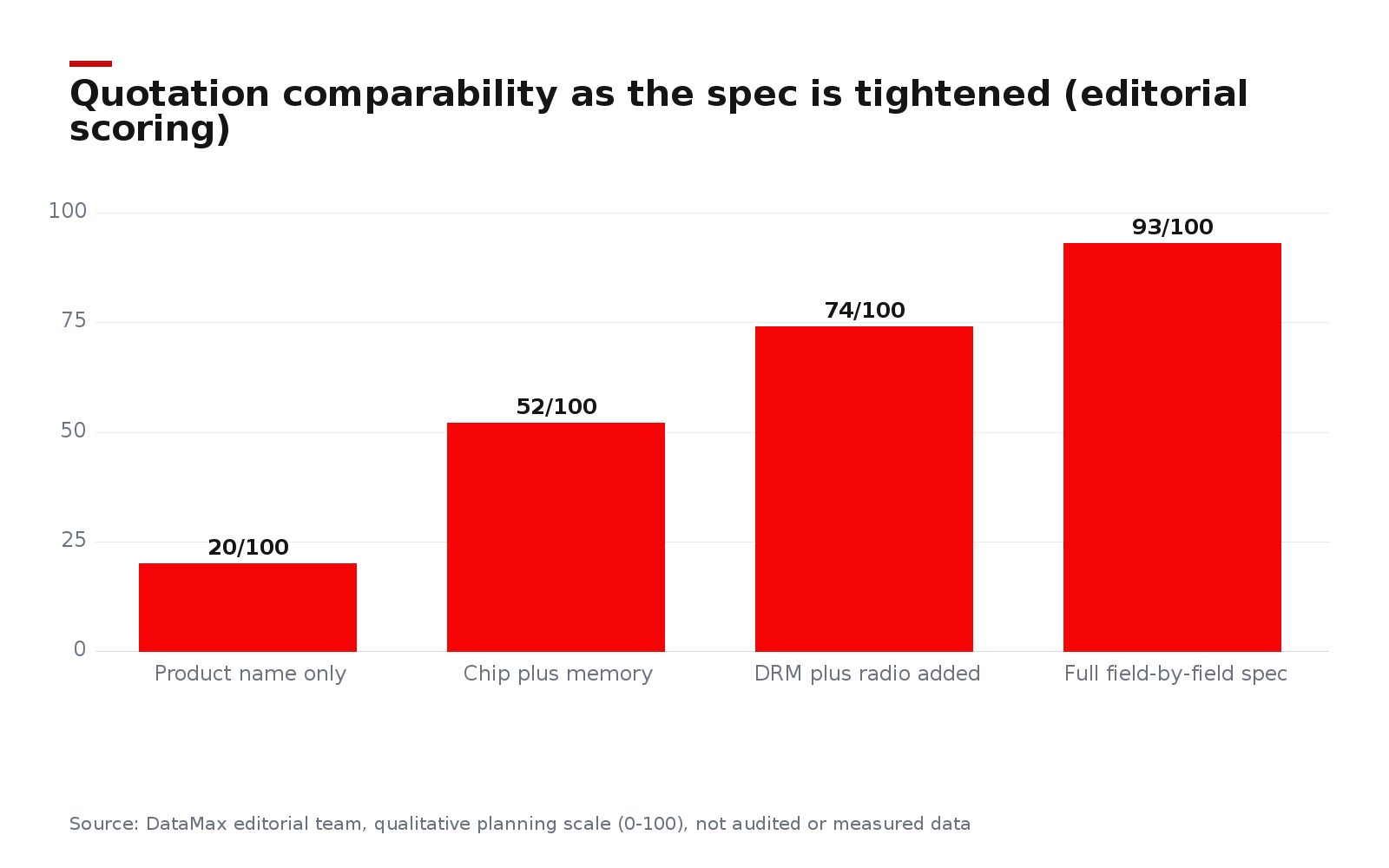
The chart below is an editorial planning aid. It ranks quotation completeness, not product quality.
The same figures, in searchable form:
| Quotation basis | Editorial score |
|---|---|
| Product name only | 20 |
| Chip plus memory | 52 |
| DRM plus radio added | 74 |
| Full field-by-field spec | 93 |
The comparison reveals which risk is being priced. Product-name-only offers leave almost every acceptance criterion unresolved. Chip plus memory establishes a compute baseline but still omits the display, ports, OS, power, and recovery behavior. Adding DRM and radio narrows certification and RF concerns, yet the display mode and application integration can remain unresolved. A full field-by-field quotation provides the best baseline for comparing two production SKUs, provided the fields are backed by an approved sample and release records.
| Dimension | Entry quotation | Commitment quotation |
|---|---|---|
| Product identity | Generic model name | Exact SKU and configuration sheet |
| Display | Size only | Panel, resolution, touch, orientation, mode list |
| Platform | “Android” or “same as sample” | SoC, RAM/ROM, OS build, decode/encode baseline |
| Connectivity | Port count | Port version, Ethernet speed, radio version, optional peripherals |
| Recovery | Not addressed | Launch policy, reset, update, restart, power-restoration behavior |
| Quality | “Factory tested” | Inspection plan, sample approval, traceable release records |
| Change control | Implicit | Written notice before BOM, firmware, or model changes |
Entry-tier quotation is suitable only for preliminary comparison or a controlled sample exercise. Commitment-tier quotation is required before a fleet purchase, particularly where the application must boot reliably, manage controlled content, or expose operators to a stable interface. Do not convert missing fields into zero risk; convert them into open technical questions with owners and deadlines.
The entry tier can still be useful. It provides market screening and identifies whether the general form factor is acceptable. Its output should be a clarification list, not a purchase order. By contrast, the commitment tier supports comparison of two final production configurations. It should identify the baseline, optional BOM, excluded features, test evidence, approved sample, and change-control process.
A practical scoring method can assign fields to three gates. Gate 1 contains identity and safety: model, SKU, panel, power, and regulatory scope. Gate 2 contains operational behavior: OS, application, network, recovery, and update control. Gate 3 contains fleet evidence: sample equivalence, inspection, aging, serial traceability, and change notification. A quotation missing a Gate 1 field is not ready for technical acceptance; missing Gate 3 evidence prevents volume release.
One comparison trap is allowing optional DRM or radio terminology to inflate apparent completeness. A commitment quotation must identify whether the feature is selected, included, or merely available. For example, “Widevine L1/HDCP2.2 optional” on the DP02L is not equivalent to a supplied unit carrying that configuration. The same rule applies to 4GB memory, 1G Ethernet, PoE, cameras, and other options in the DataMax range.
The mechanism behind the spec
A kiosk display is an endpoint whose operating mode is constrained by software and administration. “Kiosk” therefore describes a configuration state, not a connector, screen size, or Android version. The terminal may need a fixed launcher, restricted navigation, controlled application installation, remote policy, automatic restart, and a defined reset path. These mechanisms determine whether the panel behaves as an operational terminal or merely presents a full Android interface.
The hardware chain must also be understood as separate stages. Application rendering creates a framebuffer; the SoC composites and outputs that framebuffer; the HDMI transmitter and cable carry the signal; the display controller scales or presents it on the panel; the touch controller reports input through the operating system. Capability at one stage does not prove capability at the next. A 4K decoder therefore does not establish native 4K output, and a capacitive panel does not establish that all touch gestures are available in kiosk mode.
Android lifecycle behavior is equally relevant. AOSP identifies the Android baseline, while device-owner APIs, managed provisioning, application signing, and update mechanisms define deployment control. GMS and EDLA certification are distinct compliance states; neither should be inferred from an Android label. For any HDCP or Widevine requirement, state the applicable security level, content path, and required device behavior. HDCP 2.2 or 2.3 describes content-protection requirements, while Widevine L1 or L3 describes a DRM security level; they are not interchangeable.
Broadcast operations add constraints that a generic kiosk specification often omits:
- Timing: Define whether the terminal receives content from IP, multicast, local media, or a control service. Specify startup latency, scheduled playback behavior, and clock-source expectations.
- Redundancy: Separate the network architecture from the display behavior. Specify link-loss behavior, local playback fallback, restart timing, and operator visibility.
- Security: Define network ingress, application signing, remote administration, credential storage, and update authorization.
- Support: State log retrieval, fault codes, field-replacement boundaries, and the evidence needed to diagnose a failed unit.
The exact broadcast workflow remains operator-specific. It must be described as an interface and acceptance test rather than compressed into a certification claim. The general procurement principle is to map every operational requirement to a field, a test, or a documented exception.
The distinction between AOSP and GMS matters because application distribution, device management, and certification obligations follow different paths. AOSP identifies the supplied Android baseline in the cited DataMax facts, but does not establish Google certification. EDLA similarly describes a certification route rather than an interchangeable operating-system name. Ask for the exact certificate and product identity when a deployment depends on either route; do not infer either from an Android logo, launcher, or catalogue badge.
Device-owner mechanisms are the usual foundation for managed Android deployments. Depending on implementation and OS baseline, device-owner APIs can support application allowlisting, lock-task presentation, remote configuration, and policy enforcement. These capabilities still require a defined enrollment process, administrator credentials, update path, and recovery method. The kiosk display procurement should specify the intended management architecture, not merely request “kiosk mode.”
For broadcast content, separate ingestion, decoding, rendering, output, and display. H.265 4K@60 may describe decoding on a specified platform, while native output remains constrained by the panel and supported HDMI modes. Ask whether content arrives as files, HTTP, multicast, or another mechanism; where scheduling and synchronization are required; and which component holds the authoritative clock. These are architecture decisions with direct operational consequences.
The local-storage path also needs a security boundary. TF media, USB storage, or an internal partition may be suitable for content delivery but introduce file-replacement and unauthorized-access risks. Define whether operators can copy files, whether content signatures are checked, how stale content is removed, and what happens when scheduled material is absent. A controlled kiosk display should fail in a defined state rather than expose an unrestricted Android home screen.
Which DataMax models actually sit here
Four supplied DataMax product families occupy different roles. They should not be treated as interchangeable variants of one broadcast kiosk display. The table preserves the supplied facts and separates compact self-service, wall signage, portrait desk signage, and bedside care.
| Model and fit | Platform | Memory and media | Display | Interfaces and power |
|---|---|---|---|---|
| DP810U Bank/government/hotel desktop self-service kiosk | Rockchip RK3562 quad A53 up to 1.2GHz, Mali-G52 1-Core-1EE; AOSP Android 11 (datasheet) | 2GB / 16GB (4GB optional); H.265 4K@60, H.264/VP9 1080P@60 | 8"/10.1" capacitive touch; 1280x800 | 1920x1200; 1x3W | HDMI out; USB2.0 x2; TF x2 (up to 128GB); 3.5mm; RJ45 100M; DC12V/2A; Wi-Fi + BT5.0 |
| DS43H Hospitality/hospital/restaurant wall signage | Hisilicon Hi3751 quad 32-bit A53, Mali-450; AOSP Android 9 (datasheet) | 1GB / 8GB (PDP); 1080P@60 + VP9 10-bit; no 4K/AV1 | 43" TFT LED 1920x1080; 300 cd/sqm; 1500:1; 6ms; 89deg; backlight 50,000h; 0-50C | HDMI in; LVDS in; USB2.0 x4; RJ45 100M (1G opt); DC12V/2A; 989x578.5x60.3mm |
| DP104R Retail/hospitality portrait L-shape desk sign | Rockchip RK3566 quad A55, Mali-G52 1-Core-2EE; AOSP Android 11 or above | 2GB / 16GB (4GB optional); H.265/H.264/VP9 4K@60 decode; 1080P encode; 8M ISP | 10.1" IPS capacitive touch; portrait 800x1280 | 1200x1920 (9:16); 5MP cam optional | HDMI out; USB2.0 x2; TF x2; 3.5mm; RJ45 100M; DC12V/2A; Wi-Fi + BT5.0 |
| DP02L Hospital bedside infotainment/care terminal | Rockchip RK3399 dual A72 + quad A53, Mali-T860 MP4; AOSP Android 11 | 4GB / 32GB (8GB/64GB optional); H.265 10-bit 4K@60; H.264 4K@30; Widevine L1/HDCP2.2 optional | 21.5" capacitive touch 1920x1080; 16:9 or 16:10; 16h/7d; 8MP camera; 2x3W + mic; 2x headset | USB2.0 x1 + USB3.0 x2; RJ45 1000M (PoE optional); Wi-Fi + BT5.0; DC12V/3A |
The DP810U is the direct compact self-service option. It is not the DS43H wall-signage model, DP104R portrait desk model, or DP02L bedside terminal. Its quoted panel options, RAM option, TF provision, and connector set should be locked in the PO.
For DS43H, confirm the power option because the supplied facts conflict. For all models, reconcile the proposed configuration against the production datasheet. Optional labels such as Widevine L1/HDCP2.2, PoE, camera, 1G Ethernet, or expanded memory remain optional until named in the accepted SKU.
Field selection should begin with installation geometry rather than processor identity. The DP810U fits a bank, government, or hotel desktop self-service position; DS43H fits a 43-inch wall-signage position; DP104R fits a portrait L-shape desk sign; and DP02L fits a hospital bedside care terminal. These fit descriptions prevent a procurement team from using a compact terminal where a large wall display, portrait desk arrangement, or bedside accessory set is required.
The DP810U’s two panel choices also change the integration file. The 8-inch option is listed with 1280x800 resolution, while the 10.1-inch option is listed with 1920x1200. Both are capacitive touch. The RFQ should therefore identify physical size and resolution together, then require the application layout, bezel, cable route, and mounting drawing to match. A photograph or catalogue rendering cannot establish the native mode.
The interface mix also affects peripheral planning. DP810U and DP104R each list HDMI out, USB2.0 x2, TF x2, 3.5mm, RJ45 100M, DC12V/2A, and Wi-Fi + BT5.0 in the supplied facts. DP02L instead provides USB2.0 x1, USB3.0 x2, RJ45 1000M with PoE optional, Wi-Fi + BT5.0, and DC12V/3A, alongside the care-terminal audio and camera features. DS43H uses HDMI in and LVDS in, making it a different signal-path role.
The media claims must remain attached to the correct model. DP810U has H.265 4K@60 plus H.264/VP9 1080P@60 decoding. DS43H is listed for 1080P@60 and VP9 10-bit with no 4K/AV1. DP104R has H.265/H.264/VP9 4K@60 decode, 1080P encode, and an 8M ISP. DP02L has H.265 10-bit 4K@60 and H.264 4K@30, with Widevine L1/HDCP2.2 optional. These distinctions prevent a media capability from being carried across model lines by assumption.
The procurement task is therefore not “find a touchscreen.” It is “select and freeze the production configuration whose role, panel, platform, media path, interfaces, power, and optional features match the acceptance plan.” DataMax product facts support that selection process, but any configuration not explicitly shown in the table remains subject to confirmation against the production datasheet.
Deployment scenarios and the spec each needs
Real deployment decisions depend on the workflow around the screen. A bank self-service station, wall-mounted information display, portrait retail sign, and bedside care terminal have different recovery, input, and connectivity requirements. The matrix maps each situation to a concrete requirement and model direction.
| Situation | Primary requirement | Specification emphasis | Model direction |
|---|---|---|---|
| Bank or government self-service | Compact desktop operator or customer terminal | Touch panel, Ethernet, controlled launcher, power recovery | DP810U; confirm 8-inch or 10.1-inch panel and 2GB/16GB baseline |
| Hotel or hospital wall signage | Large-format landscape information display | Native 1920x1080 panel, input path, continuous-operation requirement | DS43H; confirm power option and 1G Ethernet selection |
| Retail or hospitality desk sign | Portrait information or interaction point | Portrait native resolution, touch, optional camera, compact desk integration | DP104R; lock 9:16 panel and optional 5MP camera |
| Bedside care terminal | Patient-facing information and optional care applications | Headset, camera, microphone, wired network, optional DRM and PoE | DP02L; confirm Widevine L1/HDCP2.2 and PoE as selected options |
| Broadcast control desk | Operator monitoring rather than passive signage | Application rendering, input devices, Ethernet, restart and recovery behavior | Use DP810U only where its fixed workflow and interface match; otherwise confirm against the production datasheet |
A factory audit can expose whether inspection stations, material controls, and release procedures operate as a traceable system.

A broadcast workflow adds operational checks. Test application launch after boot, scheduled content change, loss and restoration of Ethernet, power interruption, screen timeout, touch recovery, log retrieval, and the exact display mode used in production. Record expected and observed results against the serial number.
For the bank or government case, define the customer journey and failure path before selecting a panel. If identity capture, form entry, printing, or external peripherals are involved, confirm each interface and application dependency. The DP810U’s supplied ports can support a defined desktop workflow, but the quotation must state the approved accessory set and enclosure arrangement. A protected kiosk display should return to the required launcher after interruption rather than expose unrestricted navigation.
For hotel or hospital wall signage, test the content source and signal direction. DS43H is listed with HDMI in and LVDS in, so the content source and playback architecture must align with the input path. Confirm its power option against the production datasheet before drawing the installation. The 43-inch TFT LED panel is specified at 1920x1080, 300 cd/sqm, 1500:1, 6ms, and 89deg; those values belong to the display specification, not an automatic application-uptime claim.
For a retail desk sign, preserve the portrait requirement. DP104R is listed as a 10.1-inch IPS capacitive-touch panel in portrait, with 800x1280 or 1200x1920 resolution and 9:16 orientation. Its optional 5MP camera must be named as selected or excluded. This matters when the application uses portrait touch coordinates, overlays, or camera capture.
For bedside care, DP02L adds camera, microphone, headset, audio, optional PoE, and optional Widevine L1/HDCP2.2. The RFQ should state which are required for the care workflow and which are omitted. Test privacy prompts, session reset, network fallback, headset behavior, and patient-facing recovery. The kiosk display here is a managed care terminal rather than a signage screen, even though both can run Android.
For the buyer coordinating release, ask DataMax to connect the approved sample, production line, firmware baseline, and shipment records. The manufacturer page can establish the operating context, while compliance and certifications should be treated as separate evidence paths rather than inferred platform claims. Send the field-by-field RFQ to DataMax contact, including destination, installation drawing, workflow, panel size, and required evidence. The first message should state the exact proposed configuration and request SKU confirmation against the production datasheet.
Further reading
- Compact Kiosk Display: When Footprint Is the Constraint
- 4K 60fps Android TV box guide
- Rockchip Android TV box guide
- Dolby Vision Android TV box guide
- RFQ checklist for device procurement
- Compact kiosk display
- 43-inch hospital digital signage
FAQ
Is the DP810U suitable for a broadcast control desk?
Use the DP810U when the desk needs a compact 8-inch or 10.1-inch capacitive-touch terminal, the specified RK3562 platform, and controlled Android application behavior. Its quoted 2GB/16GB configuration, RJ45 100M connection, and AOSP Android 11 baseline support many self-service workflows, but do not prove multiview rendering, timing accuracy, or failover. Validate the application, display mode, Ethernet recovery, restart policy, and operator peripherals against the final desk configuration.
What must be included in a kiosk display RFQ?
Include exact SKU, panel size and resolution, touch type, SoC, RAM/ROM, Android baseline, media decode/encode requirements, port versions and counts, Ethernet speed, radio version, power input, operating environment, kiosk lockdown, recovery behavior, and the approved evidence package. Ask the supplier to mark every optional feature and require written notice before BOM, firmware, or model-number changes. This approach converts ambiguous catalogue language into testable purchase-order terms.
Does H.265 4K@60 mean the display outputs 4K?
No. H.265 4K@60 describes media decoding, while output resolution also depends on the application, SoC graphics path, HDMI output, cable, panel, and display controller. The DP810U is quoted with 8-inch and 10.1-inch panels at 1280x800 or 1920x1200, so media capability and native panel capability must be evaluated separately. Request the supported output-mode list and test the final hardware combination.
Can the four DataMax models be treated as equivalent signage products?
No. They address different installation classes. DP810U is a compact desktop self-service platform, DS43H is 43-inch wall signage, DP104R is a portrait L-shape desk sign, and DP02L is a bedside care terminal. Their processors, memory, operating systems, ports, power arrangements, and display configurations differ. Use the exact model configuration in the PO, and confirm any optional feature against the production datasheet.
Which documents should accompany the approved sample?
Request the approved sample identifier, signed configuration sheet, firmware build, inspection record, aging record, and any application compatibility report. The sample should also be linked to the serial-number and production-line records used for shipment release. These documents prove that the sample represents the proposed build rather than merely a representative product. Any discrepancy between sample, quotation, and purchase order should be resolved before volume approval.
Should Widevine and HDCP versions be written into the RFQ?
Write the required protection and certification level into the RFQ when protected content is part of the workflow. Widevine L1 and HDCP2.2 are distinct requirements, and their presence must be supported by the actual production configuration. In the supplied DataMax facts, Widevine L1/HDCP2.2 is optional for DP02L; do not assume it is included for another model. Confirm availability and the associated configuration against the production datasheet.