The short answer first: what “android display” means in a quotation
Before approving a supplier response, confirm 5 points: whether the product is an Android set-top box or a fixed-display terminal; the exact Android version; the processor and memory; display, power, and connectivity options; and the certification or DRM status. Each point must be tied to a production SKU and datasheet rather than a catalogue headline.
That distinction matters because android display can refer to 2 different procurement objects. In one, Android runs on a box that feeds a television; in the other, Android runs on the board installed behind a panel. The same label can describe either product, but the engineering evidence and acceptance criteria differ.
For the Hi3751 platform, the supplied product facts place it in the fixed-display category: DS43H uses a Hisilicon Hi3751 quad 32-bit A53 with Mali-450, AOSP Android 9, and a 43-inch TFT LED panel. It is not documented as 4K, AV1-capable, or a Google-certified Android TV platform. Its stated display capability is 1080P@60 with VP9 10-bit.
A buyer should therefore reject any statement that treats “Hi3751 Android display” as a complete specification. Ask instead for the exact SKU, firmware baseline, panel and power configuration, operating-temperature range, and port map. Where a quotation conflicts with the production datasheet, resolve it against the SKU purchase order before sample approval.
This page covers that ownership angle only: what Hi3751-based Android display hardware is, and what it is not. For the broader conceptual distinction and buyer misconception, see Hi3751 Android display: the question buyers get wrong.
| Confirmation | Required evidence | Sign-off rule |
|---|---|---|
| Product architecture | Box model or integrated-display SKU | Do not approve a mixed description |
| Software baseline | Production datasheet and build identifier | Match the ordered SKU exactly |
| Compute and memory | SoC, RAM, ROM | No chipset substitution without written approval |
| Display and power | Panel, inputs, voltage and power option | Fix every variable in the SKU PO |
| Certification or DRM | Evidence matching the target market | Do not infer GMS or Widevine status |
The verification sequence is practical. First, inspect the topology on the quotation: a box connected by HDMI is not an integrated panel. Second, compare the stated model and SKU with the production datasheet. Third, require build information, not merely “Android,” because AOSP, GMS-certified AOSP, and Android TV describe different commercial routes. Fourth, check that the claimed display, decode, network, and power fields match the ordered configuration. Finally, attach test and certification evidence to the approval record. A sample photograph is useful for identity, but it cannot establish the SoC, firmware baseline, DRM level, or production revision.
Two routes, one bill of differences: box versus integrated display
The first route is an external Android box connected to a television or commercial display. The second route is an integrated display terminal in which the compute electronics and panel form one SKU. Both can appear in an android display request, but their bills of materials, thermal paths, service procedures, and test methods differ.
An external box keeps the panel and compute products separate. The operator can standardize Android across rooms or sites while changing display hardware independently. A set-top box also supports operator middleware, channel applications, and conditional-access integration more directly. Its quotation must identify the SoC, Android baseline, memory, DRM option, output interface, and network interfaces.
An integrated display reduces external adapters and can simplify installation at a wall-mounted location. It also binds the panel, controller, power supply, enclosure, and Android build into one acceptance test. A change to panel brightness, viewing angle, input topology, or operating range is therefore a change to the delivered product, not a harmless component substitution.
The scores rank engagement depth, not product performance. A logo-only request requires little firmware control; a joint hardware/software ODM requires the widest coordination across board, enclosure, panel, application, and update policy.
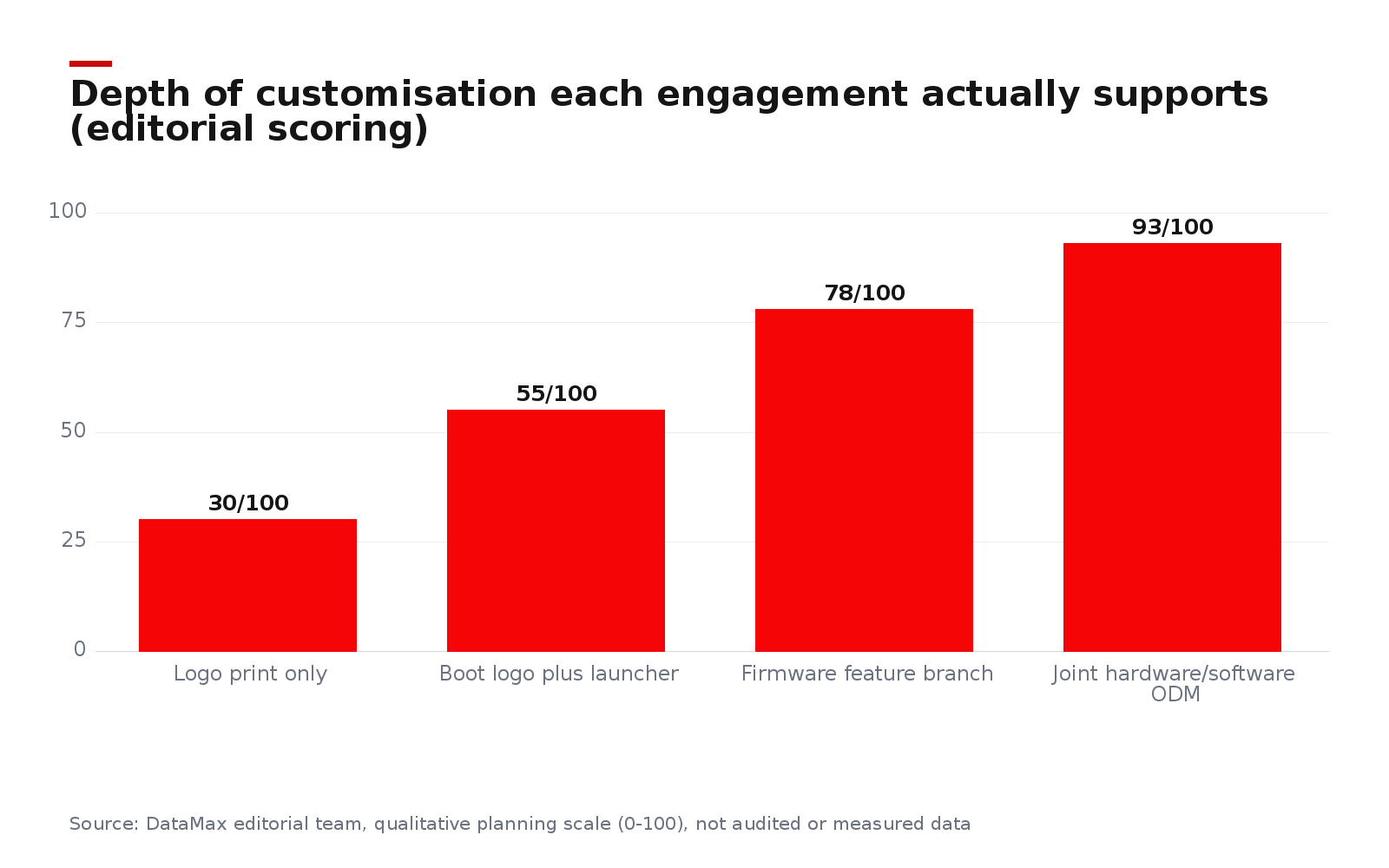
The same figures, in searchable form:
| Engagement | Editorial score |
|---|---|
| Logo print only | 30 |
| Boot logo plus launcher | 55 |
| Firmware feature branch | 78 |
| Joint hardware/software ODM | 93 |
The operational consequences are more useful than the editorial ranking. A logo-only engagement leaves the Android build, panel, enclosure, and test plan largely standard. A boot-logo and launcher engagement introduces device identity and presentation behavior that must be tested after every firmware update. A firmware feature branch can add operator middleware, boot policy, remote management, or kiosk behavior, but it creates branch and update-governance work. A joint hardware/software ODM ties panel choice, board design, enclosure, thermal design, and application delivery into one release plan.
For procurement, the commercial model should match that engineering depth. A logo-print order can use a standard model line, but a custom launcher or middleware branch needs a named firmware baseline, update owner, and regression-test list. An integrated display engagement should also identify who approves panel substitutions, power variants, and mechanical changes. Without that authority map, a nominally inexpensive customization can generate rework across assembly, packaging, certification, and field service.
A practical comparison should therefore cover more than unit price or screen size. Compare the controller boundary, display interface, power responsibility, network topology, application ownership, test coverage, and replacement strategy. A site with 200 rooms may prefer an external box because a controller can be replaced independently of the panel. A wall-mounted hospital display may favor integration because one installation SKU reduces loose components. Neither architecture is inherently superior; the error is accepting a quotation whose architecture does not match the maintenance model.
How the requirement actually works: product, board, panel, and application
An android display project has 4 coupled layers: the display panel, the compute board, the Android firmware, and the deployed application or middleware. Confusion starts when a quotation treats the panel name, processor, and operating system as interchangeable product identifiers.
The panel determines resolution, luminance, contrast, response time, viewing angle, backlight life, and operating-temperature envelope. The compute board determines decoding, application support, memory, connectivity, and power input. Android determines the API baseline, security patch process, application behavior, and update mechanism. Middleware determines whether the product actually launches into the operator’s service.
For the DS43H, the supplied facts specify a 43-inch TFT LED panel at 1920x1080, 300 cd/sqm, 1500:1 contrast, 6 ms response time, 89-degree viewing angle, 50,000-hour backlight, and 0-50C operating range. The Hi3751 has 4 32-bit A53 cores and Mali-450 graphics. The software baseline is AOSP Android 9 according to the datasheet.
Video negotiation is equally specific. The stated decode capability is 1080P@60 plus VP9 10-bit, with no 4K or AV1. That means a content workflow requiring 4K delivery, AV1 decoding, or a higher-resolution raster should not be mapped to this platform without a different, confirmed design.
HDMI or LVDS
A53 + Mali-450
firmware baseline
signage or middleware
This chain should be tested end to end. A decoder test that passes a local file does not prove HDMI input compatibility, app startup, sustained playback, or recovery after power cycling. Conversely, an app that runs correctly does not establish compliance with a target-market certification requirement.
The term “Android display” also does not establish Google services. GMS-certified AOSP is a distinct route from AOSP without Google Mobile Services, and neither label alone establishes Android TV certification. Ask the supplier to identify the exact certification, package identity, device form, and market applicability.
Three boundaries deserve particular attention. First, panel resolution is not the same as decoded source resolution. A 1920x1080 raster constrains the visible output, while the decoder specification constrains what the SoC can process. Both must be compatible with the content master. Second, HDMI input on an integrated terminal is not equivalent to HDMI output on a set-top box. The first receives a signal for the internal display; the second drives a separate panel. Third, Android compatibility does not guarantee application compatibility. The application, middleware, DRM service, and remote-control stack must run on the specified firmware and hardware configuration.
For DS43H, an acceptance sequence should include signal acquisition at the documented HDMI or LVDS inputs, app launch under AOSP Android 9, 1080P@60 playback, network operation through the selected Ethernet option, and recovery after power cycling. The test record should state the source format, duration, audio path, and whether the signage application or local playback mode was active. This creates a traceable result rather than a generic statement that the display “plays Android.”
The distinction also shapes security and lifecycle ownership. AOSP Android 9 requires a defined update and patch process for any connected network service. The RFQ should identify who provides the image, who maintains the application, how updates are staged, and whether the display supports recovery after an interrupted update. The product facts do not establish those services, so they must be confirmed against the production datasheet and the supplier’s delivery plan.
The platform shortlist with datasheet values: separate boxes from panel products
The shortlist must not place every Android product in one feature table. External boxes have output ports and operator-software fit; the DS43H has integrated display and panel inputs. The values below reproduce the supplied product facts for the identified SKUs.
| Model | System-on-chip | OS | Memory | Documented capability | Primary fit |
|---|---|---|---|---|---|
| DM21P | Amlogic S905Y4, quad Cortex-A35 | AOSP Android 11 | 2GB / 8GB; 4GB; 16/32/64GB optional | AV1 [email protected]; VP9/H.265 4K@60; H.264 4K@30 | 4K IPTV / operator middleware set-top box |
| DM21RTD | Realtek RTD1325 | GMS-certified AOSP | Confirm against the production datasheet | AV1 capable | Operators/retail requiring a Google-certified non-Google-TV AOSP+GMS SKU |
| DS43H | Hisilicon Hi3751 quad 32-bit A53, Mali-450 | AOSP Android 9 (datasheet) | 1GB / 8GB (PDP) | 1080P@60 + VP9 10-bit; no 4K/AV1 | Hospitality/hospital/restaurant wall signage |
| DM21S | Amlogic S905Y5, quad Cortex-A55 | AOSP Android 14 | 2GB / 16GB; 2/4/8GB; 16/32/64GB optional | AV1 / H.265 [email protected] 4K@60 | 4K Android TV box for IPTV/OTT white-label |
The Hi3751 row is an integrated-display reference point, not a generic android display specification. Its documented ports are HDMI in, LVDS in, 4 USB2.0 ports, RJ45 100M with 1G optional, and DC12V/2A. The power configuration is not interchangeable with an AC100-240V option without confirmation against the production datasheet and SKU PO.
DS43H’s physical dimensions are 989x578.5x60.3mm. Those dimensions become an installation constraint rather than a catalogue detail: the enclosure, wall bracket, cable route, service clearance, and input orientation must be checked as one assembly.
The box products follow a different acceptance path. DM21P specifies HDMI 2.0b output, 2 USB2.0 ports, TF, S/PDIF, 3.5mm AV, RJ45 100M, Wi-Fi6 2x2, BT5.4, and DC 5V/2A. Its DRM line is Widevine L1 / PlayReady / HDCP 2.2 optional, so a project requiring those functions must specify the relevant SKU and obtain evidence rather than infer them from the SoC.
DM21S specifies HDMI 2.0b output, S/PDIF, AV, 2 USB2.0 ports, TF, RJ45 100M with 1G optional, and Wi-Fi6 2x2 with BT5.4. Widevine L1 / PlayReady are optional, while Dolby Vision and DTS are named capabilities whose exact implementation and configuration should be confirmed against the production datasheet.
DM21RTD is included for the GMS route, not as a Hi3751 derivative. Its listed fit is a Google-certified non-Google-TV AOSP+GMS SKU for operators and retail. Do not transfer the OS status, certification, or capability of one model to another.
The comparison should be read as a routing table. DM21P is the documented direction for 4K IPTV and operator middleware, using AOSP Android 11 and an Amlogic S905Y4 platform. DM21S is the documented direction for 4K IPTV/OTT white-label work, using AOSP Android 14 and an Amlogic S905Y5 platform. DM21RTD addresses the distinct GMS-certified AOSP route for operators and retail. DS43H addresses integrated wall signage with the Hi3751 platform and 1080P@60 capability.
These are not interchangeable Android labels. The processor generation, Android baseline, physical architecture, and intended content workflow can all differ at once. For example, an operator procurement team may assume that an android display request is covered by a 4K box quote, but that would omit the panel, mounting, local signage application, input path, and environmental boundary. Conversely, a signage integrator may receive a DS43H quotation for a hospital corridor where the operating range, 300 cd/sqm brightness, input topology, and service-access arrangement have not been checked.
Each BOM line should therefore carry its own acceptance status. A box line records output, codec, memory, network, DRM, and certification. An integrated-display line records the panel, inputs, physical dimensions, power, operating range, and application behavior. A mount, cable, and service-access line records the installation responsibilities. Keeping those lines separate exposes substitutions before a production order is released.
Deployment scenarios and the spec each needs: map use case to architecture
An operator IPTV deployment, an AV integrator, and a venue owner can all ask for android display hardware while meaning 3 different systems. The request should begin with the signal path, content resolution, certification, and service model—not a processor preference.
For operator IPTV, a set-top box is usually the cleaner architecture because channel middleware, DRM, remote-control behavior, and network management are part of the acceptance model. DM21P is documented for 4K IPTV and operator middleware. DM21S is directed toward 4K IPTV/OTT white-label work. DM21RTD applies when the specified route is a GMS-certified non-Google-TV AOSP+GMS SKU.
For an integrator using a wall display, the decisive question is whether the display has integrated compute or accepts an external box. If external, specify the box model and separately specify the display. If integrated, specify panel size, native resolution, inputs, power, enclosure, and Android build as one SKU. The DS43H is mapped to hospitality, hospital, and restaurant wall signage.
For venue signage, boot behavior is part of the product. Specify whether the display must power on directly into the signage application, recover after an application crash, or respond to scheduled content changes. Also specify whether playback is local, network-sourced, or operator-controlled. A stated OS version alone answers none of these requirements.
Environmental and installation conditions also alter the specification. The DS43H operating range is 0-50C, so an outdoor enclosure, direct sunlight load, or unconditioned service space requires a separate thermal assessment. Its 300 cd/sqm panel and 89-degree viewing angle may suit controlled indoor wall signage, but they should not be assumed appropriate for every retail environment.
For healthcare, hygiene, infection-control procedures, and the preferred service access method may influence the enclosure and mounting arrangement. For hospitality, the display may need an always-on schedule, remote management, and a stable boot application. In each case, add the operational requirement to the SKU line; do not leave it as a deployment note.
A hospital corridor can require scheduled wayfinding, service access without opening the wall, and content recovery after network interruption. The RFQ should therefore identify the signage application, boot mode, update ownership, and required input behavior. It should not use “Android display” as a substitute for stating whether content is local or delivered over the network.
A restaurant or hospitality venue may require scheduled menu changes, remote fleet management, and a particular launcher visible to staff and guests. Those requirements belong in firmware and acceptance lines. A box-based installation can be attractive when the same panel is shared by day and night, while an integrated terminal can simplify a fixed menu wall. The decisive issue is the operating workflow, not simply the number of components.
An operator with 4K channels should route the requirement toward the documented 4K box directions and separately validate the connected panel. DM21P and DM21S have 4K@60 codec claims, but the terminal, cable, panel scaler, and output configuration still determine the usable result. For a retail product requiring the stated GMS route, DM21RTD addresses that certification path, but the exact package identity must match the ordered SKU. No model inherits another model’s certification merely because both use an operating system named Android.
Turning the question into a spec line: a seven-step selection sequence
A useful procurement document converts an ambiguous android display request into measurable, testable lines. The sequence below prevents the processor, panel, and software baseline from being merged into a single product claim.
- Name the architecture Write “external Android set-top box,” “integrated Android display,” or “unspecified.” Attach a topology diagram showing panel, source, controller, network, and power.
- Identify the ordered model Record the DataMax model and exact SKU suffix. Do not substitute an Android TV box for an integrated wall display because both run Android.
- Freeze the compute baseline State the SoC, CPU and GPU where documented, RAM/ROM, and any allowed options. Confirm all values against the production datasheet.
- Freeze the software baseline State the OS name and version, target-market certification, DRM requirement, update policy, and application startup behavior.
- Define the media boundary State resolution, refresh rate, codec, bitrate, HDR policy, and audio path. Mark unsupported combinations as excluded rather than “to be optimized.”
- Define the physical and electrical boundary Specify panel or output interface, port count, power input, dimensions, operating range, and installation orientation.
- Define acceptance evidence Attach the required test report, sample identity, burn-in record, packaging data, and certification evidence to the purchase order.
A pasteable RFQ line for the integrated DS43H should resemble this: “DataMax DS43H, exact production SKU to be confirmed against the production datasheet; Hisilicon Hi3751 quad 32-bit A53 with Mali-450; AOSP Android 9 per datasheet; 1GB/8GB PDP memory; 43-inch TFT LED, 1920x1080, 300 cd/sqm, 1500:1, 6 ms, 89-degree viewing angle; 1080P@60 and VP9 10-bit decode; HDMI in, LVDS in, 4 USB2.0, RJ45 100M with 1G optional; power option fixed in the SKU PO after confirmation; dimensions 989x578.5x60.3mm.”
The line deliberately excludes 4K and AV1 because the product facts explicitly exclude them. It also avoids claiming a power option that the supplied datasheet does not settle. A separate box RFQ should identify the model, output, codec ceiling, memory, DRM status, network interfaces, and target-market certification in the same controlled format.
For a mixed deployment, create 2 BOM lines rather than 1 compound line. One line governs the controller or box; the other governs the display, mount, cabling, and external inputs. This prevents a powered display from being mistaken for an Android-enabled display when no Android system is installed.
A second RFQ example for the box route would identify DM21P as the model, AOSP Android 11 as the software baseline, and the Amlogic S905Y4 with quad Cortex-A35 as the compute baseline. It would name 2GB/8GB as the memory configuration unless another documented option is selected. It would also identify HDMI 2.0b output, RJ45 100M, Wi-Fi6 2x2, BT5.4, DC 5V/2A, and the required optional DRM functions. This is a product line, not an instruction to infer every optional feature.
The same structure applies to DM21S and DM21RTD, but each retains its own documented values. DM21S uses AOSP Android 14, Amlogic S905Y5, and quad Cortex-A55, with its stated RAM/ROM options and AV1/H.265 4K@60 capability. DM21RTD uses Realtek RTD1325 and GMS-certified AOSP; its RAM/ROM and detailed interfaces must be confirmed against the production datasheet. The template remains constant, but the values do not move between models.
Before release, run a consistency check across the document. Search for model names, chipset names, Android versions, memory values, resolution, codec limits, DRM statements, ports, dimensions, and power. Every occurrence should refer to the same ordered SKU. A single leftover model name in an attachment or a copied clause can otherwise create an approval dispute, particularly when the procurement record is circulated by email.
Where quotations quietly diverge: the field traps that change the product
Most quotation divergence occurs in fields that sound interchangeable but alter compliance, installation, or application behavior. The highest-risk errors are chipset substitution, display resolution, power configuration, and certification status.
Field trap
A catalogue entry for a different chipset, memory configuration, brightness, or Android version does not amend the production datasheet. If a DS43H quotation conflicts with the stated Hi3751/1GB+8GB/300 cd/sqm configuration, reconcile the SKU and PO before approval. A processor swap can change codec support, thermal design, firmware behavior, and the entire acceptance baseline.
Power is a second trap. The supplied DS43H facts state DC12V/2A, while an AC100-240V option also appears in the source material without a settled production configuration. Do not write both into the same generic specification. Confirm against the production datasheet, then identify the exact power option and included cable or adapter in the SKU PO. The wrong assumption can affect electrical safety review, shipping, installation, or field replacement.
Certification is a third trap. “Android” does not mean GMS-certified, Google-certified, or Android TV certified. The DS43H facts state AOSP Android 9; DM21RTD states GMS-certified AOSP for a Google-certified non-Google-TV AOSP+GMS SKU. Do not transfer DM21RTD’s status to the Hi3751 product.
Field trap
An “optional” DRM or connectivity feature belongs in the RFQ only after the supplier maps it to a production SKU. “Widevine L1 optional” is not equivalent to a supplied Widevine L1 configuration. Likewise, RJ45 100M with 1G optional is not a 1G commitment. The purchase order must identify the selected option and the evidence required at acceptance.
Media claims require equal precision. “4K display,” “4K decode,” and “4K output” describe different boundaries. DS43H is 1920x1080 and does not support 4K or AV1 according to the supplied facts. A box may decode 4K while the connected panel remains 1080P, creating an end-to-end mismatch that a processor-only comparison will miss.
Finally, memory and storage options can be copied between models. DS43H is 1GB/8GB for the PDP, whereas the box products have different baselines and optional configurations. Keep memory on the same BOM line as the model, SKU, and test evidence.
A quotation can also diverge in what it treats as included. A line that lists HDMI in, LVDS in, and USB ports may omit the cable, adapter, mount, remote, or signage application. That omission changes installation time and field responsibility even if the hardware remains correct. Add an exclusions section that states what the supplier does not provide. For an integrated display, include the display enclosure, wall bracket, power supply or adapter, input cable, and firmware application as separate line items if they are not part of the stated SKU.
Watch for terminology that changes the acceptance boundary. “Android enabled” may mean a preloaded application, an AOSP build, or a certified commercial configuration. “1080P” may describe the panel, the decoder, the input, or the application output. “Hospital grade” may refer to a specific electrical or environmental standard, but the supplied facts do not establish it. Require the supplier to map each label to a documented parameter rather than approve the label alone.
Change control is the practical control against these traps. Once the SKU, panel, memory, power, OS baseline, ports, certification, and DRM selection are frozen, any substitution should require a written deviation stating the affected field, technical impact, revised test evidence, and approver. Sales correspondence is not a controlled revision. This prevents a low-cost substitution from becoming an undocumented change after the sample has passed.
Questions to put in the supplier review: trace the factory evidence
Supplier review should follow the physical and software build, not just the product flyer. The objective is to show that the sample, production order, and delivery evidence describe the same configuration.
Begin with an SMT and AOI evidence request for the ordered board revision. The packet should identify the production line, board revision, inspection coverage, defect classification, and disposition of any flagged units. A generic statement that the factory uses AOI is insufficient because it does not show which assembly or test records correspond to the shipment.
Next request aging and burn-in evidence tied to the SKU and test duration. The record should state environmental conditions, power state, video input, runtime, fault count, and serial-number coverage. For an integrated display, the test should cover panel illumination, input stability, playback, boot, network behavior, and power-cycle recovery rather than only the controller board.
The same figures, in searchable form, do not replace physical identity: retain sample photographs, carton labels, nameplate data, packaging records, and firmware build identifiers. A photograph can show a 43-inch panel or 1920x1080 output; it cannot prove the SoC or Android version. Those require board records, system information screens, and build evidence.
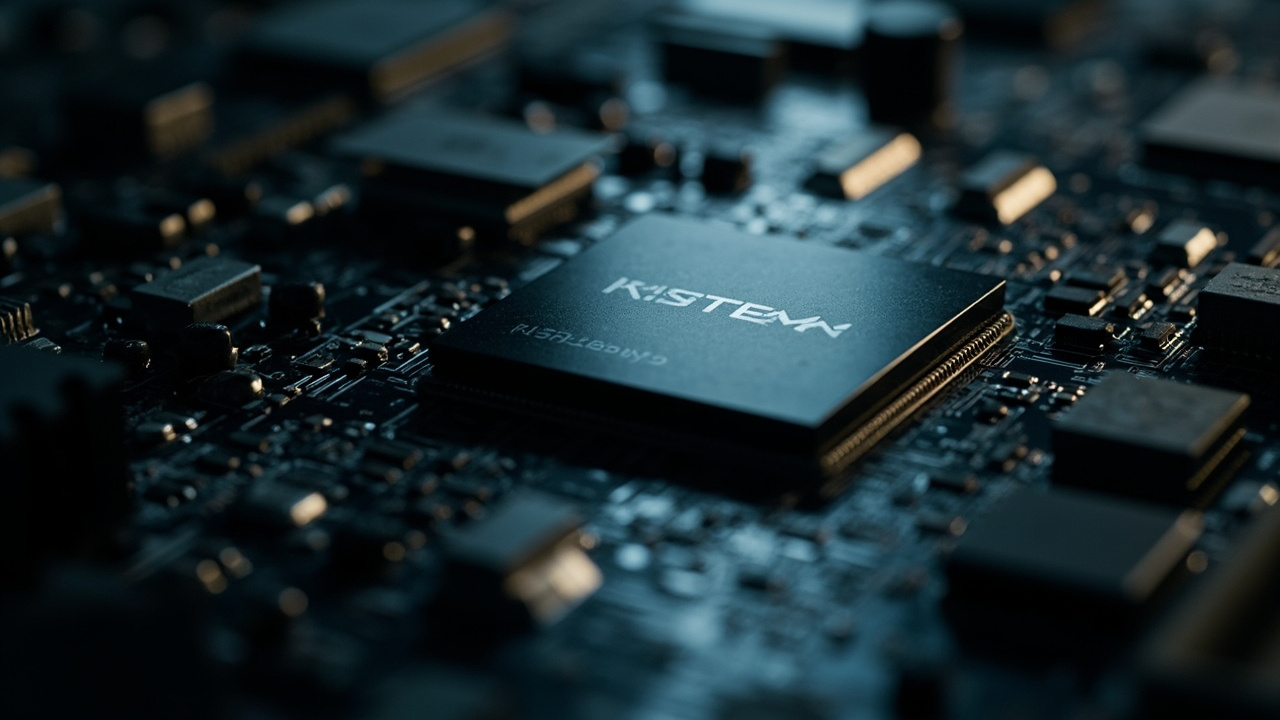
An extreme macro view of a system-on-chip package on a populated television mainboard illustrates why board-level evidence matters, but it cannot identify the supplied DS43H configuration.
- Review the build record Match the ordered SKU, SoC, RAM/ROM, panel option, port configuration, and power option to the production BOM and board revision.
- Inspect SMT and AOI evidence Confirm the inspection method, defect limits, rework records, and serial or lot traceability.
- Review aging evidence Check the test environment, duration, content source, fault handling, and coverage of the delivered configuration.
- Perform dark-room and visual checks For an integrated panel, inspect dead pixels, uniformity, mura, backlight behavior, ports, audio, and remote functions as applicable to the SKU.
- Audit firmware and certification Match the OS build, GMS status where claimed, DRM evidence, update method, and application startup to the PO.
- Close discrepancies in writing Record every approved change as a SKU-level deviation or PO amendment; do not reconcile conflicts through sales chat.
Procurement gate: no production release should combine a datasheet board revision with a catalogue memory option, a panel claim from another SKU, or a certification statement from another model. Freeze the evidence packet before shipment release.
The evidence request should be SKU-specific. For DS43H, the packet should connect the Hisilicon Hi3751 board record, AOSP Android 9 build, 1GB/8GB memory, 43-inch 1920x1080 panel, selected input configuration, and selected power option to the same serial range. For a box order, the packet should connect the named SoC, Android baseline, memory, output configuration, selected DRM option, and target-market certification to the production lot.
The dark-room review must also state what was inspected. A record that says only “dark-room passed” is not actionable. It should identify the panel or output configuration, inspection environment, visible defect criteria, sample coverage, and disposition. Where no dark-room requirement has been defined for the selected SKU, the buyer should request the supplier’s applicable visual-inspection procedure rather than presume that a signage display and an external box use the same test.
DataMax can support this review through its factory-quality process or a manufacturer audit request. Ask for SMT/AOI records, aging evidence, dark-room checks, and a sample-to-SKU traceability trail specific to the android display configuration being considered. For an operator programme, request the SKU list, target-market certifications, middleware and DRM checklist, and signed production datasheet. Email [email protected] with those 4 concrete attachments before issuing the final purchase order.
Further reading
- Hi3751 Android Display: The Question Buyers Get Wrong
- Telecom solutions
- Amlogic Android TV boxes
- Google TV devices
- AV1 Android TV box guide
- DataMax DM21P specifications and fit
- DataMax DM21RTD specifications and fit
FAQ
Is the Hi3751 Android display a 4K set-top box?
No. The supplied DS43H facts specify a 43-inch TFT LED panel at 1920x1080 with 1080P@60 decoding, VP9 10-bit, and no 4K or AV1. It is an integrated signage product, not a 4K set-top box. For 4K decoding and output, the documented box directions are DM21P and DM21S, subject to the exact SKU.
Does the Hi3751 platform include Google Mobile Services?
The supplied DS43H facts identify AOSP Android 9 and do not state GMS certification. DM21RTD is separately identified as a GMS-certified AOSP SKU for a Google-certified non-Google-TV AOSP+GMS route. Certification must be confirmed for the exact ordered SKU and target market.
Can DS43H display 4K content through its HDMI input?
The supplied facts define the panel and decode capability as 1920x1080, 1080P@60, and VP9 10-bit, with no 4K or AV1. Do not specify 4K input behavior for this platform from the available evidence. If 4K is mandatory, select a different documented platform and validate the complete source-to-display chain.
What power configuration should be written in the DS43H PO?
The supplied product facts state DC12V/2A, while another AC100-240V option appears without a settled production configuration. Confirm against the production datasheet and name one exact power option in the SKU PO, including any specified adapter or cable. Do not leave both configurations as interchangeable fields.
Which DataMax model fits operator IPTV middleware?
DM21P is documented for 4K IPTV and operator middleware, with AOSP Android 11 and an Amlogic S905Y4. Its Widevine L1, PlayReady, and HDCP 2.2 support is optional, so the required options must be fixed in the SKU. DM21S is documented for 4K IPTV/OTT white-label work.
What should be attached to a supplier review request?
Request the exact SKU list, production datasheet, target-market certification evidence, middleware and DRM checklist, plus SMT/AOI, aging, and dark-room records tied to the production configuration. For DataMax, email [email protected] with those attachments and request a video factory audit through the relevant manufacturing review.